What should you look for?
First, count the actions you want to access directly while streaming. Then check whether you can control your audio sources separately and which software your computer supports.
| What you need |
What to look for |
Who is it most important for? |
| Control audio sources |
Check that your operating system supports the source separation you want, and that your controller, plugin or mixer can control those sources. Dials can’t replace a suitable audio setup. |
If you want to adjust your voice, game audio and voice chat separately while playing, you’ll need distinct sources assigned appropriately. Around 36% of consumers consider audio control their top buying priority. |
| Switch scenes quickly |
Count the actions you want to have visible at once and check which plugin features you need. The Stream Deck MK.2 has 15 buttons; the Neo has eight. |
If you want to switch between gameplay, chat and breaks, you’ll need direct access to prepared scenes and source actions. Around 29% of consumers put scene switching first. |
| Software compatibility |
Check the requirements for your operating system, controller software and plugin separately. Elgato specifies Windows 11 (64-bit) or macOS 13 or later for the current Stream Deck software; the documented OBS plugin listing requires Stream Deck 6.9 or later. |
If you want to make sure your computer, controller software and OBS integration will work together before buying, check the specific versions. Around 21% of consumers consider software compatibility their top buying priority. |
| Compact controls |
Decide which commands you use most and check whether eight visible buttons, a layout switch or the OBS keyboard shortcuts you already have will do the job. |
If you only need a few actions, you can weigh up a small control surface against keyboard shortcuts and avoid buying extra hardware. Around 14% of consumers prioritise simple, compact controls. |
Suitable products at Joybuy
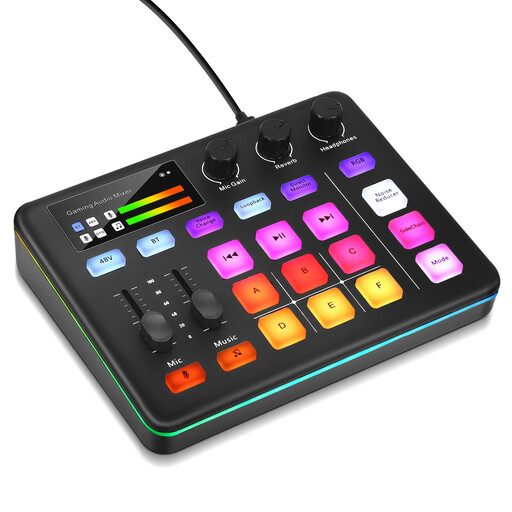
Audio control for live streaming: a suitable option if you’re looking for an audio mixer rather than a dedicated scene keypad.
 No image available
Audio mixer console for live streaming
An option to consider if you’re looking for a separate audio mixer console for your live stream. Before buying, check that the connections, controls and software will work with your audio setup.
View at Joybuy
Frequently asked questions
Does a stream controller automatically separate game audio and voice chat?
No. You first need to set up the signals as suitable sources or configure them in your mixer system. You can then assign the right actions to dials or buttons. OBS documents application audio capture for Windows 10 version 2004 and later, and Windows 11. When using this feature, disable the global desktop audio source to avoid echo.
What should I test before my first co-op stream?
Test your scenes, microphone, game and voice chat audio, and make a short test recording. If you use several recording tracks for editing later, bear in mind that OBS Project notes that standard video players usually only play one track.
What software do I need for the documented Elgato OBS controls?
The official OBS plugin listing requires Stream Deck 6.9 or later. For the current Stream Deck software, Elgato specifies Windows 11 (64-bit) or macOS 13 or later. Check device, software and plugin requirements separately.
Do I need to discuss recording with my teammates for a co-op stream?
If you process images or other personal data relating to your teammates, you need an appropriate legal basis. Consent is one possible basis, but it is not automatically the only one; the Federal Commissioner for Data Protection and Freedom of Information refers to the legal bases set out in Article 6(1) of the GDPR. Agree in advance what will be streamed live and, if applicable, recorded.


