Who can benefit from a stream controller?

Solo presenters switching between multiple views

If you switch between prepared OBS scenes, sources and recording actions while analysing a tournament, having buttons within easy reach can bring the controls together. Elgato documents scene and source actions for OBS integration.

Commentators working with different audio sources

If you commentate over game or video audio, it can be useful to mute or adjust your microphone and playback audio separately. Elgato documents OBS audio actions, while BEACN describes submixes and audio routing for the Mix Create.

Reviewers who want to capture replay moments

If you want to save individual moments for analysis, you’ll need to set up a replay workflow. OBS Project describes using a replay buffer and assigning a save action for this.

What should you look for?

Criteria What to check before buying Who it matters most to
Access scenes directly Count the OBS scenes and source actions you want to access at the same time, and check that you can assign them. If you switch between the gameplay view, camera and analysis view while explaining a play, you’ll want to access the key scenes without searching. Around 36% of consumers rank scene access as their top buying priority.
Control your voice and playback audio Check which audio sources you can control separately in your software, and whether you need buttons or dials to do so. If you want to adjust your microphone and game or video audio independently while commentating, the specific audio assignments matter. Around 29% of consumers put separate audio control first.
Save replay moments Check the OBS replay buffer, the save action and your permission to use the material. If you want to capture a moment you’ve just discussed, the replay buffer needs to be set up already. Around 21% of consumers put saving specific replays first.
Desk space Compare manufacturers’ dimensions on a like-for-like basis, taking the stand, connection and cable routing into account. If there’s little room beside your keyboard, mouse and microphone, the device should be easy to reach and connect where you place it. For around 14% of consumers, a small footprint is the top priority.

Elgato lists eight customisable LCD keys and two Touch Points for the Stream Deck Neo. The Stream Deck MK.2 has 15 customisable LCD keys, according to Elgato, while the Stream Deck + combines eight LCD keys with four dials. The stated dimensions also vary depending on whether the stand is included.

A compact layout may be a good fit if you only need a few actions visible at a glance. If you want to access more commands at the same time, focus on the number of keys you can actually assign. Dials are only useful if you can assign the audio functions you need in your setup.

Common misconceptions

  • Checking only the hardware requirements

    A device’s requirements may differ from those of the latest desktop software. A compatible connection or suitable hardware alone doesn’t prove that your entire setup will work.

    Check the device, required desktop software, OBS version and plugin separately. For its current Stream Deck software, Elgato lists Windows 11 (64-bit) with an Intel or AMD processor, or macOS 13 and later.

    Depending on your existing setup, you may need to update your operating system or adjust your software plans.

  • Assuming a replay button means replays are ready straight away

    A save action won’t work unless you’ve set up the OBS replay buffer. The controller triggers the action, but doesn’t replace the configuration it needs.

    Set up the buffer and save action in OBS, then test the whole process through to the saved file before relying on it.

  • Expecting dials to replace multiple scene buttons

    According to the manufacturer, the Elgato Stream Deck + has eight LCD keys and four dials, while the MK.2 has 15 LCD keys. These controls serve different purposes and aren’t automatically interchangeable.

    Make a note of which commands need to be visible at the same time, and which audio functions you can actually assign to the dials in your setup.

  • Confusing separate audio routing with permission to use content

    Routing VOD audio separately doesn’t establish whether you’re allowed to use tournament footage, game audio or music in your particular debrief.

    Check the rights for the image and audio material you use, separately from your audio settings.

    Your planned use may require you to clarify the rights to the material separately.

Key brands at a glance

Elgato

The Stream Deck range covers compact button layouts, more buttons for direct assignments, and combinations of buttons and dials.

  • Elgato documents OBS actions for scenes, audio and replay.
  • Check hardware requirements separately from those of the current Stream Deck software. For the software, Elgato lists Windows 11 (64-bit) with an Intel or AMD processor, or macOS 13 and later.

Razer

The Razer Stream Controller X has 15 controls for assigned streaming actions, according to Razer.

  • The manual lists Loupedeck as the required software.
  • On 19 August 2026, Loupedeck confirmed that support for Razer devices would continue. If you have detection issues, Loupedeck recommends version 6.4.1 or later. Check the software requirements for your setup.

BEACN

The Mix Create is particularly relevant for mixing and routing multiple audio sources.

  • BEACN describes assignable audio sources, submixes and an output that can be used with OBS.
  • A focus on audio mixing isn’t the same as having lots of dedicated OBS scene buttons. Separating audio technically doesn’t give you blanket permission to use third-party material.

Logitech

The MX Creative Console combines an LCD keypad with a separate dialpad and is also designed for creative applications.

  • Logitech describes customisable keys and analogue controls.
  • Don’t assume that this model has a specific OBS replay integration. Before buying, check that the exact model offers the features you need.

Loupedeck

Existing Live and Live S devices may appeal if you’re specifically looking for their button-and-dial workflow and software.

  • On 19 August 2026, Loupedeck announced that it would continue supporting Razer devices.
  • Loupedeck stopped selling its own product range on 28 March 2025 and announced technical support and warranty processing. Check the current support status for the specific device you’re considering.

Suitable products on Joybuy

This selection includes controllers with directly assignable actions, as well as an option focused on audio control for streaming.
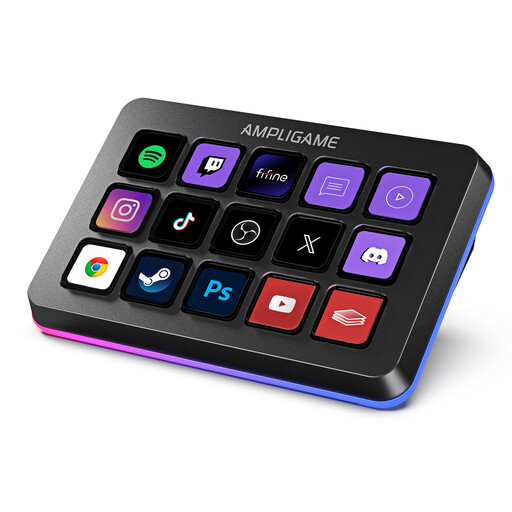
FIFINE D6 RGB macro keyboard with 15 programmable keys

FIFINE D6 RGB Macro Keyboard, 15 programmable keys

Could be a good fit if you want to access several streaming actions directly. The product details list 15 programmable keys and PC/Mac compatibility.

Joybuy

AJAZZ AKP153 Studio Controller with 15 macro keys, black

AJAZZ AKP153 Studio Controller, 15 macro keys, black

An option if you want to access several assigned actions directly. The product details list 15 macro keys and PC/Mac compatibility. Check that the actions you need work with your software.

Joybuy
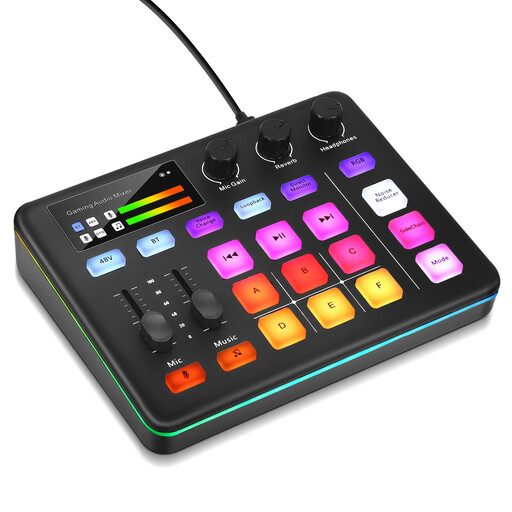
Audio mixer console for live streaming and interactive entertainment

Audio mixer console for live streaming

Could be worth considering for a debrief if audio control matters more to you than having lots of dedicated scene buttons. First, check that the audio features you need work with your microphone and OBS setup.

Joybuy

Frequently asked questions

Do I need to buy a controller to capture individual tournament moments?

No, not if an OBS hotkey is enough for you. OBS Project describes a configurable replay buffer with an assigned save action; a controller gives you another way to trigger it. First, test whether your existing hotkey works for your setup.

What should I set up before my first debrief?

First, set up your OBS scenes and audio sources. If needed, enable the replay buffer before assigning buttons or hotkeys. For an Elgato OBS plugin, the Elgato Marketplace page lists Stream Deck 6.9 or later; also check the requirements for your software version.

Can I show someone else’s tournament footage or game audio publicly?

You can’t tell from the fact that a controller can play or save the material. Check the rights for the specific images and audio you plan to use, as well as any requirements for a legal exception, if applicable. The Copyright Act, as at 26 May 2026, provides the legal framework; each specific use needs to be assessed separately.

Do I need a broadcasting licence in Germany for a tournament debrief?

There’s no blanket yes or no for an unspecified service. The 2021 checklist from the German media authorities calls for each case to be assessed individually and expressly applies to services aimed at a nationwide audience. It distinguishes, among other things, linear services broadcast according to a schedule from on-demand videos. If you have a specific regular live service, your state media authority is a good point of contact.