Owners of passive bookshelf speakers
You want to keep using your existing speakers at your desk and are looking for a streaming amplifier to power them.


If you already own passive speakers, a streaming amplifier is suitable only if its speaker connections and documented impedance and power-handling specifications are compatible with them. Then check that your music service and preferred playback method work with the exact model. In a home office, size and ease of use matter too, while extra computer, TV or headphone connections are only important if you’ll actually use them. A wattage rating alone doesn’t guarantee a particular sound for acoustic folk.
You want to keep using your existing speakers at your desk and are looking for a streaming amplifier to power them.
You listen to folk music through a particular service or Apple device. Check that your preferred playback method is available on the exact amplifier model.
You’d like to connect a computer, turntable or TV as well as stream music, or use wired headphones. Connections vary by device.
First, check compatibility with your speakers and preferred streaming method. Then consider how much space you have, how you’ll control the amplifier and which other connections you need for your working day.
| What you need | What to check before buying | Who should consider this? |
|---|---|---|
| Connecting speakers | Check whether your speakers are active or passive. Match their connections, impedance and power-handling specifications with those of the specific amplifier. | If I want to keep my passive bookshelf speakers, I’ll check the connections and speaker specifications first; around 31% of consumers say speaker compatibility is their top concern. |
| Music service and playback method | Make a note of the service you use and how you want to control playback. Check compatibility for the full model name, especially for AirPlay 2. | I want to play folk music through my chosen service using my preferred method, so I’ll check the exact model variant; around 31% of consumers prioritise streaming compatibility. |
| Space and controls | Check the dimensions and allow room for cables. Consider whether an app, remote control or on-device controls will suit your everyday routine. | The amplifier and its cables need to fit neatly on or around my desk; around 23% of consumers say placement and ease of use are their main concerns. |
| Other sources and headphones | Match the audio outputs on your computer, TV or turntable to the amplifier’s inputs, and check for a headphone socket if you need one. | If I want to connect other devices or wired headphones as well as play music, I’ll check the connections first; around 15% of consumers say additional sources are their top concern. |
WiiM lists AirPlay 2 for the Amp, but not for the Amp Pro or Amp Ultra. The model names alone don’t reliably tell you which playback methods are available.
Check the full model name and make sure it supports the playback method you actually want to use.
If a playback method you need isn’t supported, you may need extra hardware.
Power ratings for different amplifiers don’t necessarily use the same impedance or test conditions. A single wattage figure can’t tell you how an amplifier will sound with your speakers in your home office.
Compare power ratings only when you know the conditions they refer to. First, check speaker compatibility, placement and how you want to control the amplifier.
Connections vary by model: Yamaha doesn’t list HDMI ARC for the R-N600A, while Denon lists HDMI eARC for the Home Amp.
Match the inputs and outputs you need to the exact amplifier model, rather than relying on the product category.
If your source isn’t compatible, you may need an additional adapter or source device.
The details below apply to the specific model ranges mentioned and don’t replace checking the features of the exact device you’re considering.
The Amp family combines streaming with amplification for passive speakers.
The POWERNODE range uses BluOS. Bluesound also describes the EDGE as suitable for a home office with bookshelf speakers.
The R-N600A network receiver is for listeners who want to connect traditional Hi-Fi sources as well as stream music.
The Home Amp combines speaker amplification with HEOS multi-room audio and an additional TV connection.
The MODEL 40n is a streaming stereo integrated amplifier with HEOS and HDMI ARC.
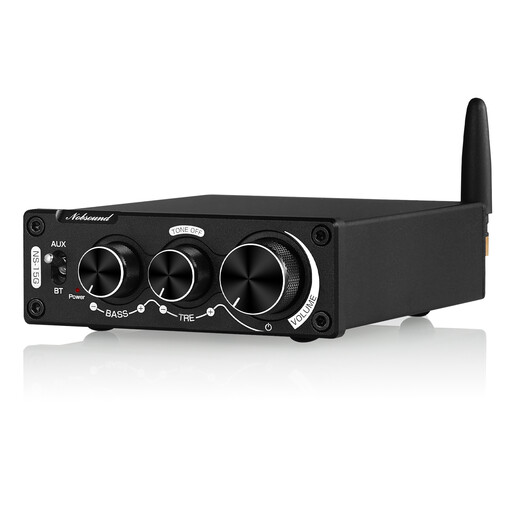
This selection is for anyone looking to power passive speakers with a compact amplifier and play music from a Bluetooth device.
 No image available
This compact model is an option if you have passive speakers and want to play music from a Bluetooth device.
The product name mentions Bluetooth and bass and treble controls. Make sure your speakers are compatible with the stated impedance of 4–8 Ω.
Not if your chosen streaming amplifier has suitable speaker outputs and is compatible with your speakers. WiiM and Bluesound explicitly describe the devices mentioned here as suitable for passive speakers; still, check your speaker pair’s specifications against the exact model.
No. WiiM’s model-specific list shows the WiiM Amp as AirPlay 2 compatible, but not the Amp Pro or Amp Ultra. If AirPlay is your preferred playback method, check the full model name before buying.
First, match the source’s audio output to a suitable amplifier input. Yamaha lists optical and coaxial inputs for the R-N600A, but no HDMI ARC; Denon lists HDMI eARC for the Home Amp. An HDMI connection for your TV doesn’t remove the need to check that there’s a suitable connection for your computer.
For market surveillance, Germany’s Federal Network Agency (Bundesnetzagentur) checks factors including the CE mark, an identifiable product and correct manufacturer details, German-language instructions and safety warnings, and a declaration of conformity. The CE mark alone isn’t an independent sound or quality test; check the information for the specific device being sold.
Your statutory rights against the seller are separate from any voluntary guarantee. For a standard online purchase, you generally have a 14-day right to cancel from the date you receive the goods. According to the Verbraucherzentrale, you must notify the retailer or other contracting party that you wish to cancel.