If you want to keep using your existing passive speakers, choose an amplifier based first on how you’ll stream and start your morning news briefing. If you listen in different spots around the room, speaker placement and, where needed, a compatible multi-room system matter more than a single wattage figure. Extra inputs are worth having mainly if you’ll use those sources. Features such as AirPlay 2 vary by model, so check the full model name.
Who is this type of device for?
Casual listeners in open-plan spaces
If you listen to the news while moving between your living room and kitchen, focus on how it sounds in your usual listening spot and on positioning your speakers sensibly. A single power rating doesn’t tell you how clear speech will sound there.
Those who want a quick start in the morning
If you want your briefing to start every morning without having to choose a source each time, check that your news app works with the streaming method and controls on the specific model. WiiM and Sonos list different features depending on the model.
Owners of existing passive speakers
If you want to keep using your speakers, check that their connections and specifications are compatible with the amplifier. WiiM, Sonos and Bluesound describe the models mentioned here as suitable for use with passive speakers.
What should you look for when buying?
| Priority |
What to check when buying |
Who is this particularly important for? |
| Clear speech |
Speaker placement and available sound controls; compare wattage figures only on a like-for-like basis. |
If I want to understand the briefing clearly from different listening spots, how it sounds in the room matters more to me than a single power figure. Around 36% of consumers prioritise clear speech in their main listening spot. |
| Quick start |
Check that your news source’s app and streaming method work with the exact model. |
I want to start my particular briefing in the morning without any faff, so I check that the source and controls work together. Around 29% of consumers say an easy daily start is their top priority. |
| Multiple listening areas |
Check which additional compatible devices you’ll need and how many listening zones the system supports. |
If I move between the living room and kitchen during my briefing, I want to know whether I’ll need other compatible devices. Around 21% of consumers prioritise listening in multiple areas. |
| Existing speakers |
Check whether your speakers are passive or active, their connections and whether you need TV or phono inputs. |
If you want to keep using your existing passive speakers, check their connections and any additional sources you need before buying. Around 14% of consumers prioritise these connection and speaker requirements. |
Common misconceptions
-
A higher wattage automatically means clearer news
Power ratings alone don’t show how clearly speech will come across in your listening spot. Manufacturers may also quote figures using different impedance ratings.
Compare power ratings only on a like-for-like basis. First, check your speakers, their placement and the sound settings available.
-
AirPlay 2 works with every amplifier from a brand
WiiM lists the Amp as AirPlay 2-enabled; according to WiiM’s model-specific support list, the Amp Pro and Amp Ultra are not supported.
Check the full model name against the streaming method you use for your briefing before relying on AirPlay.
If AirPlay is essential for your source, choosing an incompatible model could mean you need an additional way to play your audio.
-
The amplifier already includes a complete speaker and multi-room system
The devices mentioned are designed for passive speakers. Depending on the system, you’ll need additional compatible components to add more listening zones.
Make a list of your existing speakers and the listening areas you actually need before putting your system together.
Brands to consider
WiiM
WiiM offers several streaming amplifiers for passive speakers. Check the features of each specific model.
- WiiM says the Amp supports AirPlay 2 and includes an equaliser and HDMI ARC.
- WiiM’s support list explicitly states that the Amp Pro and Amp Ultra do not support AirPlay 2. Details for the Amp don’t necessarily apply to other models.
Sonos
The Sonos Amp connects passive speakers to the Sonos system and is worth considering if you’re planning additional listening areas.
- Sonos lists AirPlay 2, HDMI ARC, on-device controls and podcasts via supported services among the Amp’s features.
- According to Sonos, hands-free voice control requires an additional voice-enabled speaker; it isn’t built into the Amp.
Bluesound
Bluesound describes the POWERNODE EDGE as a compact streaming amplifier for a pair of passive speakers, with the option to expand using BluOS.
- For this model, Bluesound lists 40 W per channel, HDMI eARC, Ethernet, AirPlay 2 and BluOS.
- These model specifications don’t tell you how clearly speech will sound in every listening spot in an open-plan home.
Yamaha
The R-N600A may suit households looking to use MusicCast and traditional sources as well as streaming.
- Yamaha lists a phono input and an optical TV input for the R-N600A.
- An optical TV input isn’t the same as HDMI ARC. Check whether you’ll actually use the additional connections for your news briefing.
Suitable products on Joybuy
This selection is for consumers who want to play a news briefing over Bluetooth and use their existing passive speakers.
 No image available
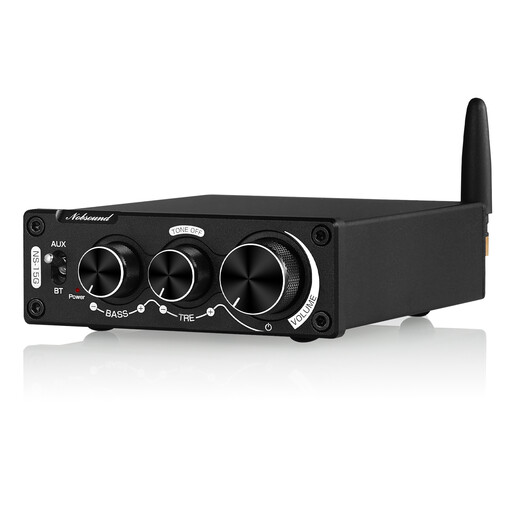
Nobsound 200 W Mini Bluetooth Digital Amplifier with bass and treble controls
This could be a good fit if your briefing comes from your phone over Bluetooth and you want to keep using compatible passive speakers.
The product title mentions Bluetooth and bass and treble controls. According to the product description, the device is designed for passive speakers rated at 4–8 Ω.
Use the amplifier only with the compatible power supply provided. The product description warns that an incompatible power supply could cause overheating or fire.
View on Joybuy
Frequently asked questions
Do I need separate speakers for a streaming amplifier?
The amplifiers covered here are designed to power passive speakers, so you’ll need compatible speakers. Before buying, check whether your existing speakers are passive and whether they’re compatible with the amplifier’s connections.
Can I play my news briefing from my iPhone using AirPlay 2?
It depends on the exact model and your source. WiiM lists the Amp as AirPlay 2-enabled, but the Amp Pro and Amp Ultra as unsupported; Sonos lists AirPlay 2 for the Amp. Also check that your particular briefing can be played this way.
What should I bear in mind when setting it up?
Connect compatible passive speakers and set up your network and playback source according to the instructions for your model. For example, WiiM explains how to set up the Amp Ultra and adjust its audio settings in the WiiM Home app. These details may not apply to other models.
Can one streaming amplifier be used for multiple listening areas?
You may need additional compatible devices in the relevant system to add listening areas. Sonos and Bluesound describe ways to expand their own systems, so check in advance which components will work with your planned set-up.
What should I check about CE marking on a device sold in Germany?
The German Federal Network Agency says that market surveillance checks include correct CE marking and whether the product and manufacturer can be identified. Check these details for the specific product version; a brand or model name alone doesn’t confirm them.


