Jazz listeners with limited space
You want to use passive stereo speakers in a small living room, but can’t position your speakers and listening spot wherever you like.


Choose an amplifier that suits your existing speakers and the music service you actually use, then check that its connections work with your other devices. If your setup is tricky, room correction can offer more ways to fine-tune the sound, but it’s no substitute for suitable speakers or sensible positioning in the room.
You want to use passive stereo speakers in a small living room, but can’t position your speakers and listening spot wherever you like.
You want to start music services easily, so check whether the exact amplifier model supports your preferred service and playback method.
You may want to connect a TV or turntable as well as stream music, so you’ll need the right inputs on your chosen model.
Start by checking your speakers and listening position, then consider how you want to stream and finally check the connections for your other devices.
| What matters | What to check before buying | Who it matters most to |
|---|---|---|
| Sound balance in a small room | Space for your speakers and listening position, plus any available tone controls or room calibration. | If I can’t easily reposition my speakers and listening spot, getting balanced sound where I sit is especially important to me. Around 36% of consumers also make room layout and speaker placement their top priority. |
| Music service and controls | Check the specific service you use, the playback method you need and whether the exact model supports them. | If I want to start music directly through my usual service and device, reliable controls matter to me. Around 29% of consumers also prioritise their streaming service and ease of use. |
| Compatible speakers | Check whether your speakers are passive or active and whether their specifications are compatible with the amplifier. | If you already own passive speakers, the main thing you’ll want to know is whether they’ll work with your chosen amplifier. Around 21% of consumers put this compatibility first. |
| TV and other sources | Check that the exact model has the inputs you need for your TV, turntable and other devices. | If I want to connect a TV or turntable as well as stream music, I need the right inputs for those devices. Around 14% of consumers also prioritise connections for additional sources. |
The sound at your listening position also depends on the room’s acoustics and how the speakers are placed. Genelec’s placement guidance highlights their impact; power ratings should also only be compared when the reference conditions are comparable.
Start by checking your speakers, listening position and placement options. Compare power ratings only when the impedance and measurement basis are clear.
WiiM lists the WiiM Amp as AirPlay 2 compatible, but the Amp Pro and Amp Ultra are not AirPlay 2 compatible.
Check the full model name against the streaming method you actually use.
NAD describes Dirac Live as optional on the NAD C 700 V2. The manufacturer says you need to buy a separate licence and calibration microphone to use it.
Check what’s included with the room calibration features on the exact model and what you’ll need to buy separately.
HDMI eARC, an optical digital input and an MM phono input all serve different purposes. Denon lists optical TV audio inputs for the PMA-900HNE; NAD lists HDMI eARC and an MM phono input for the C 700 V2.
Compare the connections on your actual devices with those on the exact amplifier version.
Compact streaming amplifiers for passive speakers; features such as room correction vary by model.
The C 700 V2 combines BluOS with HDMI eARC and an MM phono input for connecting multiple sources.
The current POWERNODE combines amplification with BluOS and connections for other devices.
The Evo 150 SE combines StreamMagic with HDMI ARC and an MM phono stage.
The PMA-900HNE combines HEOS streaming with phono and digital audio inputs.
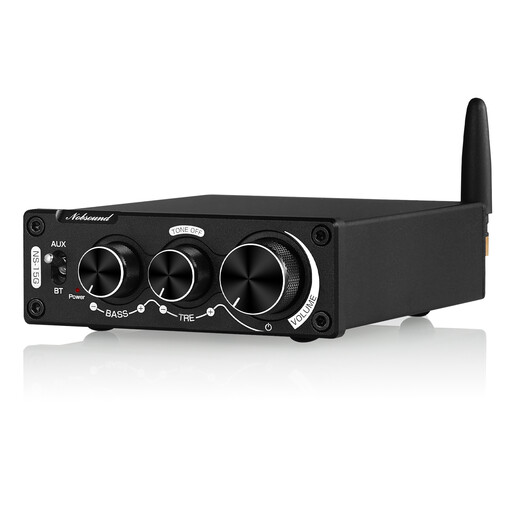
This selection features a compact stereo amplifier with a Bluetooth input and speaker connections. Check that Bluetooth suits your preferred way of streaming and that the connection specifications work with your speakers.
 No image available
For a compact stereo system with Bluetooth playback, provided your speakers are compatible with the amplifier.
Bluetooth 5.0; stereo output; stated speaker impedance range: 4–8 Ω.
Dimensions: 92 × 108 × 30 mm. Bass and treble controls and tone bypass are listed.
The 200 W figure appears in the product name; check what operating conditions it refers to before buying. Use the supplied power adapter and make sure there’s adequate ventilation during use.
The integrated amplifiers with speaker outputs covered here are designed for passive speakers. Check whether your existing speakers are passive; active speakers don’t need the same type of amplifier.
Position your speakers and listening spot as sensibly as possible, then check the available room calibration or tone controls. Genelec notes that room acoustics and speaker positioning affect the sound you hear at your listening position.
No. WiiM lists the WiiM Amp as AirPlay 2 compatible, but the Amp Pro and Amp Ultra are not AirPlay 2 compatible. Make sure you check the exact model name.
No. NAD describes Dirac Live as optional for this model and says you’ll need to buy a separate licence and a calibration microphone.
CE marking is required for products covered by the relevant EU harmonisation legislation. The German Federal Network Agency points out that the marking alone is not an independent quality mark for sound or product safety.