Who is a streaming amplifier right for?

Playlist fans with passive speakers

If you want to keep using your existing passive speakers and play a soul playlist with ease, check which music services the model supports and how it works. WiiM lists Spotify Connect and TIDAL Connect for the amplifiers described.

Listeners short on space

For a tidy stereo set-up, the device’s dimensions and the settings you’ll actually use are important. WiiM describes a room-adaptation feature, but this is a feature, not a guarantee of a particular sound in your room.

Listeners planning to expand their set-up

If you may want to add TV audio or sound in other rooms later, check the connections and compatibility of the specific devices. Sonos, Bluesound and Denon each describe multi-room functionality for their own compatible systems.

Which buying criteria matter?

Start by checking the music service and speakers you’ll actually use. Then consider available space, followed by TV connectivity or multi-room features if you’re planning to expand your set-up.

What you need What to check before buying Who this matters most to
Play a playlist easily Check that your music service is supported, along with any Connect feature or device app, and the network connection available. If I want to play my soul playlist without the hassle of an extra source device, the amplifier needs to support my music service; around 36% of consumers put playlist controls first.
Connect the right speakers Check whether your speakers are passive or active. For passive speakers, compare their connection and technical specifications with those of the exact amplifier model. If I want to keep using my passive speakers, the amplifier needs to match their connection and technical specifications; around 29% of consumers prioritise speaker compatibility.
Compact set-up and room adjustment Check the dimensions and allow space for connections. Consider EQ, subwoofer or room-correction features only if they’re relevant to your set-up. With limited space, I want a compact device and only the sound settings I’ll actually use in my room; around 21% of consumers put size and room adjustment first.
Connect a TV or add sound in other rooms Check for the right ARC or eARC connection, supported TV audio formats and compatibility with the specific multi-room devices. If I want to add TV audio or sound in other rooms later, I’ll need the right connections and compatible devices; around 14% of consumers see this as their top priority.

Which buying mistakes can you avoid?

  • Choosing on wattage alone

    A power rating on its own doesn’t show whether a particular amplifier is suitable for your existing speakers or how the combination will sound in your room.

    First check whether your speakers are passive or active, then compare their technical specifications with those of the exact amplifier model.

    An unsuitable set-up could mean you need to buy another device.

  • Assuming ‘multi-room’ means different systems will work together

    Manufacturers describe multi-room functionality for specific compatible devices and systems. The term alone doesn’t mean products from different platforms will work together.

    Before choosing, check whether the devices you already own and plan to buy can be grouped in the system you want to use.

    You may need to buy additional compatible devices to expand your set-up as planned.

  • Planning to use TV audio without checking the connection and format

    Yamaha Deutschland doesn’t list an HDMI-ARC connection for the R-N600A. For the Amp Pro’s HDMI-ARC input, WiiM lists PCM stereo or Dolby Digital; DTS and Dolby Atmos aren’t supported.

    Before buying, compare your TV’s connections and audio formats with the specifications for the exact amplifier model.

Which brands are worth considering?

WiiM

WiiM describes the Amp and Amp Pro as compact streaming amplifiers for passive speakers.

  • WiiM lists Spotify Connect, TIDAL Connect, HDMI ARC and room adaptation for both models.
  • According to WiiM, the Amp supports AirPlay 2, while the Amp Pro doesn’t. Room adaptation doesn’t guarantee a particular sound improvement in your room.

Sonos

The Sonos Amp connects passive speakers to the Sonos system, making it an option if you already own, or plan to buy, compatible Sonos devices.

  • Sonos lists HDMI ARC, AirPlay 2, an analogue input and multi-room functionality with Sonos speakers.
  • Check separately whether your chosen music service and devices from other manufacturers will work together as you’d like.

Bluesound

Bluesound describes the POWERNODE EDGE as a compact amplifier for passive speakers, controlled via BluOS.

  • The manufacturer lists HDMI eARC, AirPlay 2 and a combined analogue/digital input.
  • Expanding your system via BluOS requires compatible devices; the stated power output doesn’t guarantee that it’ll suit every pair of speakers.

Denon

The Denon Home Amp is an option if you want to connect passive speakers to HEOS multi-room and, potentially, a TV.

  • Denon lists HDMI eARC, a subwoofer output and HEOS multi-room.
  • The multi-room feature works with compatible HEOS devices, not just any Wi-Fi speakers.

Yamaha

The R-N600A is a network Hi-Fi receiver for streaming and additional wired audio sources.

  • Yamaha Deutschland lists MusicCast, a phono input, a headphone output and optical inputs.
  • According to Yamaha’s specification sheet, the R-N600A doesn’t have an HDMI-ARC connection. Its dimensions are 435 × 151 × 392 mm, so check that you have enough space for it.

Joybuy product selection

This selection is for compact stereo set-ups where you want to play a soul playlist via Bluetooth or RCA.
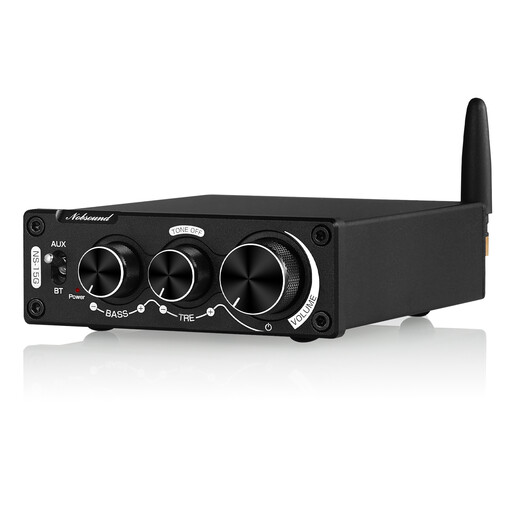
Nobsound 200 W mini Bluetooth digital amplifier

Nobsound 200 W Mini Bluetooth Digital Amplifier

If you have compatible passive speakers and a Bluetooth or RCA source, this device offers the relevant inputs and speaker outputs.

It has Bluetooth 5.0, an RCA input, bass and treble controls, and a bypass mode. Its dimensions are 92 × 108 × 30 mm.

Use the compatible power adapter supplied. An incompatible adapter could cause overheating, a fire risk or damage to the device.

View at Joybuy

Frequently asked questions

Can I connect active speakers to a streaming amplifier?

That depends on the right signal input on your active speakers and a matching output on the source device. Don’t use a speaker output as if it were a standard line output.

What settings do I need to change when connecting a WiiM Amp Pro to my TV?

For the HDMI-ARC connection, WiiM lists PCM stereo or Dolby Digital; DTS and Dolby Atmos aren’t supported. Check your TV’s ARC or eARC connection and set its audio output to a supported format.

What should I check on a device sold in Germany?

For electrical and electronic equipment, the German Federal Network Agency (Bundesnetzagentur) says that retailers must provide, among other things, correct CE marking, clear device identification, the required manufacturer or importer details, and German-language instructions for non-commercial users. A brand name alone doesn’t confirm that these details apply to the specific product being sold.

How should I dispose of an old amplifier?

Waste electrical equipment must be collected separately, not put in household rubbish. The German Environment Agency (Umweltbundesamt) states that local collection points generally accept electrical waste free of charge.