Owners of passive speakers
You want to keep using your existing stereo pair for streamed piano sonatas, so you first check the speaker connections, positioning and available space in your room.


For listening to piano sonatas in a small living room, first check whether a streaming amplifier is compatible with your existing speakers and gives you the music access you want. A compact model can save space, but it won’t remove the need to position your speakers carefully. If you also want to connect a TV, headphones or other sources, check the connections on the specific model rather than relying on its power rating alone.
You want to keep using your existing stereo pair for streamed piano sonatas, so you first check the speaker connections, positioning and available space in your room.
You want to find specific recordings through a music service or in your local collection. The key is to check which ways of accessing music are supported by the specific model.
You may also want to use a TV, headphones or other sources, so compare the connections on each device.
First check that your speakers and available space are suitable. Then look at how you’ll access your recordings, and finally consider any extra connections you might need.
| Buying priority | What to check | Who is it important to? |
|---|---|---|
| Speakers and positioning | Check the connections and power ratings at the right impedance; plan space for both the speakers and amplifier. | If I want to keep my passive speakers, the connections and positioning need to work in my small room. Around 36% of consumers prioritise speaker compatibility and positioning. |
| Access to sonatas | Check that the specific model’s features are compatible with your music service, local collection and preferred control method. | If I want to listen to specific recordings, I want to access my music service or own collection without taking an extra step. Around 29% of consumers prioritise access to music. |
| Controls and headphones | Check whether you can operate the device without a smartphone and whether the headphone connection is Bluetooth or wired. | If I want to listen quietly or without using a smartphone, a suitable headphone connection or direct controls are important to me. Around 21% of consumers prioritise ease of use and private listening. |
| Other sources | Consider only the sources you actually plan to connect, and check for the right inputs, such as HDMI ARC or phono. | If I also want to connect a TV, record player or other sources, the amplifier needs to have the specific inputs I need. Around 14% of consumers prioritise additional sources. |
Power ratings can be based on different impedances and test conditions. On their own, they say nothing about speaker positioning or whether you’ll hear a difference when listening to piano sonatas.
Compare the power rating at your speakers’ impedance, and first work out how to position the speakers and listening spot in your room.
WiiM lists AirPlay 2 for the Amp, but not for the Amp Pro.
Check the exact model name and whether it supports the service or streaming method you need.
If the streaming method you need isn’t supported directly, you may need an additional playback device.
The Bluesound POWERNODE EDGE is described as offering Bluetooth headphone output, while the Yamaha R-N600A is listed as having a headphone output. These descriptions don’t necessarily mean the same type of connection.
Check the connection type specified for the device against the headphones you own.
The Amp and Amp Pro are compact streaming amplifiers for passive speakers.
The POWERNODE EDGE connects passive speakers to BluOS streaming and offers a TV connection.
The Denon Home Amp connects passive speakers to HEOS and can also be used for TV audio.
The R-N600A is a larger network receiver for streaming and several traditional audio sources.
The Evo 150 SE combines streaming and amplification with additional controls and connection options.
This selection is for anyone who wants to use existing passive stereo speakers with a compact amplifier and an external Bluetooth playback device.
 No image available
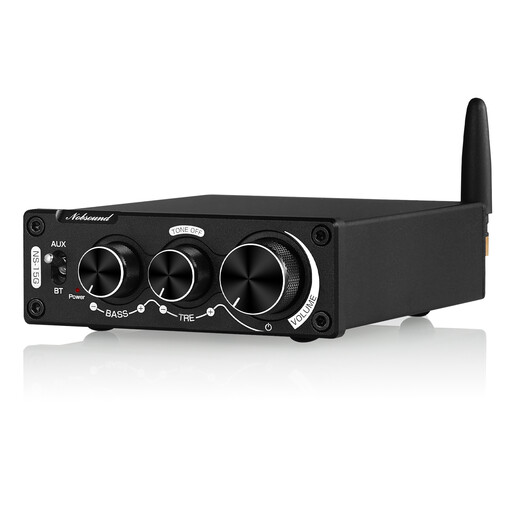
This compact device may suit you if you have passive stereo speakers and want to stream music from a Bluetooth playback device.
The product title mentions Bluetooth and bass and treble controls. Bluetooth playback requires a compatible playback device.
Before buying, check that your speakers’ connections and impedance match the specifications for this particular device.
For passive speakers, check the connections and impedance, as well as the amplifier’s power rating at the correct impedance. WiiM describes the Amp and Amp Pro specifically as devices for passive speakers. Active speakers don’t usually need an additional power amplifier.
Start by arranging the speakers as symmetrically as possible around your listening position, then check how close the speakers and listening spot are to the walls. Genelec’s positioning advice is intended for monitors. It highlights room reflections, but doesn’t promise a particular result with an amplifier.
No. Genelec points out that calibration alone may not resolve every acoustic issue in a room. First check where you can position your speakers, then use any available calibration feature as an extra.
When you buy from a business seller in the EU, you’re generally entitled to a legal guarantee of at least two years from the date you receive the goods. An additional manufacturer’s warranty doesn’t replace these rights. Your Europe – European Union explains the EU-wide minimum period; keep your seller and purchase receipts.
For market surveillance, the German Federal Network Agency lists points to check including the CE marking, product and manufacturer identification, German-language instructions with any required warnings, and the declaration of conformity. A CE mark shown in a picture alone doesn’t prove that the specific device delivered has been checked.