Listeners with passive speakers
You want to use your existing passive speakers for a daily live or podcast briefing, so you’ll also need an amplifier.


For a daily news briefing in your hobby room, the right way to stream audio matters more than extra streaming features. Choose an amplifier only once you’ve confirmed that your preferred app works with the exact model and that the device suits your speakers. ARD Help lists Google Chromecast and Apple AirPlay as ways to stream ARD Sounds; according to WiiM, the Amp supports AirPlay 2, but the Amp Pro does not. If you already have suitable active speakers or an amplifier, first check whether you can keep using your existing setup.
You want to use your existing passive speakers for a daily live or podcast briefing, so you’ll also need an amplifier.
You choose your news on your phone and want to listen to it in your hobby room in as few steps as possible. The key is whether your app’s streaming method works with the exact amplifier model.
You want to use the same speakers with other devices you already own, as well as for news, so you’ll need the right inputs.
A good fit if: You have passive speakers and want a single device for network streaming and amplification.
Consider: The specific programme must be available through a supported service. A radio station preset doesn’t prove that individual podcast episodes are accessible.
A good fit if: You want to connect existing analogue devices or headphones, as well as listen to the news.
Consider: Extra connections won’t necessarily be useful for a short briefing alone, and may take up more space.
A good fit if: You already have a working amplifier with passive speakers, or suitable active speakers.
Consider: Before adding more equipment, check whether you can play ARD Sounds through an existing compatible input or receiver.
| What you need | What to check before buying | Who should consider this? |
|---|---|---|
| Access to the programme you want | Find the specific programme in ARD Sounds, then check that you can stream it to the exact amplifier model using Google Chromecast or Apple AirPlay. ARD Help lists both methods; WiiM specifies AirPlay 2 for the Amp, but not the Amp Pro. | If I want to start my daily briefing directly from the app I’ve chosen, the right streaming method is what matters most. Around 36% of consumers say access to the programme they want is their top priority. |
| Compatible speakers | Check whether your speakers are passive or active, then compare their connections and specifications with those of the specific amplifier. | If you want to use your existing speakers in your listening space, start by checking their connection type. Around 29% of consumers prioritise compatibility with their existing speakers. |
| Reliable playback | Check the connection where you plan to set up the device, and whether the model offers Ethernet as well as Wi-Fi. ARD Help says a stable internet connection is needed for uninterrupted listening. | If I want to listen to my briefing without dropouts, the network connection where I set up the device is crucial. Around 21% of consumers say reliable playback is their top priority. |
| Other sources and your overall setup | Make a list of the audio sources and speakers you’ll actually use, along with any extra components you need. HDMI eARC may be useful for TV audio; check the connections on the model you’re considering. | If you want to use the same setup with other devices, check that it has the right inputs and will fit in your space. Around 14% of consumers prioritise other sources and their overall setup. |
WiiM lists AirPlay 2 for the Amp, but not the Amp Pro. If you want to stream ARD Sounds this way, don’t rely on the fact that they share a product family name.
Check the full model name against the streaming method you need.
A saved radio station and the latest available briefing episode are different features. WiiM describes presets for radio stations, among other things; access to a specific episode depends on the service.
Before choosing a model, check that you can access the exact format you want to listen to every day.
A streaming amplifier for passive speakers alone doesn’t make a complete listening setup.
Check which speakers and connections you already have, and plan separately for any components you’re missing.
If you still need suitable speakers or connection cables, remember to include them in your setup too.
The Amp and Amp Pro are compact streaming amplifiers for passive speakers. They’re worth considering if app streaming and radio station presets suit your daily routine.
The R-N600A combines network streaming with connections for other audio devices, making it a possible choice for a hobby room used for more than listening to the news.
The Home Amp is a compact alternative for passive speakers if you also want TV audio or HEOS multi-room functionality.
The POWERNODE combines amplification with BluOS, internet radio, AirPlay 2 and buttons for saved content. These features may be useful if you listen to a wider range of audio.
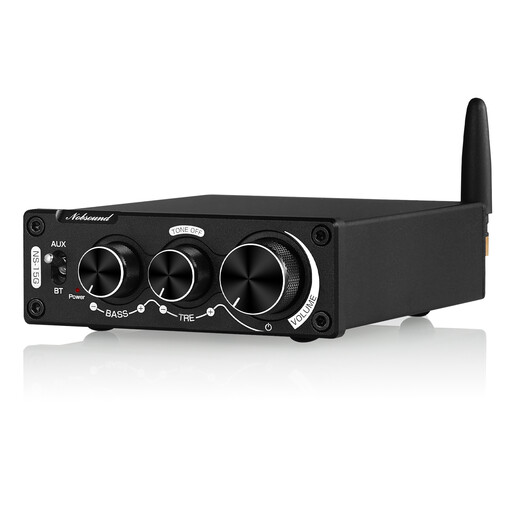
The product below is a compact Bluetooth amplifier. Before buying, check that the streaming method you use for your news briefing works with this model.
 No image available
May suit you if you want to stream audio over Bluetooth and need a compact amplifier for your speakers.
The product title mentions Bluetooth and a power rating of 200 W. Check that your chosen streaming method works with the news service you need.
According to the product description, use only the correct power supply. An incompatible adapter may cause overheating, a fire risk or damage to the device.
Yes. ARD Help lists Google Chromecast and Apple AirPlay as streaming methods, provided you have a compatible receiving device. Check that the method works with your phone and the exact amplifier model: according to WiiM, the Amp supports AirPlay 2, but the Amp Pro does not.
First check the internet connection where the device is set up, the volume and the connections. If other content also cuts out on the same device, trying a wired connection to your router may help you pinpoint the problem. ARD Help says a stable internet connection is needed for uninterrupted listening.
Not necessarily. WiiM describes presets for radio stations and supported content, among other things; whether you can select a new episode depends on the specific service. ARD Sounds includes both live programmes and podcasts.
No. Verbraucherzentrale distinguishes between statutory consumer rights for faulty goods and a guarantee, which is a voluntary additional promise subject to its own terms.
Having another receiving device in the same private home doesn’t, by itself, mean you have to pay an additional broadcasting contribution. The ARD ZDF Deutschlandradio Beitragsservice generally bases the contribution on the home; a separate additional home is assessed separately.