Quiet listeners with passive speakers
If you want to keep using passive speakers for quieter music, check that they’re compatible and consider how easy it is to adjust the volume and sound from your listening position.


First, choose an amplifier that’s compatible with your passive speakers and the streaming method you actually use. Then check whether you can set a comfortable volume from your listening position. EQ and room correction give you options for fine-tuning the sound, but neither they nor a high power rating guarantee good sound at your preferred low volume. If you’re planning to add other rooms or TV audio, the connections and platform offered by each model also matter.
If you want to keep using passive speakers for quieter music, check that they’re compatible and consider how easy it is to adjust the volume and sound from your listening position.
If you usually play ambient music through a particular app or AirPlay, check that the exact model you’re considering supports it.
If you also want to connect other rooms or a TV, compare the multi-room platform and inputs you’ll need.
| What to consider | What to look for | Who it matters most to |
|---|---|---|
| Volume control at low levels | If possible, try making small volume adjustments while playing your music in your usual listening spot. Check the EQ, volume limit and, where available, room correction for the exact model. | If I mostly listen at low volume, I want to be able to set a comfortable level from my listening position. Around 36% of consumers in this buying situation give low-volume control top priority. |
| Connecting your existing speakers | Check whether your speakers are passive, then compare the connections and manufacturer’s specifications with the full amplifier model. | If I want to keep using my existing passive speakers, the amplifier needs to be compatible with them. Around 29% of consumers put speaker compatibility first. |
| Streaming service and playback method | Check that your service and preferred streaming method are supported. According to WiiM, AirPlay 2 is supported by the Amp, but not the Amp Pro or Amp Ultra. | If I always start ambient music through the same app or streaming method, I want to keep using it with my new device. Around 21% of consumers prioritise compatibility with their preferred playback method. |
| Additional rooms and audio sources | Make a note of the additional rooms and sources you actually want to connect, then check multi-room compatibility and whether you need HDMI or optical inputs. | If I have specific plans for additional listening areas or another audio source, the platform and connections need to suit them. Around 14% of consumers put expandability first. |
Rated power figures are based on specific test conditions. On their own, they don’t tell you how easy it is to control the volume, or how the sound will be with your speakers from your listening position.
Check your speakers’ compatibility and, if possible, test the volume control and any available sound adjustments from your listening position.
WiiM lists AirPlay 2 support for the Amp, but not the Amp Pro or Amp Ultra.
Compare the full model name with the streaming method you actually use.
Sonos, HEOS and BluOS are different expansion platforms; inputs and TV connections vary by model.
First, make a note of the rooms and sources you plan to connect. Then choose the platform and connections you need.
Amp models for passive speakers, with streaming and model-specific control and playback features.
The Sonos Amp is an option if you want to use Sonos multi-room or AirPlay 2 with your existing devices.
The Denon Home Amp is a compact option for passive speakers if you’re planning a HEOS system or want to connect a TV.
The R-N600A is a network receiver for listeners who need traditional audio inputs as well as streaming.
The POWERNODE EDGE is a streaming amplifier for passive speakers, with the option to expand using BluOS.
This selection features amplifiers for compact music systems, with Bluetooth playback and manual volume or tone controls.
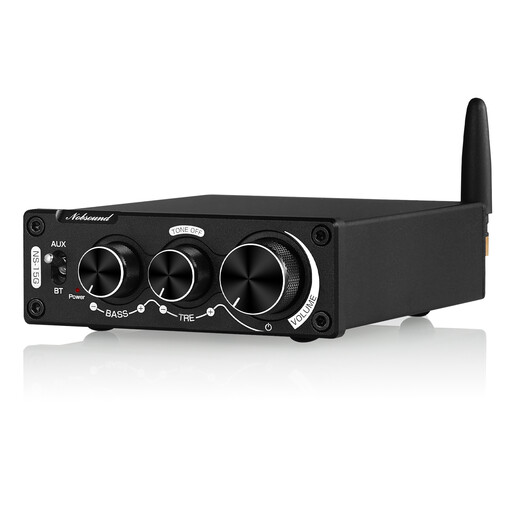 No image available
For a compact system where Bluetooth playback and manual volume and tone controls are important. Before buying, check that the connections suit your speakers.
Bluetooth 5.0; stereo RCA input; Tone-Bypass; volume control and bass and treble controls with a stated range of ±10 dB.
Not just to amplify them. The speaker outputs discussed here are designed for passive speakers. For active speakers, check which compatible input and streaming method you already have or need instead.
First, connect suitable passive speakers and set up your preferred streaming method. Adjust the volume while playing your music from your usual listening spot. If needed, try the EQ or room correction settings available on that model, and compare the sound with these settings switched off too.
The amplifier features described here don’t imply that you need an additional amplifier subscription. Whether the content you want requires a paid plan depends on the service and playback method you choose, so check both before buying.
For goods bought from a business seller in the EU, you’re generally entitled to at least two years of statutory protection from the seller, starting from the date you receive them. This is separate from any voluntary manufacturer’s warranty. This information applies to the EU.
No. The German Environment Agency advises that electrical and electronic waste must be collected separately from unsorted household waste. Check with your local authority for suitable collection points. Further conditions may apply if you return it to a retailer, depending on the device and the collection point.