Viewers in bright daylight
If it’s hard to see the picture during the day, check for reflections and your TV’s brightness first rather than expecting a player to fix a display problem. RTINGS.com considers both factors when evaluating TVs.


A new streaming player is most worthwhile when your TV is missing an app you need or a suitable connection. However, it won’t eliminate reflections or brighten a TV picture that’s too dim in daylight, so first check the view from your usual seat. If you do need an extra device, a stick may be all you need if you have a suitable HDMI port and reliable Wi-Fi. A box is mainly worth considering if you’ll use its specific features, such as Ethernet.
If it’s hard to see the picture during the day, check for reflections and your TV’s brightness first rather than expecting a player to fix a display problem. RTINGS.com considers both factors when evaluating TVs.
If you’re looking for specific titles, check whether they’re available on your preferred service and whether your TV or streaming device has the right app. The ARD Mediathek has a comedy section, but individual films may only be available for a limited time.
If your connection keeps dropping out by the TV, the network connection available where you plan to set it up is what matters. A box with Ethernet may allow you to connect by cable; whether that’s practical depends on whether an Ethernet cable can reach your TV.
A good fit if: the services you want work on your TV and you’re happy with the picture and controls.
Things to consider: app choice and controls depend on the specific TV model, and reflections will still be there.
A good fit if: you’re missing an app you need, your HDMI port and power supply are suitable, and the Wi-Fi is reliable where you plan to use it.
Things to consider: check the exact device generation and available apps. A 4K or HDR label won’t reduce reflections on your TV.
A good fit if: you want to use a particular interface or connect your TV via Ethernet.
Things to consider: ports, cables and what’s included vary by model, and you may need to do some extra preparation.
| What matters | What to check before buying | Who is it particularly important to? |
|---|---|---|
| Viewing in daylight | Watch the same content at the time of day you normally watch, from your usual seat. RTINGS.com identifies reflections and SDR brightness as relevant factors in bright rooms. | When I watch during the day, I first want to find out whether reflections or a picture that’s too dim are a problem. Around 36 % of consumers rank visibility as their top buying priority. |
| Particular film classics | Search for the specific title on your preferred service and check the app, availability period and access requirements. The ARD Mediathek notes that legal requirements and licences affect how long content is available. | When I want to watch a particular classic, the first thing that matters is whether I can actually stream it on a suitable service. Around 29 % of consumers put specific film titles first. |
| Connections and ports | Check Wi-Fi where your TV is, whether you have a free HDMI port and how the device will be powered. Google lists Ethernet on the TV Streamer (4K); Xiaomi’s German technical specifications for the TV Box S (3rd Gen) don’t list an Ethernet port. | If my Wi-Fi isn’t reliable by the TV, I want to know whether a wired connection is possible and which ports the box actually has. Connection stability is a priority for around 21 % of consumers. |
| Total cost | As well as the device, factor in any cables you might need and the access requirements for your chosen services. Some apps or films may require a subscription, purchase or download. | If the TV app already does the job, I don’t want to budget for an extra player or unnecessary accessories. Around 14 % of consumers focus mainly on avoiding unnecessary costs for devices, cables and services. |
Reflections and picture brightness in daylight depend on your TV and the lighting conditions. Adding a player won’t change either of these.
Check the picture from your usual seat and adjust the lighting if needed. Only then decide whether you’re actually missing an app or a connection.
This helps you avoid buying an extra device that won’t solve the visibility problem.
A service with a comedy section doesn’t guarantee that a particular classic will still be available. Licensing and rights may limit how long content can be streamed.
Before choosing a device for a particular film, check the title, service, stated expiry date and access requirements.
Resolution and picture-format specifications alone won’t tell you whether a network connection, particular port or cable is better suited to your setup.
Compare the network connection you need, the available ports on your TV and what’s included with the specific model.
Depending on the model, you may need to provide a cable separately; ports you don’t use won’t make a difference in day-to-day use.
The Google TV Streamer (4K) is a separate box for anyone who wants to use Google TV and have a built-in Ethernet port.
The TV Box S (3rd Gen) is a Google TV box supplied with an HDMI cable.
Apple TV 4K may suit anyone specifically looking to use tvOS and Apple features. The ARD Mediathek has a tvOS app.
Roku Express 4K is a standalone streaming platform; the ARD Mediathek has a Roku channel.
The Joybuy products below offer different ways to stream: a TV with Google TV, a projector with built-in apps and a streaming station that requires compatible Rokid AR glasses. In each case, check whether this type of device suits your TV and your bright living room.
 No image available
A possible choice if you want to use apps directly on your projector; the specifications don’t say how clearly the picture can be seen in bright ambient light.
Listed in the product name: 50–200 inches, 50–100 % digital zoom and 180° rotation.
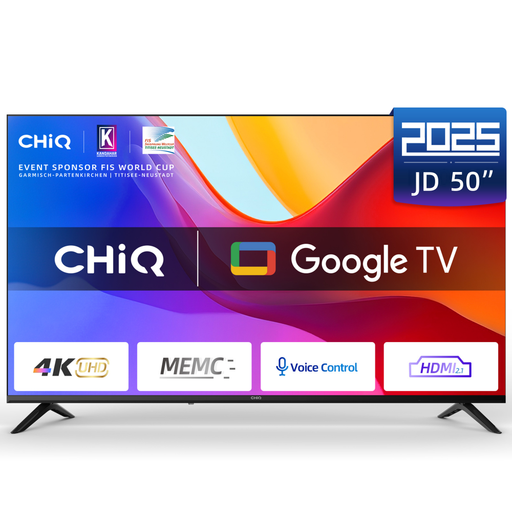 No image available
If you’re already looking for a TV with a built-in streaming interface, this model is described as a Google TV and doesn’t necessarily need a separate player for apps.
Listed in the product name: 4K Ultra HD, HDR10, MEMC, HDMI 2.1 ALLM and Dolby Audio.
 No image available
Only suitable if you use compatible Rokid Max or Air AR glasses: according to the product information, the station can’t be used on its own.
The product information lists a 5,000 mAh battery and up to seven days on standby. Netflix is currently not supported, according to the description.
No. Reflections and picture brightness in ambient light depend on your TV and the lighting conditions. First, assess the picture at the time of day and from the seat where you usually watch.
Search for the specific title on the service you plan to use and check the stated expiry date. The ARD Mediathek explains that legal requirements and licences affect how long content is available; a comedy section doesn’t guarantee that a particular film will always be there.
Check that you have a free HDMI port, internet access and a power supply, and see what’s included with the specific version. Google requires a certified HDMI 2.1 cable for the TV Streamer (4K), sold separately; Xiaomi lists an HDMI cable as included with the TV Box S (3rd Gen).
Some apps or films may require a subscription, purchase or download. Check the service’s terms for the specific title before choosing a device solely for that film.
For market surveillance, the German Federal Network Agency looks at factors including correct CE marking, identifiable product and manufacturer details, German-language instructions with the required warnings, and a declaration of conformity. Check the information for the specific item on offer; the CE mark is not an independent quality mark for streaming performance.