Film fans with a 4K HDR TV
You want to enjoy the picture formats available for your favourite adventure films, so you’re checking the device’s HDR support against your TV and streaming service.


If your TV has a spare HDMI input and the Wi-Fi signal is reliable where it’s set up, a compact streaming stick may be all you need. A box is worth considering if, for example, you want to use Ethernet. Choose picture and sound formats that suit your TV, the films you watch and your audio equipment. Also check which apps are available, whether you’ll need extra cables and any package requirements.
You want to enjoy the picture formats available for your favourite adventure films, so you’re checking the device’s HDR support against your TV and streaming service.
You want to add film apps without expecting a 4K or HDR picture from an HD screen.
You need a reliable connection by your TV and are comparing a Wi-Fi stick with a box that has built-in Ethernet.
A good fit if: you have limited space behind your TV and stream over Wi-Fi.
Bear in mind: the HDMI port, power supply and Wi-Fi reception where the device is set up all need to be suitable.
A good fit if: Wi-Fi by your TV is unreliable and you can run a network cable to the device.
Bear in mind: a box needs space to sit. The certified HDMI 2.1 cable required for the Google TV Streamer (4K) is sold separately.
A good fit if: you specifically want to use a waipu.tv TV package as well as watching films.
Bear in mind: according to the provider, a waipu.tv package is required even when buying the waipu.tv Stick (2nd Generation) on its own.
| Priority | What to check when buying | Who is it important to? |
|---|---|---|
| Picture quality suited to films | Check the resolution and HDR formats supported by your TV, the full device model and the films you watch. | If I want to watch adventure films in the picture formats supported by my TV, I check which formats the screen and content actually support. Around 29% of consumers put picture quality suited to films first. |
| TV and app compatibility | Check for a spare HDMI input, space around the port, power requirements and whether the app you want is available for the exact model. | If I want to keep using my existing TV, its connection needs to work with my preferred film app. Around 23% of consumers prioritise TV and app compatibility. |
| Reliable film streaming | Test the connection where your TV is set up and, if needed, check whether the specific device has Ethernet. Netflix recommends a stable speed of at least 15 Mbit/s for 4K UHD streaming. | I want to stream without interruptions on my TV. If the Wi-Fi signal is weak there, I’ll consider a wired connection. Around 18% of consumers put connection stability first. |
| Sound at low volume | Check the audio output you need, headphone compatibility, your sound system and the available audio track. | When I watch quietly in the evening, a suitable headphone or sound system set-up matters more than a surround sound logo on its own. Around 18% of consumers prioritise listening options suited to their needs. |
| Accessories and package requirements | Check what’s included, which cables you already have and the terms for the film and TV services you actually want. | Before choosing, I want to know whether I’ll need an extra cable or a particular TV package. Around 12% of consumers put included accessories and package requirements first. |
Your TV, the content and, where applicable, your audio equipment must also support the format you want.
Check the formats supported across your entire set-up against the films you actually watch.
COMPUTER BILD’s test list covers similarly named versions of the Fire TV Stick 4K Max separately. A shortened model name can therefore hide important differences.
Compare the full model name and generation with the specific product listing.
The certified HDMI 2.1 cable required for the Google TV Streamer (4K) is sold separately. The provider states that a waipu.tv package is required for the waipu.tv Stick offer featured here.
Before choosing, check which cables are included and what terms apply to the services you want.
The TV Stick 4K (2nd Gen) is a compact Google TV option for TVs with an HDMI port.
The Google TV Streamer (4K) is a streaming box with built-in Ethernet.
The Streaming Stick 4K, model 3820, is an HDMI stick that can also work with an HD TV.
The Stick (2nd Generation) is also aimed at viewers who want to use waipu.tv’s TV service.
The LEAP-AIR is another documented Google TV stick for TVs with HDMI.
The products below include projectors with built-in apps and an HDMI router dongle. These are different types of device from the streaming sticks and boxes compared here. For each model, check that the film apps and connections you want will work with your TV.
 No image available
A possible choice if you’re looking for a projector with built-in apps rather than a streaming stick.
The title lists WiFi 6, Bluetooth, a Play Store, a projection size of 50–200 inches and 180° rotation.
 No image available
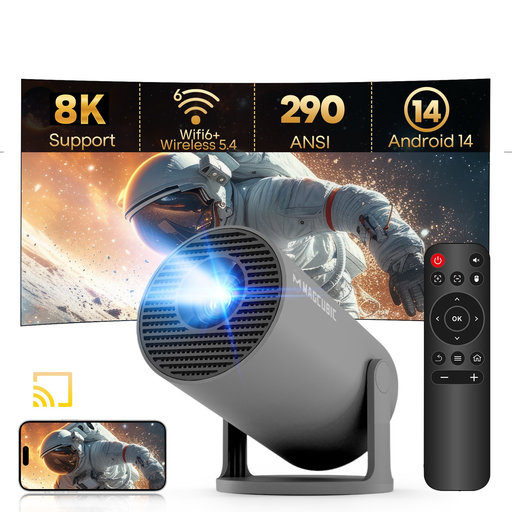
This projector is worth considering if you’re looking for a portable device with built-in streaming apps rather than a separate streaming stick.
The title lists Android 14, WiFi 6, Bluetooth 5.4, 290 ANSI and 180° rotation. The description lists 720p as the native resolution; the 1080p and 8K claims refer to support or decoding.
 No image available
This projector may suit you if you’re looking for built-in apps and flexible positioning in a small room.
The title lists native 1080p, 900 ANSI, Android 14, WiFi 6, Bluetooth 5.4, automatic image correction and 180° rotation. According to the description, it can project a 1:1 image from 1.35 m away.
 No image available
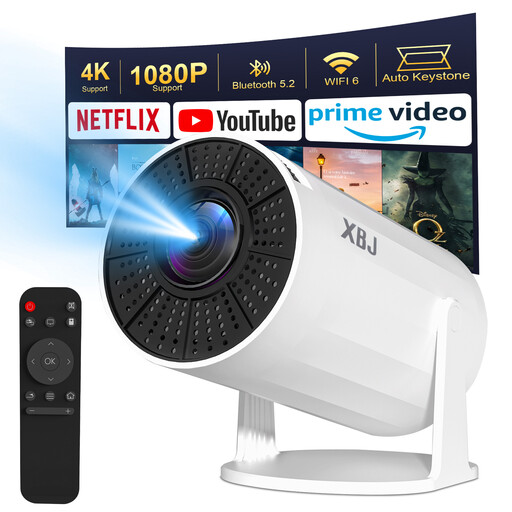
This projector is an option if you want to use Android apps directly on the device.
The title lists Android 11, 1080P HD with 4K decoding and 200 ANSI. The description lists WiFi 6, Bluetooth 5.2, automatic image correction and 180° rotation.
 No image available
If you’re looking for an HDMI dongle rather than a streaming box, check that the device supports the film apps and connections you want before choosing.
The product title describes the model as an HDMI 2-in-1 router dongle.
No. Roku says the Streaming Stick 4K, model 3820, also works with a TV that doesn’t support 4K or HDR, but it won’t deliver 4K or HDR picture quality on that screen. Check compatibility for other devices against the specifications for the specific model.
Check the connection by your TV and use the power supply specified for your model. Roku notes that the USB cable for model 3820 has a built-in Wi-Fi receiver, and that some TV USB ports may not provide enough power. Netflix recommends a stable speed of at least 15 Mbit/s for 4K UHD streaming.
It depends on the device and the offer. Google lists the certified HDMI 2.1 cable required for the TV Streamer (4K) as sold separately. Xiaomi lists pre-installed apps such as Netflix and YouTube; you may need a subscription or have to pay to watch some content. A waipu.tv package is required for the waipu.tv Stick featured here.
Germany’s Federal Network Agency explains that CE marking is required for products covered by the relevant EU harmonisation legislation, so the requirement cannot be determined from the device category alone. In 2017, the Court of Justice of the European Union ruled in a case concerning a media player with add-ons for illegal film sources that selling it could infringe copyright, and that the streaming in question did not fall under the exception for temporary reproductions. This does not mean that ordinary streaming sticks are prohibited. Use authorised sources for films.
Germany’s Federal Ministry for the Environment explains that waste electrical and electronic equipment must be handed over to an authorised collection point, such as a local authority collection site or a retailer required to take it back. Conditions apply to retailer take-back schemes.