A new streaming player won’t fix reflections or make your TV screen brighter: how well it handles reflections depends on the screen and its surroundings, as RTINGS.com explains. First, check the picture in daylight from where you usually sit. Then choose a device based on the documentary apps you need, compatible picture formats and the connections available on your TV. If your Wi-Fi works well and you have a spare HDMI port, a stick may be enough; a box is a better fit if you need, for example, built-in Ethernet or extra TV features.
Who is this guide for?
Documentary fans watching by a bright window
If you watch nature documentaries during the day, first check whether reflections and your current TV’s picture brightness make the image difficult to see. RTINGS.com notes that reflections can be a distraction when watching TV.
Viewers who use specific documentary streaming services
If you want to watch particular films or use specific streaming services, check both whether the title is available and whether the device supports the app. The ARTE Help Centre lists Google TV and tvOS among its supported systems.
Homes with weak Wi-Fi by the TV
If your connection is unreliable where the TV is set up, it’s worth comparing it with a box that has built-in Ethernet. Google lists Gigabit Ethernet as a connection option on the Google TV Streamer (4K).
What should you look for?
Keep using your existing smart TV
A good fit if: the documentary apps you need already work on your TV and the main issue is the light from the window.
Bear in mind: An extra player won’t change how the screen handles reflections or add any apps that are missing.
Compact streaming stick
A good fit if: you want to add apps to a TV with a spare HDMI port and Wi-Fi is reliable where it’s set up.
Bear in mind: Power supply, app version and the availability of an Ethernet adapter depend on the model.
Streaming box with LAN
A good fit if: Wi-Fi by the TV is unreliable, you can run a network cable or you want to use extra features offered by that particular box.
Bear in mind: A box needs space; depending on the model, you may also need extra accessories or a service package.
| What matters |
What to look for when buying |
Who is this important to? |
| Picture by a bright window |
Check the TV in daylight from your usual seat; the screen and its surroundings affect reflections, as RTINGS.com explains. |
When I sit by the window during the day, I first check whether I can still see the picture on my current TV despite the reflections. Around 28% of consumers put picture visibility in daylight first. |
| Access to documentaries |
Check the specific title, service, subscription and app support. The ARTE Help Centre lists Google TV and tvOS among its supported systems. |
I want to make sure the nature documentary I’m looking for and the right streaming service are actually available. Around 22% of consumers say access to documentaries is their top priority. |
| 4K and HDR playback |
Check that the TV, player and content support the same resolution and HDR formats; device specifications alone don’t tell you what picture you’ll see on your TV. |
If I want to use 4K or HDR, my TV, player and content all need to be compatible. Around 22% of consumers prioritise picture formats they can actually use. |
| Connection by the TV |
Test Wi-Fi where the TV is set up and check whether you can run a network cable. Google says the Google TV Streamer (4K) has a built-in Ethernet port. |
A reliable connection right by the TV matters to me; if Wi-Fi is weak, I check whether a LAN connection is possible. Around 17% of consumers put connectivity where the device is set up first. |
| Extra costs |
Compare what’s included and the service terms: Google says an HDMI 2.1 cable for the TV Streamer (4K) is sold separately; waipu.tv requires a package to use its service. |
I want to know in advance whether I’ll need a cable or an ongoing service package as well as the device. Around 11% of consumers put the overall cost first. |
Avoid common buying mistakes
-
Confusing HDR with a solution for window reflections
HDR support is only one part of the playback chain. Reflections still depend on the screen and its surroundings.
First, check the TV picture in daylight, then compare only formats supported by both your TV and the content.
-
Assuming an available app has the film you want
An app being supported doesn’t guarantee that the documentary you’re looking for is available on it.
Before choosing a device, check the specific title, service, app support and whether you’ll need a subscription.
Depending on the service, you may have to pay extra for a subscription.
-
Treating the box, cable and service package as one purchase
What’s included and the terms of use vary by device and service.
Check the complete setup and the service terms for the specific model, rather than comparing device names alone.
Depending on your choice, you may need to buy an HDMI cable separately; the waipu.tv Box requires a package to use the waipu.tv service.
Key brands to consider
Google
The Google TV Streamer (4K) is a separate box with Google TV and built-in Gigabit Ethernet.
- Google lists Dolby Vision, HDR10, HDR10+ and HLG as supported formats.
- Google says the required certified HDMI 2.1 cable is sold separately. These specifications don’t show that the device will reduce window reflections.
Xiaomi
The Xiaomi TV Box S (3rd Gen) is a Google TV box for users who want to take its listed HDR formats and included accessories into account.
- Xiaomi lists Dolby Vision and HDR10+; according to the manufacturer, an HDMI cable is included.
- The listed connections don’t include a built-in Ethernet port. This information relates to the TV Box S (3rd Gen).
Apple
Apple TV 4K is an option for buyers who want to use tvOS and the connections available on the relevant generation.
- Apple’s current specifications page lists Gigabit Ethernet, among other features.
- Apple says the HDMI cable is sold separately. Apple announced a new generation on 13 October 2026, due to go on sale from 13 November 2026; it shouldn’t automatically be treated as equivalent to an older version.
waipu.tv
The waipu.tv Box is aimed at households that want to use the waipu.tv television service as well as apps, and need a LAN connection.
- waipu.tv lists LAN and Wi-Fi as connection options.
- The provider says you need a waipu.tv package to use the waipu.tv service.
Products to consider at Joybuy
The Joybuy product below is an Android TV projector for streaming documentaries. Check separately whether it’s suitable for your intended location and the available daylight.
 No image available
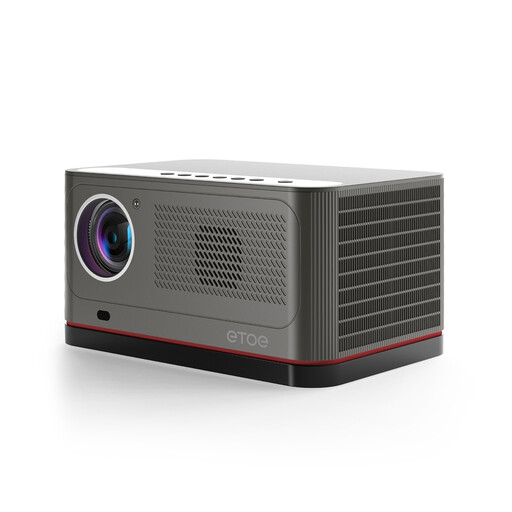
ETOE Whale Pro 800 Android TV projector
The product description lists Android TV, streaming apps and dual-band Wi-Fi for streaming.
Native resolution: 1080p. The stated 4K decoding does not mean native 4K playback.
HDR10 is listed; automatic focus and automatic keystone correction are included as setup aids.
Before using it in Germany, check the details in the specific listing about product identification, manufacturer information, CE marking and whether German-language instructions are required.
View at Joybuy
Frequently asked questions
Will a 4K stick make a picture that reflects in sunlight brighter?
No. Reflection handling is a feature of the TV. Check the window light and picture from where you actually sit; 4K doesn’t describe the brightness of the panel.
How do I check the connection for a documentary in 4K?
Test the connection where the TV is set up and check the requirements of the service you use. Netflix recommends a stable speed of at least 15 Mbit/s for UHD; this isn’t a general requirement for every streaming service.
What else will I need to set it up?
Check that you have a spare HDMI port and a power supply, and see what’s included with the specific model. Google says the TV Streamer (4K) requires a certified HDMI 2.1 cable, sold separately; Xiaomi lists an HDMI cable as included with the TV Box S (3rd Gen).
Does buying the device replace a streaming subscription or TV package?
No. Depending on the service, subscription fees may apply; waipu.tv says you need a waipu.tv package to use its service with the box.
What should I look for on device labels in Germany?
Check the specific listing for product identification, manufacturer details, CE marking and any requirement for German-language instructions. The German Federal Network Agency lists these points, among others, in connection with market surveillance; a CE mark alone doesn’t verify a particular sales listing.


