If you already take notes on a computer and are short on space, a compact graphics tablet without a screen is a sensible place to start. Wacom describes the One by Wacom Small as suitable for taking notes on a computer you already own. If you want to write directly beneath the pen tip, a pen display could be an option, provided you have the right computer ports, cables and space. To take notes without a connected computer, compare a general-purpose tablet with a paper-focused note-taking device. Your apps, PDF workflow, preferred writing area and the exact model’s included accessories are all important factors.
Who are these devices for?
Note-takers with a small desk
If you already work on lecture notes and scripts on your computer, a compact, screenless tablet can give you a writing surface that’s easy to put away. Compare the overall dimensions with the active area, and measure the space you have. Wacom describes the One by Wacom Small as an option for annotating on a computer you already own.
Writers who want to write directly on screen
If you want to see your handwriting directly beneath the pen tip, a pen display could be an option. Make sure you have space and the right ports. XPPen describes several connection options for the Artist 12 (2nd Generation).
Students who don’t want to connect a computer
If you want to write on a standalone device, compare a general-purpose tablet with a paper-focused note-taking device. The right choice depends on whether you need general tablet apps or mainly a PDF and note-taking workflow.
What should you look for when buying?
Screenless graphics tablet
A good fit if: You have a compatible computer with a screen and want to put the device away after studying.
Consider: You write on a different surface from the one where you see the result. Check the software and connection requirements too.
Pen display connected to a computer
A good fit if: You want to write directly on the displayed note and can connect a computer.
Consider: It isn’t a standalone note-taking computer. Space, connection options and any extra cables or power requirements depend on the model.
Standalone tablet with a stylus
A good fit if: You want to write without a connected computer and use tablet apps too.
Consider: Check which apps you need, how you’ll transfer files and whether the right stylus is included.
Paper-focused note-taking device
A good fit if: Focused writing and working with PDFs matter more to you than a wide choice of general tablet apps.
Consider: Compare the file formats you need, stylus compatibility and cloud features. According to reMarkable, unlimited cloud storage requires Connect.
| Criterion |
What to look for when buying |
Who is this especially important to? |
| Writing space at your desk |
Compare the overall dimensions and active area separately, and measure the space available alongside your computer and study materials. XPPen gives the Deco 01 V3 a working area of 10 × 6,25 inches. |
If there’s not much room on my desk alongside my computer and study materials, I want to be able to put the device away after studying; around 36 % of consumers put a compact writing surface first. |
| Writing directly on the display |
Think about whether you’d rather write while looking at a separate monitor or directly on the displayed note. With a pen display, check the ports, power supply and cables required for your planned connection. |
When annotating, I want to see my writing right where the pen touches down; around 29 % of consumers therefore prioritise writing directly on the displayed surface. |
| Taking notes without a computer |
Check which apps and PDF features you need, and confirm whether the right stylus is included in the specific offer. Samsung lists the S Pen as included with the Galaxy Tab S10 FE in the manufacturer’s described configuration; Apple does not list a Pencil among the included items for the iPad (A16). |
If I don’t want to connect a computer to take notes, I need a device that supports my note-taking workflow on its own; around 21 % of consumers prioritise writing without a computer. |
| Compatibility with study software |
Check that the operating system, drivers and note-taking app meet your needs. For PDFs, make sure the file formats you need can be imported and exported. Wacom describes different set-up options for the One by Wacom Small on Mac, PC and Chromebook. |
I want to be able to use my existing study software and files in the writing workflow I have planned; around 14 % of consumers therefore prioritise compatibility with their study software. |
Avoiding buying pitfalls
-
Assuming a pen display is a standalone note-taking computer
A pen display such as the XPPen Artist 12 (2nd Generation) connects to a computer; it doesn’t replace one. Connection options and power requirements can vary by model and set-up.
If you want to write without a computer, compare standalone devices. Otherwise, check the ports and included accessories for the specific display model before you buy.
-
Assuming a stylus is included because it’s a tablet
Samsung lists an S Pen as included with the Galaxy Tab S10 FE in the manufacturer’s described configuration. Apple names compatible Pencil models for the iPad (A16), but does not list a Pencil among the included items.
Check the included accessories for the specific offer and make sure the stylus generation is compatible with your device.
-
Assuming a similar retailer product name means it’s the same model
A product name alone doesn’t always tell you which model variant is being offered. If the model number doesn’t match, it can be harder to check the features and compatibility.
Before you buy, compare the full model number and key device specifications shown in the listing.
-
Taking cloud features and stylus compatibility for granted
According to reMarkable, unlimited cloud storage for the reMarkable Paper Pro requires Connect. Pens from other reMarkable generations are not necessarily compatible either.
Check which syncing features you need and which pen works with the specific device.
Key brands at a glance
Wacom
The One by Wacom Small is a compact option for taking notes on a computer you already own. The One range also includes graphics tablets and pen displays.
- Wacom describes the One by Wacom as suitable for writing and annotating. According to the manufacturer, you can use it over USB with a Chromebook without installing drivers.
- Wacom describes driver installation for Mac and PC. On the screenless model, your notes don’t appear on the surface you write on.
XPPen
The Deco 01 V3 is a screenless graphics tablet with a larger working area. The Artist 12 (2nd Generation) is a pen display alternative for your computer set-up.
- XPPen gives the Deco 01 V3 a working area of 10 × 6,25 inches.
- With the Artist 12 (2nd Generation), connection options and any additional power supply depend on your set-up. According to the instructions, a USB-C cable may be sold separately.
Huion
The Inspiroy 2 S is a compact, screenless input device for use with a compatible device.
- Huion lists a battery-free PW110 pen, six buttons and a scroll wheel for the Inspiroy 2 S.
- The Android compatibility advertised by the manufacturer doesn’t remove the need to check your own device and note-taking app.
Samsung
The Galaxy Tab S10 FE is a standalone Android tablet option if you want general tablet features as well as handwritten notes.
- Samsung lists an S Pen as included with the Galaxy Tab S10 FE configuration described.
- Compare the full model number and specifications in the specific offer with the version you want.
Apple
The iPad (A16) is a standalone tablet alternative, provided the apps you need are available on iPadOS.
- Apple lists support for Apple Pencil (USB-C) and Apple Pencil (1st generation).
- A Pencil isn’t included with the iPad as listed. Apple specifies a USB-C adapter for pairing and charging the 1st generation Pencil.
reMarkable
Paper Pro is designed for a paper-focused writing and PDF workflow, rather than general tablet use.
- reMarkable lists PDF import and export, a proprietary operating system and an 11,8-inch display.
- According to the manufacturer, unlimited cloud storage requires Connect. Pens from other reMarkable generations are not necessarily compatible.
Joybuy products for handwritten notes
This selection includes LCD writing tablets, as well as standalone tablets and E-Ink note-taking devices for handwritten study notes.
 No image available
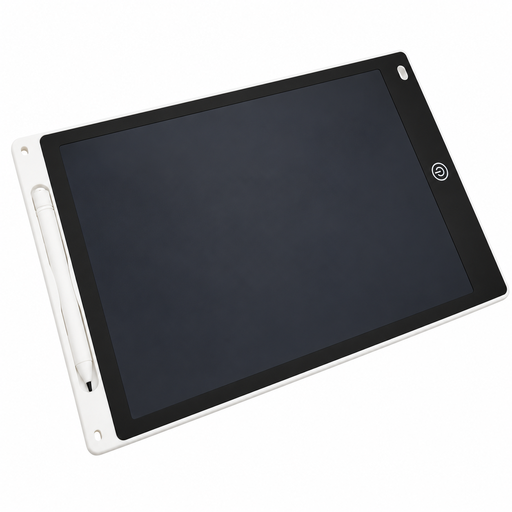
12-inch LCD drawing tablet with pen and erase function
An option for quick handwritten notes and sketches on an LCD writing surface.
The product title specifies a 12-inch size, a stylus and an erase function.
View at Joybuy
 No image available
Teclast ArtPad Pro 2025, 13,4-inch, 2K, T-Pen
For handwritten notes on a standalone tablet when you want to work without a connected computer.
The product title specifies a 13,4-inch 2K display, a T-Pen with 4096 pressure levels and Android 15.
View at Joybuy
 No image available
iFLYTEK AINOTE 2, 10,65-inch E-Ink tablet with protective case
An option for standalone handwritten notes and a paper-focused study workflow.
The product title specifies a 10,65-inch E-Ink display, handwriting-to-text conversion and transcription in 16 languages. An internet connection is required for the described speech transcription.
View at Joybuy
Frequently asked questions
Do I need a driver for a screenless graphics tablet?
It depends on the model and computer. For the One by Wacom Small, Wacom describes driver installation on Mac or PC; according to the manufacturer, a USB connection is all you need to use it with a Chromebook. Also check that your note-taking app handles pen input as you need it to.
Is a USB-C port enough for a pen display?
Not necessarily. For the XPPen Artist 12 (2nd Generation), the instructions describe several ways to connect it to a computer, the possibility of additional power and a USB-C cable sold separately. Check that the connection option you plan to use, including video output and everything in the box, is compatible with your computer.
What ongoing costs should I consider for a note-taking device?
Check whether you’ll need additional pens, suitable software or cloud features. According to the manufacturer, unlimited cloud storage for the reMarkable Paper Pro requires Connect. Whether you need this feature depends on how you sync and edit your work.
What are my rights when buying online from a business seller?
According to information from the European Union, you generally have a 14-day right to cancel an eligible distance purchase, starting from delivery of the goods, subject to applicable exceptions. Faulty goods are covered by a legal guarantee of at least two years from receipt. The right to cancel because you’ve changed your mind and your rights when goods are faulty are separate entitlements.
Can I put an old graphics tablet in my household rubbish?
No. The German Environment Agency explains that old electrical equipment must be disposed of separately from household rubbish. Local recycling centres generally accept old electrical equipment free of charge.


