What to look for when buying
Start with the key feel if others in the room are studying or sleeping. Then check the layout and connection against your devices, and choose a size that suits the space available on your desk and how often you actually enter numbers.
| What matters |
What to check before buying |
Who is it important to? |
| Quiet keys |
If possible, try typing on the keyboard yourself; check the returns policy for the specific purchase. |
If others in the room are studying or sleeping, I want to disturb them as little as possible while typing. Around 36% of consumers put quiet keys first. |
| Desk space |
Measure the space available on your desk and consider whether you use a number pad regularly. |
When space is limited, I want to leave room for my mouse and papers, and can do without a number pad if I rarely need one. Around 29% of consumers prioritise the space available. |
| German layout |
Check that the specific version is explicitly listed as “German (QWERTZ)” and has the characters you need. |
For a biography in German, I want to use a familiar keyboard layout. Around 21% of consumers prioritise having the right German layout. |
| Connection and switching between devices |
Check your devices’ USB ports or Bluetooth support, and make sure the keyboard’s connection type is compatible. |
If I switch between a laptop and tablet, I need a connection that works with both. Around 14% of consumers put connection type or switching between devices first. |
Joybuy keyboards for compact typing
The options below include compact keyboards with different layouts and connection types. Before buying, check that the specific keyboard layout suits typing in German and works with your devices.
 No image available
Inateck Bluetooth Keyboard KB01003G, QWERTZ
The QWERTZ layout makes this worth considering for typing in German, if your devices support Bluetooth.
- Bluetooth 5.3; switches between three devices
- Slim, lightweight design; powered by AAA batteries
View at Joybuy
 No image available
Inateck Foldable Mini Keyboard N0153BK
The foldable design with an integrated touchpad is worth considering if there’s little room on your desk for a keyboard and mouse.
- Foldable Bluetooth keyboard with touchpad
- Three Bluetooth channels; check the exact keyboard layout before buying
- Product specifications list compatibility with iPadOS, Android and Windows
View at Joybuy
 No image available
Keyboard with LCD display and rotary dial, QWERTZ
The QWERTZ layout may suit typing in German; choose the connection that works with the ports and devices you actually use.
- Bluetooth, 2.4G and USB-C
- QWERTZ layout and backlighting
- 2000 mAh battery
View at Joybuy
 No image available
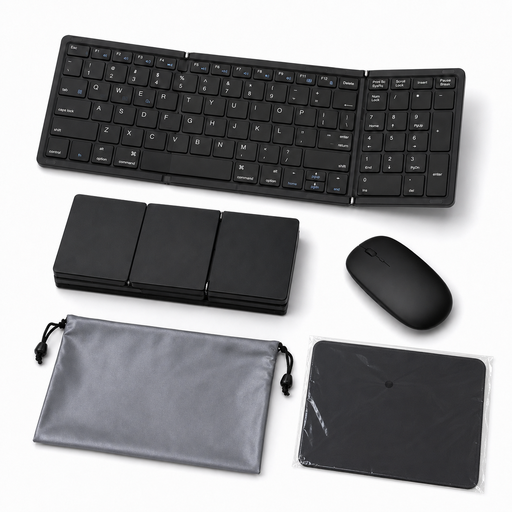
Tri-fold Bluetooth keyboard with number pad and mouse set
The foldable model with a number pad is worth considering if you need to enter numbers and the QWERTY layout on offer suits how you work.
- 81 keys, QWERTY and Bluetooth 5.1
- Connects to up to three devices
- USB-C rechargeable battery; mouse pad and case included
View at Joybuy
 No image available
CHERRY MX-LP 2.1 Wireless Gaming Keyboard, German QWERTZ, white
This compact model with a German QWERTZ layout is worth considering if you want to choose between the connection types listed.
- 65% format with low-profile MX Speed switches
- 2.4 GHz, Bluetooth and USB-C
- RGB backlighting; colour: white
View at Joybuy
Frequently asked questions
Do I need a number pad for a short biography?
If you’ll mostly be typing prose, a TKL keyboard can save space; if you enter numbers frequently, a full-size model with a number pad is a suitable alternative. It all depends on how you actually use your keyboard.
How can I use one keyboard with a laptop and tablet?
First check which connection types both devices support. Logitech says the Pebble Keys 2 K380s features Easy-Switch between three compatible devices; the wired Dell KB216 needs a suitable USB-A port.
How should I set up my workspace for longer typing sessions?
Leave enough room to position your mouse and keyboard comfortably, and make sure your hands are in a comfortable position. The BAuA highlights the importance of space for a keyboard, mouse and wrist rest when working at a computer; the ASR A6 occupational safety rule doesn’t apply generally to private work in a student room.
What are my rights when buying a keyboard online?
The Verbraucherzentrale says online purchases generally come with a 14-day cancellation period; the exact start of the period and any exceptions should be checked. If a product is faulty, statutory consumer rights are separate from a voluntary guarantee.
What should I know about compliance when buying a keyboard in Germany?
According to the Bundesnetzagentur, for electrical and electronic devices the retailer must, among other things, ensure the CE marking is correct, the device and manufacturer can be identified, and a German-language instruction manual is available for non-commercial users. A brand name or product page alone doesn’t confirm these details for the specific version.


