Students sharing a room
If you take notes within earshot of other people, think about how the keys feel and sound when pressed. Manufacturer descriptions such as “quiet” are not measurements that allow a direct comparison.


If you keep plant specimens and notes next to your computer, a compact keyboard is a good place to start. The key question is whether you need a number pad for entering measurements. A wired model may suit a permanent workstation, while a compatible Bluetooth keyboard can be useful if you switch between a computer and a tablet. Split keyboards involve a separate trade-off between desk space and getting used to a new layout. Manufacturer descriptions such as “quiet” do not compare the models mentioned under the same conditions.
If you take notes within earshot of other people, think about how the keys feel and sound when pressed. Manufacturer descriptions such as “quiet” are not measurements that allow a direct comparison.
If you need to leave room for a mouse, notes and plant specimens next to your keyboard, weigh up the benefits of a number pad against the space available.
If you write detailed descriptions or enter lots of measurements, it’s worth choosing a key layout, number pad and hand position that suit the way you work.
First, check how much desk space you have and which keys you actually need for your notes and measurements. Then consider how the connection, device switching and typing feel will work with your setup.
| What matters when buying | What to check | Who is it important to? |
|---|---|---|
| Being considerate of others | Check the key mechanism and returns policy; if possible, assess the noise in the conditions you’ll use it in. | If you work in a shared room, you’ll want to disturb others as little as possible. Around 26% of consumers put considerate typing first. |
| Desk space | Measure the available width and depth of your desk, then compare them with the keyboard’s dimensions. | If you need to leave room for plant specimens, notes and a mouse next to your keyboard, choosing a suitable footprint is essential. Around 21% of consumers prioritise desk space. |
| Written notes and measurements | Check the available key layout and whether you need a number pad, arrow keys or special keys for your data-entry form. | If you enter lots of descriptions and measurements, you’ll need a key layout that suits what you type. Around 21% of consumers prioritise data entry. |
| Switching between devices | Check Bluetooth support and operating system compatibility against your own devices. | If you record observations on both a computer and a tablet or mobile phone, the connection needs to work with both. Around 16% of consumers prioritise switching between devices. |
| Hand position | Consider how much space it needs, the key layout and whether you’ll need time to get used to it. | If you write detailed descriptions and want to try a different hand position, the keyboard’s shape is part of your decision. Around 16% of consumers prioritise hand position. |
The German version of the CHERRY KC 6000 SLIM, article number JK-1600DE-2, is different from the US-layout version, model number JK-1600EU-2. The product name alone therefore doesn’t confirm that the key layout is the one you want.
Before buying, check the full model code and the key layout shown in the images, especially if you’ll be entering German plant names and special characters.
A TKL model saves width by leaving out the number pad. The split Perixx PERIBOARD-413 B is described as compact, but Perixx lists its dimensions as 400 × 275 mm.
Measure the actual available width and depth of your desk, then compare them with the dimensions of the specific keyboard.
CHERRY and Logitech describe their respective models as quiet to type on. These claims don’t compare their noise levels under the same conditions.
If possible, assess the typing feel and noise in your own surroundings. If you’re buying online, check the applicable returns policy.
A wired model may be better suited to a permanent workstation with the right connection. With a wireless keyboard, you’ll need to consider device compatibility and power supply.
Choose according to how much portability and device switching you actually need, and check the power supply for the version you’re considering.
The models described here include both compact keyboards without a number pad and a full-size option.
The Pebble Keys 2 K380s is a compact Bluetooth keyboard, while the split design of the ERGO K860 offers a different approach.
The K3 Max is aimed at anyone considering a compact mechanical keyboard with several connection options.
The wired PERIBOARD-413 B has a split key layout for anyone who wants to try a different hand position.
The German KM555 set combines a keyboard and mouse, making it most relevant if you need both.
The selection below includes compact Bluetooth keyboards for switching between devices, models with a number pad and a wired keyboard-and-mouse combo. Check that the layout, connections and footprint suit your recording device and workspace.
 No image available
If you switch between devices, a Bluetooth keyboard may suit your setup; check that it’s compatible with your specific devices.
The product is described as a QWERTZ keyboard with three Bluetooth connections.
 No image available
If you don’t want to make separate room for a mouse beside your keyboard, the built-in touchpad may suit your workspace.
The product name specifies a foldable design, QWERTZ and three Bluetooth channels. Check that it’s compatible with your devices.
 No image available
If you’re looking for a mechanical keyboard with a German QWERTZ layout, check that the available connection works with your devices.
The product name lists Bluetooth, Logi Bolt and Tactile Quiet switches. “Tactile Quiet” is not a comparative noise measurement.
 No image available
If you regularly enter measurements, a separate number pad can be useful; check that you have enough desk width for the full layout.
The product name lists QWERTZ, Bluetooth 5.3 and a mouse included in the set. The full layout takes up more desk width than a compact keyboard.
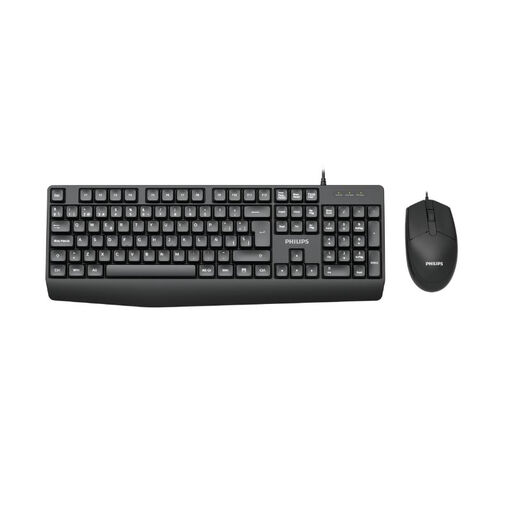 No image available
A wired combo may suit a permanent workstation if you need both a keyboard and a mouse.
The product name specifies a wired keyboard-and-mouse combo in the German version. Check that its connection is compatible with your computer.
First, check your device’s ports and Bluetooth support. The CHERRY STREAM KEYBOARD TKL is wired; Logitech lists Bluetooth for the Pebble Keys 2 K380s, while Keychron lists Bluetooth, 2.4 GHz wireless and wired connections for the K3 Max. The version you choose needs to work with your device.
Before buying, measure the available width and depth, including the space you need for your mouse. A TKL model leaves out the number pad, but a split keyboard can still take up considerable desk depth.
If you choose a battery-powered keyboard, allow for the possibility of replacing the batteries later; with a wired model, you won’t need to. The Verbraucherzentrale (German consumer advice centre) says consumers buying online in Germany generally have a 14-day cancellation period; you must notify the seller that you wish to cancel. Statutory rights are separate from a voluntary manufacturer’s warranty.
For electrical and radio equipment, the Bundesnetzagentur (Germany’s Federal Network Agency) checks matters including correct CE marking, manufacturer information and required German-language notices. A CE mark is not an independent quality or noise certification, so check the information for the specific product.
In Germany, electrical waste must not go in household rubbish. The Umweltbundesamt (German Environment Agency) lists local collection points and suitable take-back options at retailers. Remove the batteries if this is easy to do, then take them separately to a battery collection point.