Students with a small desk
If you want to keep room for your mouse and papers while comparing timetables, look for a compact layout and check which keys have been left out.


If you’re comparing timetables at a small desk, the main question is whether you want to save space, keep typing noise to a minimum for others or switch between a laptop and tablet. A compact wired keyboard saves you the hassle of pairing, while Bluetooth can be handy if you use several compatible devices. Whichever type you choose, check the key layout, connection and what’s included; claims about quiet keys are usually specific to the model and come from the manufacturer, rather than being based on standardised measurements.
If you want to keep room for your mouse and papers while comparing timetables, look for a compact layout and check which keys have been left out.
If you share a room or work at quieter times, treat claims about noise levels as model-specific information from the manufacturer and check the exact version.
If you want to use the same keyboard with several devices, check which connections it supports and how to switch between them.
Manufacturers’ claims about quiet keys apply to the specific keyboard and aren’t a substitute for comparisons carried out under the same test conditions.
| What matters to you | What to check before buying | Who is it important to? |
|---|---|---|
| Quiet typing | Check the exact model version and compare noise claims only where the test conditions are clear and similar. | If I share a room or type at quieter times, keeping typing noise to a minimum is my priority. Around 31% of consumers also prioritise quiet typing. |
| More desk space | Compare the dimensions and key layout; check whether you can manage without a number pad or certain navigation keys. | When space is tight, I want to be able to fit my mouse and papers alongside the keyboard. Around 31% of consumers put space-saving design first. |
| Switching between devices | Check Bluetooth support, the operating system and how switching works on the exact version; also consider pairing and power requirements. | If I work on a laptop and tablet in turn, I want to connect the keyboard to both and switch between them. Around 23% of consumers prioritise switching between devices. |
| Easy connection | Check the USB port on your device, the plug type and the key layout you need; a cable uses a port and needs to be routed across your desk. | If I mainly use one device, I want to connect the keyboard directly without having to set up Bluetooth pairing. Around 15% of consumers prefer a straightforward connection to a single device. |
Descriptions can refer to different key layouts depending on the model version. The Trust Lyra version reviewed here is explicitly a US version.
Before ordering, check the layout and product images for the exact version.
The wrong layout can mean extra time getting used to it or having to arrange a return.
For the models considered here, claims about quiet keys come from the manufacturers and aren’t based on a standardised noise measurement.
If noise levels matter to you, look for clear information about the exact model version and comparable test conditions.
Bluetooth and a USB wireless receiver are different ways to connect. Check which connection your device supports and what comes with the specific model.
Make sure the connection type and stated contents are compatible with your device.
Some models need batteries; you’ll also need to account for a wireless receiver if one is required.
The STREAM KEYBOARD TKL is a wired option without a number pad, designed for a small desk.
The Pebble Keys 2 K380s is designed for compact Bluetooth use and switching between devices.
The PERIBOARD-416 DE is described as a compact wired keyboard with a built-in USB hub.
The compact Lyra is designed to work with several types of device.
The Essential USB Keyboard is a wired option for a permanent desk setup.
This selection includes compact keyboards with wired and Bluetooth connections for small workspaces and use with multiple devices.
 No image available
Designed for switching between devices, it features three Bluetooth channels and a built-in touchpad.
QWERTZ; compatible with iPadOS, Android and Windows.
 No image available
The TKL layout, which has no number pad, could be a good fit if you want to save desk space.
ISO-DE-QWERTZ; USB-C; hot-swappable; Akko V3 Pro Cream Yellow switches; black and gold.
If typing noise matters to you, check the exact switch version rather than assuming the layout determines how loud it is.
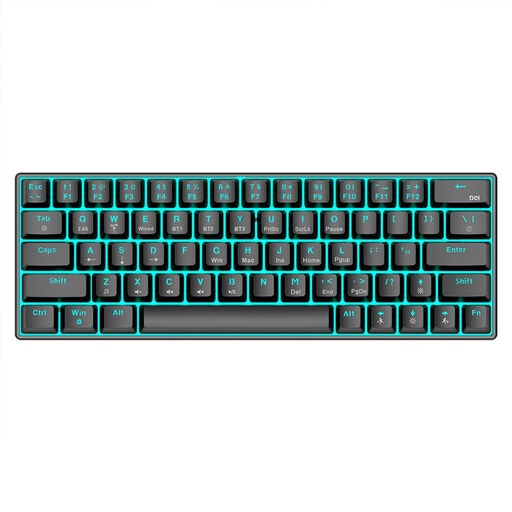 No image available
The product name lists three connection options, so you can check which one suits your device.
Bluetooth 5.0, 2.4 GHz or USB cable; RGB lighting; 1450 mAh battery.
 No image available
For switching between devices, the product name states that Bluetooth connections are available for up to four devices.
Bluetooth, 2.4 GHz and USB-C; 2000 mAh battery; backlighting.
 No image available
The listed Bluetooth connection for up to three devices could be useful if you switch between a laptop and tablet.
65% layout; German QWERTZ; Bluetooth, 2.4 GHz or USB-C; low-profile MX Speed switches.
Compare the connection and supported operating system of your device with the exact keyboard version. For Bluetooth, set it up through your device’s Bluetooth menu. Logitech’s guide describes this process for the keyboards it covers and doesn’t automatically confirm that other models are compatible.
Not necessarily: according to CHERRY, the main typing area on the STREAM KEYBOARD TKL is identical to that of the larger STREAM version. For other compact layouts, check which keys are included on the exact version.
If you buy from a trader, your statutory consumer rights apply. According to consumer information from the European Union, the seller must repair or replace faulty goods, or goods that don’t work as described, free of charge and in line with the applicable rules. This is separate from any voluntary manufacturer’s warranty.
For a consumer purchase made at a distance, you generally have 14 days from receiving the goods to exercise your right to cancel. You must notify the seller that you’re cancelling. Verbraucherzentrale recommends checking the contract information and any exceptions that may apply to your specific purchase.
Check that the product listing includes the required conformity information. The Bundesnetzagentur monitors products including those with Bluetooth. It states that a CE mark does not prove that a product was manufactured in the European Economic Area.