A monitor is right for a student room when its footprint, usable space for notes and connections suit your desk and laptop – not simply because it is as large as possible. A 16:10 aspect ratio may be useful for long documents. If you want to connect your laptop with a single cable, check that the specific USB-C port supports video and provides enough power for charging. Dell lists the P2425 as having 1920 × 1200 pixels in a 16:10 format, but describes its USB-C port as a data port providing up to 15 W, not as a confirmed video input.
Which monitor is right for you?
Students with lots of study materials
If you want to keep course notes, assignments and your own notes in view at the same time, compare the usable screen area and aspect ratio. Manufacturer specifications for resolution and aspect ratio describe the display; they do not measure the effect on your learning.
Students with a small desk
If you also need room on your desk for books and stationery, check the dimensions of the monitor and stand, as well as how adjustable the stand is. Lenovo lists an adjustable stand and a 100 × 100 mm VESA mount for the ThinkVision T24i-30.
Students who work on a laptop
If you regularly connect a laptop, check the video connection and – if you want to charge your laptop – the power output of the monitor’s specific port. USB-C features vary between the models covered here.
What to look for when buying
First measure the available desk space, then decide whether seeing documents clearly, connecting your laptop or keeping running costs down matters most to you.
| Buying priority |
What to check |
Who it matters most to |
| Viewing documents clearly |
Aspect ratio and resolution; text size on your own computer |
If I want to organise course notes and my own notes side by side, I need a usable screen area without the text becoming too small. For around 30% of consumers, being able to view documents clearly is the top buying priority. |
| Desk space |
Monitor and stand dimensions; preferred adjustability or VESA mounting |
On a small desk, I need to leave room for writing alongside the monitor, so I’d measure the whole setup. Around 30% of consumers put available space first. |
| Laptop connection |
Check the laptop’s video output and charging requirements against the monitor port’s features |
If I want to use as few cables as possible, the video connection and, where needed, power supply must suit my laptop. For around 20% of consumers, connecting a laptop is the top buying priority. |
| Purchase and electricity costs |
Required features, plus the EU energy label and EPREL entry for the specific model |
If I need to keep an eye on my budget, I want to distinguish useful features from those I actually need, and check power consumption too. Around 20% of consumers prioritise purchase and running costs. |
Avoiding common monitor-buying mistakes
-
Assuming every USB-C port works as a laptop dock
USB-C alone does not tell you whether a monitor can transmit video, pass on data or charge your laptop sufficiently. Dell describes the P2425’s USB-C port as a data downstream port providing up to 15 W; this is not a confirmed video input for a laptop.
Check the video, data and charging functions of the specific port separately, and make sure they match your laptop.
Depending on how your devices connect, you may also need an adapter or a separate power supply.
-
Comparing screen size alone
A monitor may make documents easier to view while taking up valuable space for books and writing. The stand and mounting options also affect how it fits on your desk.
Measure the available width and depth, then compare them with the dimensions and mounting specifications of the model you’re considering.
-
Confusing the manufacturer’s guarantee with your statutory rights
A guarantee is a voluntary offer; statutory rights relating to faulty goods are generally claims against the seller. The consumer advice centre distinguishes between these types of claim.
Keep your proof of purchase and the guarantee terms, and check which basis for a claim applies to your situation.
Brands and models to consider
Dell
The P2425 is a manufacturer example of a 24-inch monitor with a 16:10 aspect ratio.
- Dell lists a resolution of 1920 × 1200 pixels and an adjustable stand.
- Dell describes the USB-C port as a data port providing up to 15 W, not as a confirmed video input for a laptop.
Lenovo
The ThinkVision T24i-30 is an example of a 23.8-inch FHD monitor with a range of setup options.
- Lenovo lists an adjustable stand, VESA 100 × 100 mm, HDMI, DisplayPort and a USB hub.
- The specifications consulted do not list a USB-C video connection for this model.
Philips
The 24E1N1300A/00 is an example of a 23.8-inch FHD monitor with USB-C.
- Philips lists video, data transfer and power delivery over USB-C for compatible devices.
- Whether it will work with your laptop depends on its ports and requirements.
Samsung
The ViewFinity S6 LS27D604UAUXEN is a manufacturer example of a 27-inch QHD monitor with USB-C.
- Samsung lists a resolution of 2560 × 1440 pixels and USB-C charging at 90 W.
- Make sure the 27-inch screen fits your available space, and check your laptop’s requirements separately.
LG
The 27UP850K-W is an example of a 27-inch 4K monitor with USB-C.
- LG lists a resolution of 3840 × 2160 pixels and an adjustable stand.
- Text size also depends on your computer’s scaling settings. Check that the screen size and setup suit your workspace.
Joybuy products for your study space
The models below include desktop monitors and portable secondary screens. Focus on the screen area you need, the space available and the ports on your device.
 No image available
Lenovo ThinkVision T27Q-40, 27-inch QHD IPS monitor
An option if you want to view study materials on a larger monitor rather than just your laptop, and have room for a 27-inch screen on your desk.
27 inches, QHD, IPS.
View at Joybuy
 No image available
Portable wireless 16-inch monitor with 2.5K resolution
For a flexible screen you can use around your room, provided the wireless connection works with your devices.
16 inches, 2.5K, IPS; built-in 8000 mAh battery; supports AirPlay and Miracast.
View at Joybuy
 No image available
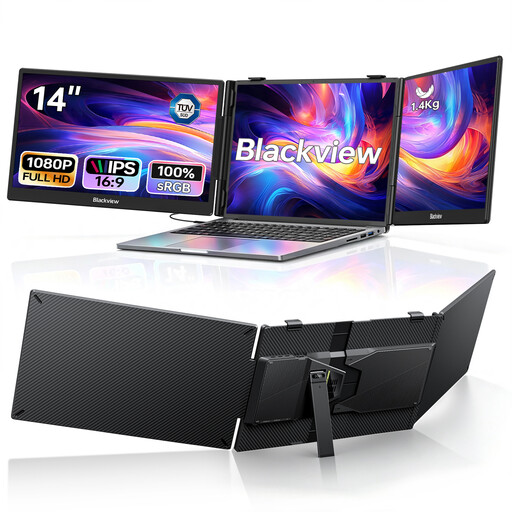
Blackview DCM5, portable dual monitor
Worth considering as a laptop screen extension if you want to view several digital items at once and your laptop falls within the stated size range.
Two 14-inch FHD IPS screens, each with 1080p; designed for laptops from 13 to 17.3 inches; USB-C plug-and-play and 100 W PD.
View at Joybuy
 No image available
UFYQL M156F04, portable 15.6-inch FHD IPS monitor
A compact external display for study materials if you’re looking for a portable screen with connections that suit your devices.
15.6 inches, FHD 1080p, IPS; USB-C and HDMI; stand with smart cover and VESA mounting option.
View at Joybuy
 No image available
UPERFECT, portable 18.5-inch FHD IPS monitor
For viewing study materials on an external screen, if a portable 18.5-inch display suits your space and device.
18.5 inches, FHD with 1920 × 1080 pixels, IPS; 120 Hz; USB-C and Mini-HDMI; VESA-compatible.
View at Joybuy
Frequently asked questions
How can I check whether my laptop will work with a USB-C monitor using just one cable?
Check your laptop’s video capabilities and charging requirements against the specific monitor port. Dell describes the P2425’s USB-C port as a data downstream port providing up to 15 W; Samsung lists USB-C with 90 W for the LS27D604UAUXEN. This alone does not tell you whether the connection will suit your laptop.
What should I check before setting up or wall-mounting a monitor?
Measure the available space, including the stand, and check that the mount is compatible with the exact monitor model. Lenovo lists VESA 100 × 100 mm for the ThinkVision T24i-30; also check that your chosen mount is suitable for this specific combination.
How should I take power consumption into account?
Compare the EU energy label and, if needed, the EPREL entry for each model. The European Commission gives electronic displays, including computer monitors, an efficiency scale from A to G. Your actual electricity costs will also depend on how you use the monitor and your tariff.
What are my rights when buying online in Germany?
For a standard distance-selling contract with a consumer, there is generally a right of withdrawal; Section 355 of the German Civil Code (BGB) sets a period of 14 days, while Section 312g lists exceptions. Statutory rights relating to faulty goods against the seller are separate from a voluntary guarantee. Subject to the applicable legal details, Section 438 of the BGB sets a standard limitation period of two years from delivery for claims relating to faulty goods.
Does a monitor in a private student room have to meet the ASR A6 workplace rule?
ASR A6 applies to its relevant scope covering workplaces and teleworking environments; the Federal Institute for Occupational Safety and Health expressly excludes use in private settings outside such workplaces. It is therefore not a general legal purchasing requirement for a private student room.


