What should you look for when buying a switch?
First check which devices your accommodation’s network allows. Then consider the number of free ports, where you’ll put the switch and whether you actually need any management features.
| What you need |
What to check before buying |
Who it matters most to |
| Accommodation network access and registration |
Ask your provider about the number of devices allowed, MAC address registration and router use. The Dresden Student Network Working Group specifies a registered MAC address and a router for connecting multiple devices. |
If I still need to check whether my room’s network allows several devices, I’ll make sure I can get online first. Around 40% of consumers put this kind of connection approval first. |
| Available Ethernet ports |
Count the uplink and all the devices you plan to connect. With a five-port model, you’ll have room for up to four other devices after the uplink. TP-Link and NETGEAR list five ports on their models. |
If I want to use my streaming box and other devices over LAN at the same time, I need enough ports after allowing for the uplink. For around 30% of consumers, having extra ports is the top priority. |
| Quiet operation and space |
Check whether it has a fan, its dimensions and the power supply. TP-Link lists a maximum of 2,776 W at 220 V/50 Hz for the LS105G; this isn’t a measured continuous power consumption figure. |
If the switch is going right next to my bed or desk, I want to avoid fan noise and leave enough room for both the device and its power supply. Around 20% of consumers prioritise quiet operation and a compact design. |
| Network management |
Only consider VLAN or IGMP snooping if you have a specific need and have checked that these features can be used on your existing network. Zyxel describes these features on the GS1200-5. |
If I genuinely need VLAN or multicast control and am allowed to use it, management features may matter. Around 10% of consumers prioritise configurable network features like these. |
Joybuy products for your student room
The models below include both straightforward Gigabit port expanders and switches with extra management features. A switch requires an authorised, working network connection and doesn’t replace a router.
 No image available
D-Link DGS-1005P/E, five-port Gigabit switch with four PoE+ ports
A good fit if you need PoE+ ports as well as extra wired connections.
Five Gigabit ports, including four PoE+ ports; stated PoE budget: 60 W. Fanless metal case and plug-and-play setup, according to the product name. Check whether your connected devices need PoE+ and are compatible with it.
Shop at Joybuy
 No image available
TP-Link TL-SG1005D, five-port Gigabit desktop switch
An option if you need an easy way to add wired ports to a connection that’s already working.
Five 10/100/1000 Mbps RJ45 ports with auto-negotiation and Auto-MDI/MDIX; the case is listed as plastic. Check that your connected devices and cables can support the connection speed you want.
Shop at Joybuy
 No image available
TP-Link TL-SG105PE, five-port Gigabit Easy Smart switch with four PoE+ ports
A good fit if you need extra network features such as VLAN, QoS or IGMP, and don’t mind a little more setup.
Five Gigabit ports, including four PoE+ ports with a stated budget of 65 W; VLAN, QoS and IGMP are listed in the product name. These extra features may take more work to set up than a basic plug-and-play model.
Shop at Joybuy
 No image available
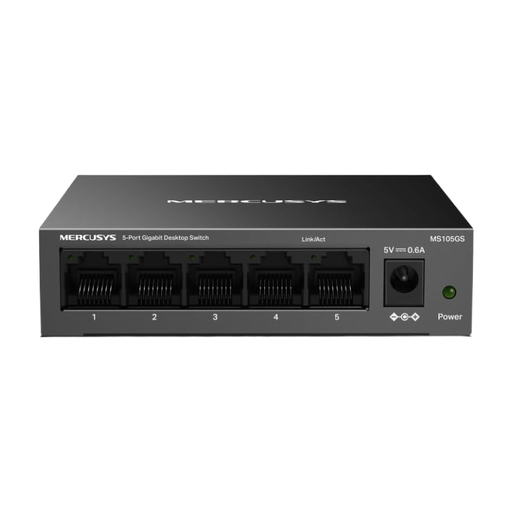
MERCUSYS MS105GS, unmanaged five-port Gigabit switch
A straightforward way to add ports if you don’t need network management.
Five Gigabit ports, plug-and-play setup, metal case and fanless desktop design, according to the product name. Check that the planned location suits the switch’s dimensions and power supply.
Shop at Joybuy
 No image available
Ubiquiti UniFi Switch Flex Mini USW-FLEX-MINI-EU, five-port Gigabit switch
An option if you need management features such as VLAN as well as extra Gigabit ports, and can allow for the additional setup.
Five Gigabit RJ45 ports; the product name lists VLAN and USB-C or PoE power. You’ll need a compatible USB-C or PoE power source.
Shop at Joybuy
Frequently asked questions about network switches in student rooms
Will a switch automatically give me several usable internet connections from my accommodation’s network?
No, you shouldn’t assume it will. For example, the Dresden Student Network Working Group requires a registered MAC address and specifies a router for connecting multiple devices. Other accommodation providers may have their own rules, so check the requirements for your connection before buying.
How do I connect the switch if my router can support several devices?
Connect one switch port to the router with an Ethernet cable, then connect your streaming box to a second port. That leaves up to three ports for other devices on a five-port switch. Also check whether your particular streaming box has an Ethernet port: Apple says that only the Wi-Fi + Ethernet version of the 3rd-generation Apple TV 4K has Gigabit Ethernet.
Do I need a web-managed switch for everyday streaming?
Not just because you have a streaming box. A web-managed model may be useful if you have a specific need for VLAN or IP multicast, but it takes more work to set up. There’s no evidence that IGMP snooping is essential for standard video-on-demand.
Do I need a 2.5 Gbit/s switch for Netflix in 4K?
Not based on Netflix’s recommendation for 4K alone: Netflix recommends a stable internet speed of at least 15 Mbps. This is guidance from the service, not a guarantee of uninterrupted playback, and it doesn’t cover other streaming services or your specific accommodation connection.
What can I check if there’s no network connection after I plug everything in?
First check the power supply and connections, then test the cables, streaming box and incoming network connection one at a time. After that, check your accommodation provider’s rules on device or MAC address registration before considering extra switch features.


