Students with just one desktop PC
If there’s a usable LAN connection, you can start by connecting your PC directly. CHIP also explains that a computer at home can be connected straight to the router.


If you only need a usable LAN connection for your desktop PC, connecting it directly is usually enough; a switch adds extra wired connections. A switch may be suitable for your PC and other devices, provided your specific halls of residence network rules allow it and you know how to register the devices. Choose a 5- or 8-port model based on the number of devices you actually want to connect via LAN.
If there’s a usable LAN connection, you can start by connecting your PC directly. CHIP also explains that a computer at home can be connected straight to the router.
If you want to connect a PC and other fixed devices, check how many free ports you’ll need and what your halls of residence network allows. Studierendenwerk Trier describes an authentication requirement, while Studierendenwerk Bonn has its own network rules.
If you need network management features or faster local transfers, check the specific features on offer and the capabilities of your connected devices. For example, TP-Link lists management features for the TL-SG105E and 2.5 Gigabit ports for the TL-SG108-M2.
Studierendenwerk Trier and Studierendenwerk Bonn make it clear that authentication and local network rules may affect how you connect devices. The requirements for your own halls of residence are what matter.
| What you need | What to check before buying | Who is this important for? |
|---|---|---|
| Connecting in halls of residence | Check the rules for your specific connection and how to register additional devices; if you only have one PC, consider connecting it directly first. | If I want to connect my PC in halls of residence, I’ll first check whether that type of connection and any additional devices are allowed. Around 36% of consumers put permission and registration first. |
| Number of LAN ports | Count your PC and other devices, and allow one port for the connection to the existing network. | If I want to connect devices other than my PC via LAN, I’ll count the connections I need in advance. Around 29% of consumers prioritise having the right number of extra LAN ports. |
| Port speed | Make sure the speed of the switch ports, PC and each connected device is compatible. | If I transfer files between compatible devices on a local network, I’ll check the speed of the entire transfer path. Around 21% of consumers prioritise the right local data rate. |
| Noise and placement | Check the specific model’s fan design, dimensions and power supply requirements. | If the switch will be kept near my desk or bed, I’ll look for quiet operation and a suitable place to put it. Around 14% of consumers prioritise unobtrusive, continuous operation in their room. |
You can connect a single PC directly to a usable LAN connection. CHIP describes connecting a computer straight to the router as one option.
First, check whether you actually need extra LAN ports.
An additional device takes up space and needs a power supply.
With a typical setup, the connection to the existing network uses one port. TP-Link lists five Gigabit ports for the TL-SG105G and eight for the TL-SG108.
Count all the devices you plan to connect and allow for the connection to the existing network before choosing between five and eight ports.
Information from Studierendenwerk Trier and Studierendenwerk Bonn refers to authentication and usage rules. A basic switch adds LAN connections, but it doesn’t automatically replace registration or provide a router’s features.
Ask your halls of residence administration about the rules, and check your PC’s security settings. Microsoft Support describes stricter security measures for public network profiles than for private networks.
If the connection can’t be used with the device setup you have in mind, you won’t be able to use the switch there as planned.
The port specification describes the switch connection. It doesn’t automatically determine the speed of your PC, the connected device or your halls of residence internet connection. TP-Link lists 2.5 Gigabit ports for the TL-SG108-M2.
Choose faster ports only if the devices involved and the specific local transfer path can support them.
The model range mentioned here includes basic 5-port Gigabit switches, an 8-port Gigabit switch and an option with management features.
The GS305v3 is an unmanaged 5-port Gigabit switch that adds extra LAN connections.
The DGS-105GL is an unmanaged 5-port Gigabit option for a small wired setup.
The GS-100 series includes the unmanaged Gigabit models GS-105B V5 with five ports and GS-108B V5 with eight ports.
This selection includes Gigabit switches for adding LAN connections, as well as models with PoE, management features or 2.5 GbE ports. If you only have one PC, connecting it directly is the simpler option when a usable LAN port is available and your halls of residence allow it.
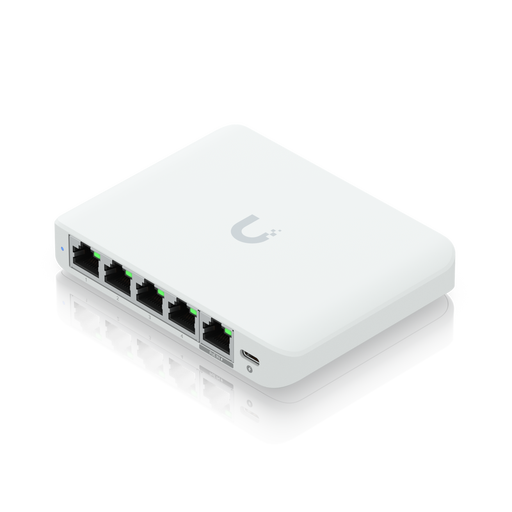 No image available
An option if you specifically need a switch that can be managed, along with compatible devices for faster local connections.
Five 2.5 GbE RJ45 ports; powered via compatible PoE or USB-C. The switch itself doesn’t provide PoE to connected devices.
 No image available
For a small wired setup if you want to connect compatible PoE+ devices as well as your PC.
Five Gigabit RJ45 ports, including four PoE+ ports with a total budget of 60 W; fanless metal case.
 No image available
An 8-port option if your planned LAN devices won’t fit the number of connections on a smaller switch, or if you need PoE.
Eight Gigabit RJ45 ports, including four PoE ports with a total budget of 55 W; fanless design and plug-and-play operation.
 No image available
For a small setup if you need specific management features or PoE+ as well as extra LAN connections.
Five Gigabit ports, including four PoE+ ports with 65 W; VLAN, QoS and IGMP Snooping. Fanless design.
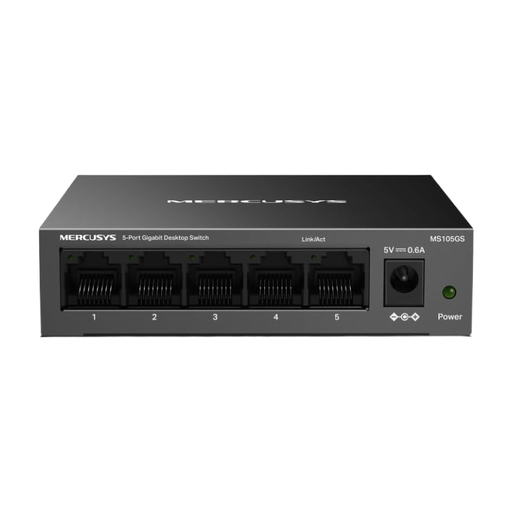 No image available
A simple option if five Gigabit connections are enough for your PC and other wired devices.
Five 10/100/1000 Mbit/s RJ45 ports; described as an unmanaged, plug-and-play switch with a fanless design.
No, not if you can connect your PC directly to a usable LAN connection. A switch is mainly for adding extra wired connections; your halls of residence network’s rules and registration requirements also apply when you connect directly.
Connect one of the switch’s ports to the designated LAN outlet and your PC to another port, then connect the power supply. Whether you need to register each additional device depends on your halls of residence network’s rules. According to TP-Link, the basic TL-SG105 and LS105G models don’t need switch configuration.
That depends on the requirements for your specific halls of residence connection. Studierendenwerk Trier and Studierendenwerk Bonn describe their own authentication and usage rules; ask the network administrator whether you’re allowed to connect a switch and multiple devices to your socket.
Don’t assume that a network you don’t control is as safe as your private home network. Microsoft Support describes stricter security measures for public network profiles than for private profiles, so check your PC’s firewall and sharing settings.
The Verbraucherzentrale distinguishes between statutory consumer rights and a voluntary guarantee. For its market surveillance, the Bundesnetzagentur lists CE marking, product identification and manufacturer details among the points to check. A CE mark alone doesn’t tell you whether a switch complies with your halls of residence rules or supports the data rate you need.