What should you look for when buying?
First, check that your device and the specific game are supported. Then you can match the connection, handling and power supply to your shared gaming space.
| What matters |
What to check before buying |
Who is this especially important for? |
| Compatibility |
Check the exact console generation or operating system, as well as the game’s input support. |
If I want to make sure the controller and game work together on my device, this check is essential. Around 28% of consumers are likely to put compatibility first. |
| Audio and freedom of movement |
Check the device’s audio output, headset connection and a suitable way to connect; route any cable safely to your seat. |
If I want to avoid disturbing others in the room while sitting comfortably, the audio solution and connection need to work for my setup. Around 22% of consumers are likely to put sharing a room comfortably first. |
| Easy-to-reach buttons |
Consider the grip and how easily you can reach the sticks and shoulder buttons; with compact models, check which features are missing too. |
If a secure grip and easy-to-reach controls matter more to me than extra buttons, I should choose a size that fits my hands. Around 22% of consumers are likely to prioritise ease of use. |
| Playing together |
Check for local multiplayer, the number of players supported and how controllers are assigned in the specific game. |
If a second person wants to join in, being able to connect another controller isn’t enough: the game must support a shared mode. Around 17% of consumers are likely to make playing together their main priority. |
| Power supply |
Check the charging or battery options. For wired models, check the connection, what’s included and the cable length. |
If I want to keep charging simple or prefer to play with a wired connection, the power supply should suit my setup and gaming routine. Around 11% of consumers are likely to consider power supply the deciding factor. |
Controllers at Joybuy
These models include controllers for PS5, Xbox, PC and Nintendo Switch 2. Before buying, check that the specific model and audio connection you want are suitable for your gaming device.
 No image available
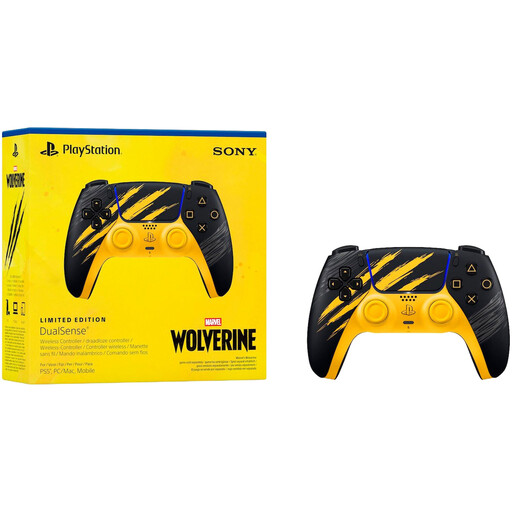
Sony PlayStation DualSense Marvel’s Wolverine Battle Limited Edition Wireless Controller
For PS5; the Marvel’s Wolverine design and listed audio options may appeal if you’re looking for a wireless controller with a headset socket.
Listed features include haptic feedback, adaptive triggers, Bluetooth, USB-C, a built-in microphone, stereo speakers and a 3.5 mm audio socket. The product description recommends use from age 12, with adult supervision.
View at Joybuy
 No image available
EasySMX D10 Controller
For players looking for a controller for one of the platforms listed in the product title; check separately that it supports the game you want to play.
The listed platforms are PC, Switch, Android and iOS. The title describes a wireless Bluetooth connection, a TMR joystick, dual-mode triggers and mechanical buttons. It also lists a 1000 Hz polling rate and RGB lighting.
View at Joybuy
 No image available
Microsoft Xbox Wireless Controller Pulse Red
An option for Xbox One, Xbox Series X/S and Windows PC, if these platforms are compatible with your game.
A wireless connection and a 3.5 mm stereo headset socket are listed. The socket is useful only if your headset and audio output are compatible too.
View at Joybuy
 No image available
GameSir G7 HE Wired Controller
For Xbox Series X/S, Xbox One and Windows 10/11; make sure a wired design works with your seating position and can be routed safely around the room.
Listed features include Hall Effect sticks, hair-trigger mode, a 3.5 mm audio socket and a 3 m USB-C cable.
View at Joybuy
 No image available
Nintendo Switch 2 Pro Controller
For Nintendo Switch 2 players looking for a wireless controller with a headphone socket.
Listed features include HD Rumble 2, motion controls, customisable GL and GR buttons, and a headphone socket. According to Nintendo, this model is compatible only with Nintendo Switch 2.
View at Joybuy
Frequently asked questions
Can I just buy a Switch controller for Switch 2?
Not necessarily: Nintendo confirms that the original Switch Pro Controller can connect wirelessly to Switch 2, while the Switch 2 Pro Controller is compatible only with Switch 2, according to Nintendo. Also check the exact model and the game’s requirements.
How do I set up a second Switch Pro Controller?
According to Nintendo, you can sync the Switch Pro Controller wirelessly or by connecting it to the Switch dock while the console is docked. Up to eight wireless controllers can be synced; the number you can use depends on the controller type and features in use. Whether two people can play together depends on the game.
Do I need an extra manufacturer’s warranty if something goes wrong?
No. For a covered purchase of goods from a trader, EU consumer law gives you a legal guarantee of at least two years from the date you receive them. Contact the seller; a voluntary manufacturer’s warranty is separate.
What does a superhero game’s age rating mean at home?
The USK explains that official age ratings govern the sale of games to minors in shops, but don’t directly determine what parents choose for their children at home. Age ratings and information about features such as purchases or chat can help parents make a choice, but they aren’t an assessment of educational suitability. Check the details for the specific game.
What should I look for in a wireless controller in Germany?
The EU Radio Equipment Directive sets requirements for placing radio equipment on the market. CE marking is required when the relevant harmonised EU rules require it for the product; it isn’t an award for gaming quality. Check the required product information for the specific model.


