
Lieferung heute & morgen

Qualitätsgarantie

Willkommens-Angebote freischalten: KOSTENLOSE Lieferung | Bis zu 80 % RABATT | Kostenlose 30-Tage-JoyPlus-Testphase
App herunterladen
Purchasing a new business laptop is a significant investment. However, the market is flooded with devices whose marketing promises often don't align with the realities of daily work. As a Joybuy Product Recommendation Officer, my role is to provide you with objective information so you can make an informed decision and avoid common purchasing pitfalls.
Many users invest in expensive "Pro" models only to find that the advertised benefits are barely noticeable in their day-to-day work. Before you buy a business laptop, consider the following points to avoid falling for exaggerated advertising claims:
To make a future-proof choice, you should focus on the core parameters that directly impact your daily productivity.
Modern workflows demand more than just raw processing power. Choosing the right platform is crucial. The 15-inch Microsoft Surface Laptop 8 for Business, for example, is built on a Core Ultra X7 series processor. Such modern chips are more than just a CPU; they integrate a graphics unit (GPU) and a Neural Processing Unit (NPU) onto a single chip. This enables more efficient task processing, especially for AI-powered applications that are becoming increasingly common in business software. Combined with an operating system like Windows 11 Pro, the full potential of this hardware is unlocked.
The quality of the screen has a direct impact on work comfort and efficiency. A 15-inch notebook with a 120Hz refresh rate offers a noticeably smoother experience when scrolling through documents or web pages and can reduce eye strain during long workdays. Also, pay attention to the aspect ratio. A 3:2 ratio, found on many Surface devices, provides more vertical space than the common 16:9 format. This is ideal for editing documents, reading emails, or coding, as it requires less scrolling.
A modern Thunderbolt 4 notebook significantly simplifies your workspace. A single USB-C port allows you to charge the device, transfer data at high speeds, and connect multiple external monitors. This reduces cable clutter and makes transitioning between mobile and desktop work seamless. At the same time, the security features integrated into Windows 11 Pro, such as BitLocker encryption and advanced management options, are essential for IT departments to protect company data.
Based on these objective criteria, we have selected a few products that suit different professional needs.
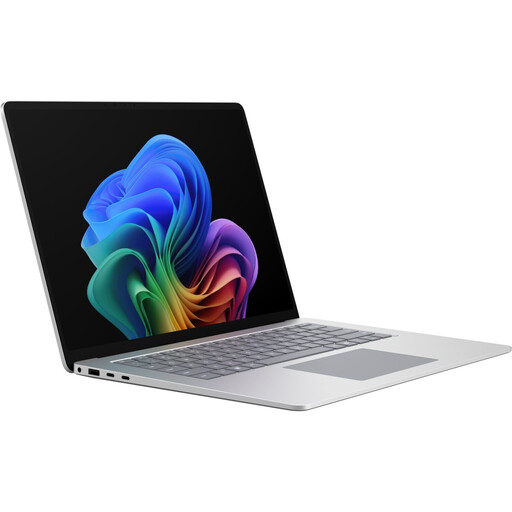
Why This Fits Their Persona: Ideal for executives, creative professionals, and developers who need uncompromising performance for demanding applications, a premium display for detail-oriented work, and a high-quality, portable chassis.
This device delivers true "Pro" performance through a balanced platform (Core Ultra X7, 16 GB RAM, fast SSD) and doesn't just rely on a label. The specifications are designed for demanding business workflows.
The combination of the Intel Core Ultra X7 processor and the high-resolution 120Hz display offers a fluid user experience. The Thunderbolt 4 ports ensure future-proof connectivity.
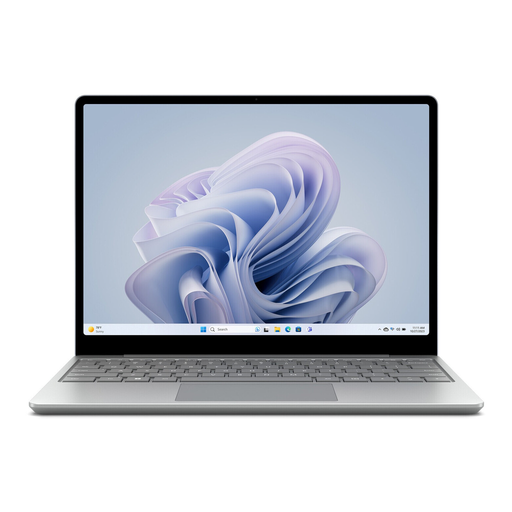
Why This Fits Their Persona: Perfect for professionals in the field or commuters who need an extremely lightweight and reliable device for standard office tasks, emails, and presentations, while valuing premium build quality.
This model focuses on the essentials: extreme portability and a premium feel, without charging for peak performance that isn't necessary for its intended use case. It's an honest, focused product.
At just 1.13 kg, it's exceptionally lightweight. The fingerprint reader integrated into the power button allows for quick and secure access, which is especially convenient on the go.
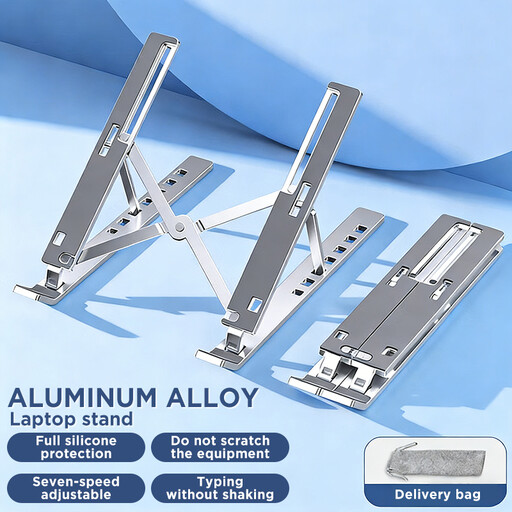
Why This Fits Their Persona: A smart addition for any laptop user who spends long hours at a desk. It promotes healthy posture and helps prevent neck and back pain, regardless of the laptop model used.
Instead of investing in a more expensive device with only marginally better ergonomics, this stand solves a core problem—unhealthy screen positioning—cost-effectively and universally for any notebook.
Improves the ergonomics of any laptop by raising the screen to eye level. The foldable aluminum design is stable yet portable for use in the office or at home.
We have compiled a complete, up-to-date list of products that fully meet these strict selection criteria and rigorous safety standards.
Is the Surface Laptop 8 for Business suitable for demanding software? Yes, the configuration with the Intel Core Ultra X7 processor and integrated Intel Arc graphics is well-equipped for many professional applications, including graphic design and light video editing. However, for extremely intensive 3D rendering or complex scientific simulations, a dedicated workstation graphics card might be more beneficial.
Why is Windows 11 Pro important for a Microsoft business notebook?Windows 11 Pro offers crucial advantages over the Home version for business use. These include enhanced security features like BitLocker device encryption, tools for remote management (e.g., Remote Desktop), and the ability to join a corporate domain (via Azure Active Directory). This makes it easier for IT departments to manage and secure devices on the network.
What ports does the Surface Laptop 8 have, and will I need an adapter? The device is equipped with two Thunderbolt 4-enabled USB-C ports, one USB-A 3.0 port, and the Surface Connector. Thanks to Thunderbolt 4, you can connect a docking station with a single cable to charge the notebook, transfer data, and run multiple monitors. For older peripherals or specific connections like a LAN port, an adapter or docking station might be useful depending on your setup.