If you often correct numbers or response codes by hand when working with survey data, a quiet full-size keyboard with a number pad could be a good fit – as long as you have enough desk space. CHERRY describes the keystrokes on certain STREAM models as quiet. If you mainly navigate spreadsheets and edit text, a TKL model without a separate number pad can save space. For longer sessions, also check that the hand position, keyboard layout and connection suit your computer. Microsoft Support notes that Excel keyboard shortcuts can vary depending on the layout.
Which keyboard is right for you?
Students who work with lots of numeric codes
If you often correct numerical responses by hand, consider whether the quick access of a number pad is worth the extra space it takes up. The German Federal Institute for Occupational Safety and Health discusses the choice between full-size and compact keyboards in relation to the numeric keypad.
Students sharing a room
If there are other people in the room, you may want to pay particular attention to how the specific model or switch option feels and sounds. CHERRY describes certain STREAM models as quiet, while the F.A.Z. also rated the POP Icon Keys as quiet in its review.
Students with a small desk
If you need to make room for a mouse and notes alongside your laptop, a keyboard without a separate number pad could be a good option. The key question is whether you can manage without the number pad without compromising on navigation keys or frequently used shortcuts.
What should you look for when buying?
First decide whether you enter lots of numbers directly or mainly navigate spreadsheets. Then consider noise, available desk space, hand position and connectivity.
Full-size with number pad
A good fit if: you enter lots of numbers or response codes by hand and have enough room for the number pad.
Things to consider: The number pad takes up extra desk space, and any claim about noise applies only to the specific model described.
Compact without a number pad
A good fit if: you mainly select cells, filter data or edit text, and need room for your mouse and notes.
Things to consider: You won’t have a separate number pad for frequent manual number entry.
Split layout
A good fit if: hand position matters to you during longer sessions and you’re comfortable adapting to an unfamiliar key arrangement.
Things to consider: Allow space for the keyboard’s shape and check that its specific layout suits the way you work.
Keyboard for multiple devices
A good fit if: you regularly switch between devices or want backlighting for your workspace.
Things to consider: Extra connection options don’t replace checking the layout, key arrangement and connection you need.
| What you need |
What to check when buying |
Who is this important to? |
| Number entry and spreadsheet controls |
Check the number pad, navigation keys, German layout and shortcuts for your spreadsheet application. Microsoft Support notes that Excel shortcuts can vary depending on the keyboard layout. |
If I correct lots of numbers or response codes by hand, quick access to a number pad matters more to me than a slim design. Around 28% of consumers put number entry first in this buying situation. |
| Quiet typing in a shared room |
Distinguish manufacturers’ claims from noise assessments in reviews; for mechanical keyboards, check the specific switch option. |
If other people are working or studying in the room, I want to avoid unnecessary typing noise. Around 22% of consumers prioritise quiet keystrokes in this buying situation. |
| Room for a mouse and notes |
Compare the width and key arrangement of the specific model with the space available and how often you enter numbers by hand. |
If my desk is small, I want to keep space for a mouse and notes beside my keyboard, so I’m more willing to do without a number pad. Around 22% of consumers put available desk space first in this buying situation. |
| Hand position during longer sessions |
Assess the support surface, keyboard position and specific layout in your own workflow; with split models, also allow for the extra space they need. |
If I spend a long time typing and correcting text, a hand position that suits me is important, even if I need to get used to a different layout. Around 17% of consumers prioritise hand position in this buying situation. |
| Connectivity and switching between devices |
Check the ports on your device, as well as the receiver you need and what’s included with the specific model. |
If I regularly use the same keyboard with several devices, I want to switch between connections without the hassle of unplugging and reconnecting. Around 11% of consumers put switching between devices first in this buying situation. |
Avoid common buying mistakes
-
Choosing a space-saving keyboard when you mainly enter numbers
TKL keyboards don’t have a separate number pad. Whether the desk space you gain is worth going without one depends on how often you enter numbers by hand.
Before choosing, think about how often you manually enter numbers when correcting data and whether you need quick access to a number pad.
-
Assuming every switch option is quiet
Perixx offers both quiet and clicky switches for the PERIBOARD-335, according to the manufacturer. So the noise description doesn’t automatically apply to every option.
Before buying, check which switch option is available rather than relying on the model name alone.
-
Taking the product name alone as confirmation of the model
A similar product name isn’t always enough to identify the exact model and option.
Before choosing a keyboard, check the model, layout, box contents and product specifications on the product page.
Brands to help guide your choice
CHERRY
The models featured here range from a wireless full-size keyboard to a wired TKL and a multi-device option.
- CHERRY describes the keystrokes on certain STREAM models as quiet. The STREAM KEYBOARD WIRELESS uses 2.4 GHz wireless, according to the manufacturer.
- The STREAM KEYBOARD TKL has no number pad, so check that its layout suits how often you enter numbers by hand.
Logitech
The keyboards featured include the compact POP Icon Keys, the backlit MX Keys S and the split ERGO K860.
- The F.A.Z. describes the POP Icon Keys as quiet and compact in its review. Logitech lists backlighting and programmable keys for the MX Keys S.
- According to the F.A.Z., the POP Icon Keys has no adjustable tilt and doesn’t include a Logi Bolt receiver. A separate review of the ERGO K860 noted that it has no key backlighting and can’t be used in wired mode; these points apply to the respective models.
Perixx
The PERIBOARD-335 is a wired, split mechanical keyboard for anyone who wants to try a different hand position from the standard layout.
- Perixx lists a German QWERTZ layout and several switch options for this model.
- Quiet and clicky switches are different options. Check which one you’re choosing; you can’t assume a split design will suit you just from its shape.
Joybuy keyboards for data entry
This selection includes compact and foldable keyboards, as well as wireless and wired models with and without a number pad.
 No image available
Foldable Bluetooth keyboard with wireless mouse
The foldable design is an option if you’re short on space or work in different locations.
The product name specifies quiet scissor keys, three connection modes, connections with up to three devices and USB-C charging. Compatible systems listed include Windows, Android and iOS.
View at Joybuy
 No image available
Logitech K120
This full-size keyboard with a number pad is a good fit if you often enter numbers by hand and want a wired connection.
The product name specifies USB Plug & Play, a German QWERTZ layout, a curved spacebar area and a spill-resistant design.
View at Joybuy
 No image available
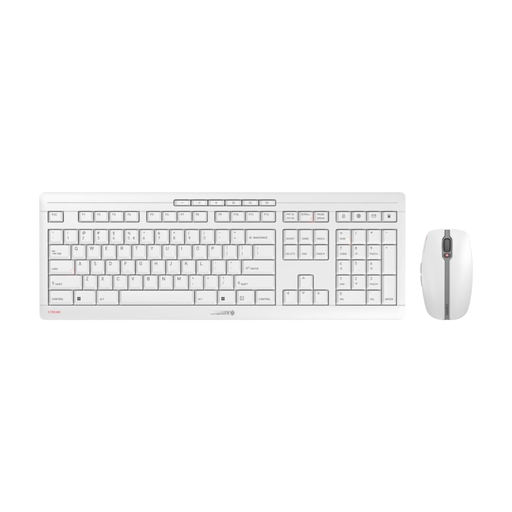
CHERRY Stream Desktop Recharge
This keyboard and mouse set is an option if you’re looking for a wireless keyboard and are happy with the stated layout.
The product name specifies 2.4 GHz wireless, quiet scissor keys and USB-C charging. The layout is listed as EU QWERTY; check that it matches the layout you need for spreadsheet work.
View at Joybuy
 No image available
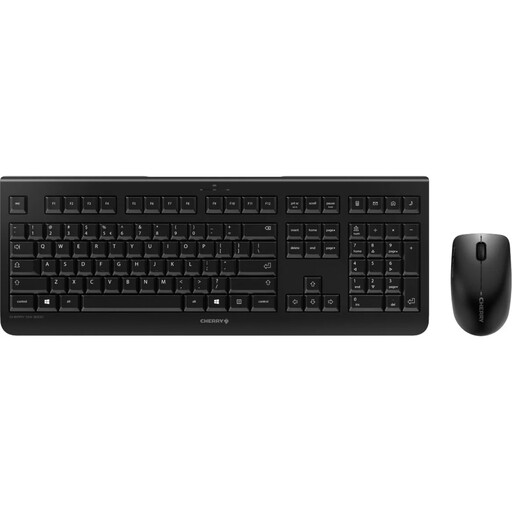
CHERRY DW 3000
This wireless full-size set with a number pad is an option if you often enter numbers and prefer low-profile, quiet keys.
The product name specifies 2.4 GHz wireless and an EU layout with a number pad. The option is described as EU QWERTY; check that this layout suits the way you type.
View at Joybuy
 No image available
CHERRY STREAM KEYBOARD TKL
The wired TKL design saves space if you can manage without a separate number pad.
The product name specifies CHERRY SX scissor technology, six multimedia keys and an English US layout with a euro symbol. Before buying, check that the layout has the keys and shortcuts you need.
View at Joybuy
Frequently asked questions
Do I need a number pad for Excel?
No. If you enter lots of numbers by hand, a number pad can make your workflow easier. If you mainly navigate and edit text, a TKL model can save space. Check the keys and shortcuts you need in your version of Excel: Microsoft Support notes that they may vary between keyboard layouts.
How do I connect a keyboard to my laptop?
It depends on the keyboard model and the ports on your laptop. CHERRY says the STREAM KEYBOARD WIRELESS uses 2.4 GHz wireless, while the STREAM KEYBOARD TKL is wired. For wireless models, check which connection you need and what’s included.
How should I position my keyboard for longer sessions?
Leave room to adjust the position of your keyboard, mouse and arms, and avoid staying in a rigid posture for long periods. The German Federal Institute for Occupational Safety and Health covers these points for computer workstations; this doesn’t mean there’s a general requirement for a student’s personal room.
Are all the switches on a keyboard described as quiet actually quiet?
No. The noise description needs to match the specific option. Perixx lists both quiet and clicky switches for the PERIBOARD-335, so check which switch option you’re selecting before buying.


