If clicks could disturb someone in a shared bedroom, first check the specific mouse for an explicit claim of quiet buttons, and pay attention to the scroll wheel too; a claim about the main buttons doesn’t automatically tell you anything about the side buttons. If you use certain actions frequently in games, a gaming mouse with the right controls may be a better choice, but gaming or optical switches don’t prove that clicks will be quiet. What matters is the noise information for the specific model, how it fits your hand and the controls you actually need.
Which mouse is right for you?
Considerate late-night gamer
You play while someone else in the same room needs peace and quiet, and you care more about click noise than extra gaming features. CHERRY describes the GENTIX Silent’s buttons as quiet; that doesn’t apply to all gaming mice.
Survival gamer with lots of actions
You want your most-used game actions within easy reach, so you compare the available buttons, profiles and scroll-wheel functions without assuming the mouse will be quiet. CHERRY lists five on-board profiles and a 4D scroll wheel for the XTRFY M50 Wireless.
Gamer looking for the right fit
You want a shape that suits your hand and grip for longer sessions; a high DPI rating alone won’t tell you that. Logitech recommends the M650 for small to medium-sized hands and offers options such as the M650 L and M650 L Left for different fit requirements.
What should you look for when buying?
First check the noise information for the specific model, then decide which game actions, fit and connection matter most in your day-to-day use.
| Priority |
What to check when buying |
Who is it most important to? |
| Click and scroll noise |
Check noise claims for the main and side buttons, as well as the scroll wheel; if possible, assess them in similar room conditions. |
If I play at night in a shared room, I want to avoid disturbing the other person with repeated clicks. Around 36% of consumers put click and scroll noise first. |
| Game actions within easy reach |
Check the number of buttons and how easy they are to reach; confirm whether you can assign the actions you want in the game you play. |
If I want to control frequently used survival actions directly from the mouse, the right button layout matters to me. Around 29% of consumers prioritise game controls. |
| Fit for longer sessions |
Compare your hand size, grip style, preferred hand and the position of the side buttons. |
If I play for longer sessions, I want a shape that suits my hand and grip. Around 21% of consumers prioritise fit. |
| Power and connection |
Check whether it uses a rechargeable battery or replaceable batteries, whether it can be used while connected by cable, and which connection types the model actually supports. |
If I want to avoid charging breaks, changing batteries or an inconvenient cable, the power and connection options are essential. Around 14% of consumers look at these first. |
Common misconceptions
-
“Optical” or “gaming” automatically means “quiet”
The switch type doesn’t prove that a mouse will be quiet. Razer describes its optical switches as having a crisp click feel; you can’t assume from this that they’ll be quiet to use.
Check the noise claims for the specific model, and consider the main buttons, side buttons and scroll wheel separately.
-
A quiet office mouse will automatically work for gaming
According to the manufacturer, the CHERRY GENTIX Silent has three buttons and no thumb buttons. This may mean you can’t control frequently used actions in the way you need to in your game.
Before buying, decide which actions you want to control with the mouse, then check that the available buttons can do the job.
A guide to relevant brands
CHERRY / CHERRY XTRFY
The models mentioned include a productivity mouse specifically described as quiet and a separate gaming mouse.
- CHERRY describes the GENTIX Silent as having specially designed quiet buttons.
- The GENTIX Silent has three buttons and no DPI switch. The information for the M50 Wireless doesn’t confirm that it is quiet.
Logitech
The M650 variants are described as productivity mice; the G305 is a separate wireless gaming mouse.
- Logitech describes the M650 as featuring SilentTouch and offers it in different sizes.
- Information about the M650 can’t be applied to Logitech G models. The product information consulted for the G305 doesn’t claim that it has quiet clicks.
Razer
Information about optical mouse switches is relevant if you’re comparing switch types and click feel.
- Razer describes its optical switches as having a fast response.
- Razer also describes a crisp click feel; this isn’t an independent noise test or a promise that the switches are quiet.
ASUS ROG
For some gaming models, ASUS offers replaceable mouse switches as a customisation option.
- ASUS lists replaceable mouse switches for the ROG Gladius III Wireless AimPoint.
- This doesn’t confirm that a particular quiet replacement switch is compatible, or that the mouse will be quiet.
SteelSeries
The product range includes wired and wireless gaming mice in a variety of shapes.
- SteelSeries offers symmetrical and ergonomic designs, as well as different button configurations.
- The range overview doesn’t provide comparable click-noise measurements for these options.
Joybuy products
The Joybuy models below are designed for wired or wireless gaming. If clicks could disturb someone in a shared bedroom, check the noise information for the buttons and scroll wheel on the specific model.
 No image available
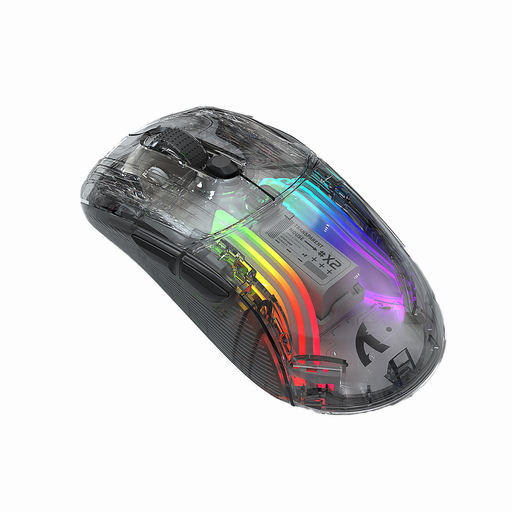
KINSI X2 wireless Bluetooth mouse, 3 modes, transparent, RGB, 2400 DPI, silent
This could suit you if wireless use and clicks described as quiet are important; the noise claim is a product description, not a comparable measurement.
The description lists 2.4 GHz wireless, Bluetooth, a rechargeable battery and five DPI settings.
View at Joybuy
 No image available
NAXSIR 3-in-1 gaming mouse, wired/2.4 GHz wireless/Bluetooth, 7 programmable macro buttons, RGB
This could suit you if you want a choice of connection types and extra game actions on the mouse; the described shape is designed for right-handed users.
The description lists seven programmable buttons and macros, plus wired, 2.4 GHz and Bluetooth connections. It describes the microswitches as quiet.
View at Joybuy
 No image available
AJAZZ AJ200 AI MC Wireless Gaming Mouse, PAW3311, 24000 DPI, tri-mode
This could suit you if you want customisable button assignments and a choice of connection types; the description says its ergonomic shape is designed for medium to large hands.
The description lists a PAW3311 sensor, up to 24,000 DPI, programmable button assignments and macros, plus USB-C, 2.4 GHz wireless and Bluetooth.
View at Joybuy
 No image available
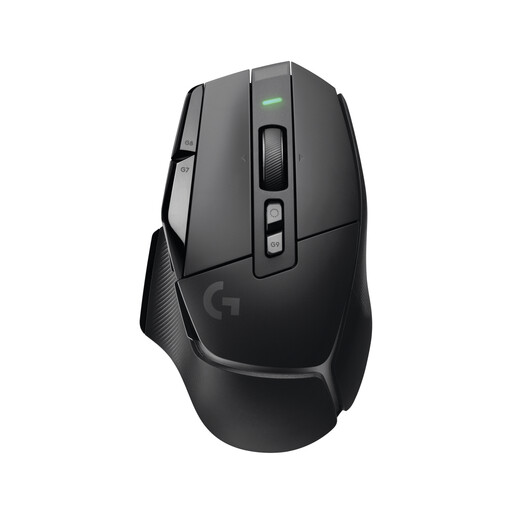
Logitech G G502 X LIGHTSPEED wireless gaming mouse
This could suit you if you want to control lots of game actions using extra buttons and are looking for a right-handed shape.
The description lists 13 programmable controls, five on-board profiles and a scroll wheel with two modes. USB-C is listed for wireless use and charging.
View at Joybuy
 No image available
Logitech G G502 HERO gaming mouse
This could suit you if you want to play with a wired connection and control extra game actions using programmable buttons.
The description lists eleven programmable buttons, game profiles, a scroll wheel with two modes and an adjustable weight system. It connects via USB using a 2.1-metre cable.
View at Joybuy
Frequently asked questions
Is “optical switch” enough to prove that clicks are quiet?
No. The term describes how the switch works, not how loud it is. Razer describes its optical switches as having a crisp click feel, so check the noise level of the specific model.
How can I set up a mouse for frequently used game actions?
First check which buttons you can assign on your specific model and in your game. CHERRY lists five on-board profiles for the CHERRY XTRFY M50 Wireless; this doesn’t mean it comes with any particular default layout for survival games.
What should I plan for when using a wireless mouse regularly?
Check whether the specific model uses a rechargeable battery or replaceable batteries, and whether you can charge or use it while connected by cable. Logitech lists an AA battery for the G305; CHERRY lists a rechargeable battery and wired use for the M50 Wireless.
What rights do you have in Germany when buying online and testing whether a product fits?
Online purchases generally come with a right to cancel, usually within 14 days of receiving the goods; you must notify the seller that you wish to cancel. If a product is faulty, your statutory rights against the seller are separate from any voluntary guarantee. Check the terms of the specific purchase.
What are the rules in Germany for wireless devices and disposing of them later?
Radio equipment covered by the relevant EU harmonisation legislation must meet CE marking requirements; a product description alone doesn’t confirm that a particular offer complies. The German Environment Agency says that old electrical equipment can be taken to municipal collection points and certain retailers. Used batteries and rechargeable batteries must not go in household waste.


