Players with a specific console
If you play on PS5, Xbox or Nintendo Switch, check that the controller is compatible with both your console and game. PlayStation, Microsoft and Nintendo each list the platforms their controllers are designed for.


Choose a controller that’s compatible with your console or PC, then check whether your specific game supports the features you want. Haptics, wireless play and extra buttons can affect how you play, but they won’t fix screen glare or make dark areas easier to see. For that, screen positioning and picture settings are what matter.
If you play on PS5, Xbox or Nintendo Switch, check that the controller is compatible with both your console and game. PlayStation, Microsoft and Nintendo each list the platforms their controllers are designed for.
If you want to feel in-game events through vibration or trigger feedback, check whether your specific game supports these features. PlayStation notes that support for DualSense haptics and adaptive triggers depends on the game.
If you play on PC, consider whether a wired or wireless connection and its power requirements suit your setup. Screen reflections are a separate issue; BenQ treats them as a matter of your screen environment.
First check your platform and game, then consider the feedback, connection and controls you want. A controller’s features don’t guarantee that a particular game will use them.
| What matters when buying | What to check | Who should pay particular attention? |
|---|---|---|
| Platform and game | Check your console or operating system, as well as support for the specific game. | If I want to avoid buying the wrong controller, I check that it works with my device and game. Around 36% of consumers say platform and game compatibility is their top concern. |
| Haptics and triggers | Check whether the game supports the feature on your platform, and whether a USB connection is needed on PC. | If you’re looking for vibration or trigger feedback in a horror game, check the game’s requirements first. Around 29% of consumers prioritise game-specific haptics. |
| Connection and power | Check the connection type, cable route and batteries or rechargeable batteries required. | If I want to move freely at my gaming spot, wireless connectivity and a suitable power source matter. If I use a cable, it needs to be long enough. Around 21% of consumers put connectivity and power first. |
| Grip and buttons | Check the layout, extra buttons and available customisation options. | If you want certain buttons to be easier to reach during long or fast-paced scenes, consider the layout and how the controller feels in your hands. Around 14% of consumers prioritise controls tailored to their preferences. |
Controller features won’t change reflections on your screen or how dark areas are displayed.
First, check the lighting, screen position and picture settings. Then choose a controller based on your platform and preferred controls.
PlayStation says DualSense haptics and adaptive triggers require game support. On PC, a USB connection may also be needed.
Before you buy, check the feature information for your specific game and platform.
With a wireless controller, you’ll need to consider both connectivity and power. Microsoft notes that rechargeable AA batteries can’t be charged in the Xbox Wireless Controller.
Check what’s included and make sure you have suitable batteries, a compatible charger or a compatible rechargeable battery pack.
The DualSense is a good option for PS5 and selected compatible PC games if you want game-specific haptic feedback.
The Xbox Wireless Controller is an option for Xbox consoles and compatible Windows games.
The G7 SE is a wired option for the Xbox and Windows systems listed by GameSir.
The Ultimate 2 Wireless is designed for compatible PC setups where wireless play, a charging dock and customisable inputs are important.
The Nintendo Switch Pro Controller is an option for compatible games on Nintendo Switch.
This selection includes controllers for PS5, Xbox, Nintendo Switch and PC. Check compatibility and whether your specific game supports the features you want.
 No image available
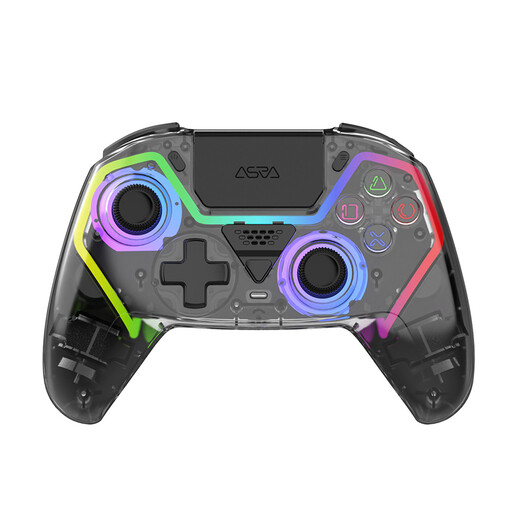
For PS5 players looking for a wireless controller with programmable buttons.
The product title lists Hall Effect sticks, programmable buttons, RGB lighting and a 1000-mAh battery. Some features may require game support and, where applicable, a USB connection.
 No image available
For players looking for a wireless controller for Switch or PC.
The description lists Bluetooth, a 6-axis gyroscope, two vibration motors and a 600-mAh battery.
 No image available
For a fixed gaming setup if you’re looking for extra input and button mapping options.
The title lists Nintendo Switch, Switch Lite, PC and PS4. The description lists gyro, dual-shock vibration, macros, turbo and customisable buttons. The controller is wired.
 No image available
For Xbox and Windows players looking for a wireless controller with customisable button mapping.
The description lists Xbox Wireless and Bluetooth, as well as support for Xbox and Windows 10 PCs. According to the description, two AA batteries are included.
 No image available
For PS5 players or PC players who want to use DualSense features in a supported game.
The product description lists haptic feedback and adaptive triggers, as well as a touchpad, motion sensor and 3.5 mm headset jack. On PC, game support and a USB connection may be required.
No. Controller features won’t change screen reflections. Consider your screen position and picture settings separately when choosing a controller.
No, the game needs to support these features. A USB connection may also be needed on PC, so check the information for your game and platform.
Microsoft lists USB, Bluetooth and, where available, Xbox Wireless as connection options. Check which mode works with your PC and game.
No. Microsoft notes that rechargeable AA batteries can’t be charged in the controller. You’ll need a suitable charger or another compatible power source.