If you play survival horror in a brightly lit room, start by comparing how well monitors handle reflections and their brightness in standard SDR mode. For dark scenes, contrast and local dimming matter too. RTINGS assesses reflections, contrast and brightness separately, so a peak HDR figure alone won’t tell you how well a particular monitor copes with light from a window. Mini-LED LCD is one option to consider for bright rooms, while OLED may be more suitable if you can control the light and deep blacks are a priority. Ultimately, it comes down to the performance of the specific model.
Who is this guide for?
Gaming in daylight
If you play in a brightly lit room, you’ll want to pay particular attention to reflections and whether the picture remains easy to see in everyday use. RTINGS assesses reflection handling separately for monitors used in bright rooms.
Contrast is a priority
If you want to make out both shadows and bright light sources in horror scenes, compare contrast and local dimming. RTINGS identifies contrast as an important factor when displaying dark areas.
Players with fluctuating frame rates
If your gaming device’s frame rate fluctuates, it’s worth checking how motion and variable refresh rate perform on the specific monitor. In its test of the AOC Q27G3XMN, RTINGS reports VRR flicker at varying frame rates.
What should you look for when buying?
VA LCD with Mini-LED
A good fit if: you usually play facing the screen and want to account for both bright room lighting and high-contrast scenes.
Trade-off: RTINGS observed black smearing and VRR flicker on the AOC Q27G3XMN it tested. This isn’t a blanket verdict on all VA monitors or every regional variant.
IPS LCD, optionally with Mini-LED
A good fit if: you use your monitor in a bright room or often view it from the side.
Trade-off: IPS alone doesn’t guarantee good reproduction of deep blacks. With Mini-LED, also consider reflections and possible blooming on the specific model.
OLED or QD-OLED
A good fit if: you can limit the light entering the room and deep blacks are particularly important to you.
Trade-off: If on-screen elements remain unchanged for long periods, consider the risk of burn-in. Check the specific model’s protection features and warranty terms.
| What matters to you |
What to check before buying |
Who is this especially important for? |
| Reflections and brightness |
Independent reflection tests and the specific model’s SDR brightness; also consider the position of windows and lamps. |
If I play during the day, I want to avoid reflections and be able to see the picture in standard use. Around 36% of consumers put reflections and brightness first. |
| Shadows and contrast |
Compare contrast and local dimming using tests of the specific model; don’t treat manufacturers’ figures as equivalent to independent measurements. |
I want to be able to distinguish dark areas from small, bright light sources in horror scenes. Around 29% of consumers prioritise shadow detail and contrast. |
| Motion and connections |
Check which resolution and frame rate are actually supported through the connection you plan to use, and how VRR performs at suitable frame rates. |
If my gaming device’s frame rate fluctuates, I want to know whether motion handling and the connections suit my setup. Around 21% of consumers prioritise frame rate and connection compatibility. |
| OLED and long-term use |
For OLED, check the panel’s protection features, care instructions and exact warranty coverage. |
If static content stays on screen for a long time, I want to weigh up panel care and protection before choosing. Around 14% of consumers prioritise long-term use. |
Common buying mistakes
-
Assuming peak HDR brightness means the screen will be easy to see in daylight
A high HDR figure doesn’t tell you how distracting direct reflections will be or how bright the picture is in standard SDR mode.
Compare reflection tests and the specific monitor’s SDR brightness. If possible, avoid positioning windows or lamps directly opposite the screen.
-
Assuming a high refresh rate guarantees smooth motion
RTINGS observed black smearing and VRR flicker at varying frame rates on the AOC Q27G3XMN it tested. The test applies to that model and doesn’t establish that every regional variant will perform the same way.
Check motion handling and VRR at frame rates your gaming device can actually reach, and make sure the supported resolution and frame rate match the connection you’ll use.
-
Choosing OLED for the brightest room based on deep blacks alone
Bright ambient light changes the balance of considerations compared with LCD. With OLED, you should also consider the risk posed by on-screen elements that remain unchanged for long periods; RTINGS describes this risk with permanently static content.
Take your lighting conditions and the amount of static content into account. Also check the specific model’s protection features and warranty terms.
-
Overlooking power consumption if you use HDR frequently
The European Commission notes that the energy label for electronic displays also includes efficiency information for HDR.
If you use HDR frequently, compare the energy label and the EPREL entry for the model you’re considering.
Key brands at a glance
AOC
The Q27G3XMN/BK is a 27-inch VA Mini-LED model. AOC lists QHD, 180 Hz and 336 dimming zones among its specifications.
- RTINGS describes the local dimming on the Q27G3XMN it tested as good.
- The test also reports black smearing and VRR flicker. The tested model name, which doesn’t include the /BK suffix, doesn’t automatically confirm that every regional variant has the same characteristics.
KTC
According to KTC, the M27P6 combines a 27-inch IPS panel with Mini-LED, 1,152 dimming zones and a 4K/160 Hz mode.
- These specifications give you useful points of comparison for resolution and local dimming.
- Dimming zones and HDR specifications are manufacturer information; on their own, they don’t tell you how the monitor handles reflections or motion.
Samsung
Samsung describes the Odyssey Neo G7 LS32BG750NPXEN as a 32-inch Mini-LED monitor with 4K resolution and a 165 Hz refresh rate.
- Its screen size and resolution are useful points of comparison if they suit your gaming device.
- Samsung specifies a 1000R curved panel. Make sure the curvature and screen size suit your viewing distance and available space. HDR labels aren’t a substitute for independent brightness and reflection tests.
MSI
The MAG 274QRFDE QD E2 is a 27-inch WQHD IPS option with a 180 Hz refresh rate.
- For this variant, MSI lists connections including HDMI, DisplayPort and USB-C.
- The range of connections alone doesn’t guarantee particularly good reproduction of dark scenes.
ASUS
According to ASUS, the ROG Swift OLED PG32UCDM Gen3 (PG32UCDM3) is a 31.5-inch 4K QD-OLED model with a 240 Hz refresh rate.
- ASUS describes OLED protection features and a BlackShield film for this model.
- Claims about protection features come from the manufacturer. Room lighting and static on-screen elements are still important factors when choosing.
Gaming monitors at Joybuy
This Joybuy selection includes gaming monitors with different specifications for room lighting, dark gaming scenes and frame rates. Compare the features listed and the conditions they apply to with your gaming device and where you plan to use the monitor.
 No image available
MSI MAG 274UPDFDE E16M, 27-inch, UHD 160 Hz/FHD 320 Hz, Mini-LED Rapid IPS
Rapid IPS and Mini-LED with 1,152 dimming zones are listed as features to consider when comparing performance in dark gaming scenes.
The product specifications list UHD at 160 Hz or FHD at 320 Hz, 0.5 ms GtG and Adaptive Sync. The 320 Hz mode is available at FHD only.
View at Joybuy
 No image available
KTC H32S17, 32-inch, QHD, 180 Hz, HVA, 1500R
The panel and contrast specifications give you useful points of comparison for dark gaming scenes.
Specifications include an HVA panel, a 3500:1 contrast ratio, 180 Hz, 1 ms and Adaptive Sync. The model is listed as having a 1500R curve.
View at Joybuy
 No image available
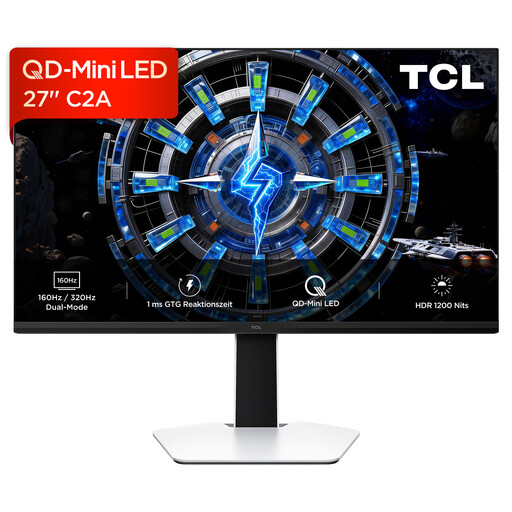
TCL 27C2A, QD Mini-LED gaming monitor
The product specifications list QD Mini-LED and local dimming as features to compare if dark scenes and bright highlights matter to you.
Specifications include 160 Hz, 1 ms GtG and FreeSync Premium. According to the product information, the 320 Hz mode is available at FHD only.
View at Joybuy
 No image available
Gigabyte GS27QCA, 27-inch, curved QHD, VA, 180 Hz
The product description lists an anti-glare surface and a VA panel as features to weigh up against your room setup and preference for contrast.
Specifications include a 5000:1 contrast ratio, 180 Hz, 1 ms and FreeSync.
View at Joybuy
 No image available
GIGABYTE G27Q26, 27-inch, QHD, SuperSpeed IPS
The product description lists an anti-glare surface and typical brightness of 400 cd/m² as useful points of comparison for a bright room.
Specifications include 260 Hz, up to 275 Hz in OC mode, 1 ms GtG, 1300:1 contrast, G-SYNC compatibility and FreeSync.
View at Joybuy
Frequently asked questions
Is a high HDR brightness rating enough for playing survival horror during the day?
No. Compare reflection handling and brightness in standard viewing conditions separately from performance in dark scenes. RTINGS assesses direct reflections separately; a peak HDR figure alone won’t tell you how light from a window affects the picture.
How do Mini-LED LCD, IPS LCD and OLED compare for this use?
For Mini-LED LCD, compare reflection handling and local dimming. With IPS LCD, also consider how dark areas are displayed. For OLED, think about whether it suits your room and how much static content stays on screen. None of these labels is a substitute for testing the specific model in suitable conditions.
What should I set up first when connecting my monitor?
Set your gaming device to a resolution and refresh rate supported by both the monitor and the connection. Then check VRR at the frame rates your device can actually reach; RTINGS observed flicker at varying frame rates on the AOC Q27G3XMN it tested.
How should I clean the screen?
LG recommends using a slightly damp microfibre cloth and wiping gently without applying too much pressure. Don’t spray cleaning products directly onto the panel. Always follow the care instructions for your specific monitor.
What consumer rights and energy costs should I consider when buying?
According to Your Europe, goods bought in the EU come with a minimum two-year legal guarantee from the date you receive them; this is separate from any additional manufacturer’s warranty. For distance purchases, you generally have a 14-day right to cancel, as explained by Verbraucherzentrale. For energy comparisons, the European Commission refers shoppers to the energy label for electronic displays. Check the details for the specific model, especially if you use HDR frequently.


