What to look for when buying
When writing a book review on the train, think about how you’ll enter text, annotate passages, use the device in a confined space and carry on working without an internet connection.
Versatile iPad or Android tablet
A good fit if: you want to read and write in compatible apps, switching between a keyboard and stylus as needed.
Bear in mind: Check accessory compatibility for the exact generation. Samsung lists the S Pen for the Galaxy Tab S10 FE, but not a keyboard.
Windows 2-in-1
A good fit if: your writing or submission process depends on a Windows desktop workflow.
Bear in mind: Microsoft lists the Surface keyboard and Slim Pen as sold separately. Check that they’re compatible with your exact generation and that the stand will work at your seat.
Paper tablet
A good fit if: you mainly read PDF or EPUB files, highlight passages and write a focused first draft.
Bear in mind: Check how you’ll get your text into the required submission format. reMarkable lists PDF, PNG and SVG as export formats.
| What matters |
What to check before buying |
Who it matters most to |
| Typing longer pieces in a confined space |
Check the compatible keyboard model, keyboard layout, what’s included and whether it can be set up in a small space. |
If I’m typing longer paragraphs on a small table, I need a compatible keyboard and a stable stand. Typing is the top priority for around 33% of consumers. |
| Reading and annotating passages |
Check support for your EPUB or PDF files, the stylus model, what’s included and how to export your notes. |
If I want to jot down thoughts next to highlighted passages, file format and stylus compatibility matter. Book annotations are the top priority for around 27% of consumers. |
| Comfort on your seat and during the journey |
Compare the dimensions and weight of the exact version, including any case you plan to use. Think about whether you’ll mostly read in your hand or at a table. |
If I’ll be reading in my hand for much of the journey or have little table space, I’ll consider the size and weight. Portability is the top priority for around 20% of consumers. |
| Continuing your draft without a constant internet connection |
Open or download your book and draft in the app you use before setting off; test editing and saving offline. |
If I want to keep writing where there’s no signal, my files need to be available offline in advance. Offline access is the top priority for around 20% of consumers. |
Joybuy products
This selection includes tablets for reading and writing longer pieces with a keyboard, as well as devices for handwritten notes on books. For each version, check which accessories are included and how your files will work offline and in the submission format you need.
 No image available
MEBERRY M8, 10.1-inch, with keyboard and protective case
For writing longer reviews on the go; the product title lists a keyboard, mouse and protective case in the package.
10.1 inches; 128 GB ROM; 30 GB RAM (8 GB + 22 GB virtual, according to the product title); 8,000 mAh.
Before travelling, check that the keyboard layout suits your needs and that your files are available offline in your writing app.
Joybuy
 No image available
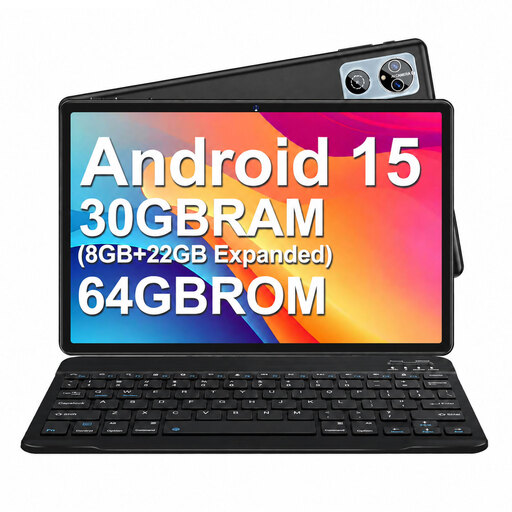
MEBERRY M6, 10.1-inch, with keyboard and protective case
For writing on the go; the product title lists a keyboard, mouse and protective case with a stand.
10.1 inches; 64 GB ROM; 30 GB RAM (8 GB + 22 GB, according to the product title); 6,000 mAh.
Check the keyboard layout and test in advance that you can open and save your draft without an internet connection.
Joybuy
 No image available
Xiaomi Pad 8, Pine Green, 8 GB RAM, 256 GB
For reading and drafting if you’re looking for an Android tablet without a keyboard bundle listed in the product title.
8 GB RAM and 256 GB internal storage, according to the product details.
Check which keyboard or stylus is compatible with this version and whether you’ll need to buy the accessories separately.
Joybuy
 No image available
Xiaomi Pad 7, grey, with keyboard
For writing longer pieces if you’re looking for a tablet with a keyboard to use on the go; check the layout suits the way you type before buying.
8 GB RAM and 128 GB ROM, according to the product title.
Check the exact keyboard version and whether the other input devices you need are included with your chosen model.
Joybuy
 No image available
iFLYTEK AINOTE 2, E Ink tablet with protective case
For book notes and handwritten drafts; the product description mentions local note storage and handwriting-to-text conversion.
10.65 inches and 4.2 mm, according to the product title.
The described transcription in 16 languages requires an internet connection. Also check how you’ll use the finished text in your chosen format.
Joybuy
Frequently asked questions
Do I need to buy a tablet with mobile connectivity for reviewing a book on the train?
Not just because you’ll be travelling by train. According to Deutsche Bahn, Wi-Fi is available across the entire ICE fleet, but only on parts of the Intercity fleet and selected regional trains. Make any files you need available offline regardless; mobile connectivity may be useful if you want to research or publish continuously while travelling.
How do I prepare a review for a journey without internet access?
Before you set off, mark the file you need as available offline in the app you use, then check that you can open, edit and save it without a connection. In Google Docs for Android, you can make a specific file available offline in advance. For mobile Word workflows, download any cloud documents you need beforehand and open them online at least once.
Does a tablet automatically come with a keyboard and stylus?
No, it depends on the model and version. Samsung lists the S Pen, but not a keyboard, in the box contents for the Galaxy Tab S10 FE; Apple lists the device and a USB-C cable for the iPad (A16). So check what’s included with the exact version, and make sure the keyboard and stylus are compatible with that generation.
Is a paper tablet suitable for a review I need to submit as text?
It depends on how you can convert your draft into the required submission format. For Paper Pro, reMarkable lists PDF and EPUB import, and PDF, PNG and SVG export. Test the whole process with one of your own book files and check whether you need Connect features for editing or syncing.
What are my rights if my tablet is faulty?
According to official EU consumer information, when you buy goods, you have at least two years of legal protection from the seller, starting from the date you receive them. This is separate from any voluntary manufacturer’s warranty.


