Answering questions on the go
If you answer questions in a browser or learning app, first check whether your particular platform needs an internet connection. Moodle, for example, says that offline quizzes depend on the course settings.


Start by checking which platform your practice questions use. Whether a quiz works offline depends on the specific app and its settings, not just the tablet. For short answers, a compact Wi-Fi model is often enough, provided your learning platform runs on it. If you need to write solutions by hand, have your own mobile connection or use specific Windows software, you may need a different setup, which could mean extra accessories, more space or ongoing costs.
If you answer questions in a browser or learning app, first check whether your particular platform needs an internet connection. Moodle, for example, says that offline quizzes depend on the course settings.
If you’ll be reading questions and answer options for a while, a comfortably readable screen and a size that suits your space in the café both matter. Apple lists the Wi-Fi model of the iPad (A16) at 477 g; Samsung gives the Wi-Fi model of the Galaxy Tab S10 FE as 497 g.
For working out calculations or marking up study materials, check that the tablet supports the stylus you need and whether it’s included with the version you choose. Samsung says the Galaxy Tab S10 FE comes with an S Pen; Apple doesn’t list a Pencil as included with the iPad (A16).
First, check that your set of questions works online and, if needed, offline on the device you’re considering. Then weigh up the size, input options and accessories to suit your café study session.
| What matters when buying | What to check before buying | Who should consider this? |
|---|---|---|
| Questions without reliable Wi-Fi | Check the operating system and app compatibility, as well as the offline rules for your specific set of questions. According to MoodleDocs, quizzes in Moodle can only be completed offline when the course settings allow it. | If I can’t rely on the café’s Wi-Fi, I want to know whether I can open and answer my particular set of questions without a connection. Around 25% of consumers put access to questions first. |
| Readability and table space | Compare the screen size and weight of the same version: Apple lists the Wi-Fi iPad (A16) as 11 inches and 477 g; Samsung lists the Wi-Fi Galaxy Tab S10 FE as 10.9 inches and 497 g. | If I’m going to read questions for a while, I need a screen that’s comfortable for me to read without taking over the café table. Around 20% of consumers prioritise readability and space. |
| Using it without a power socket | Consider battery life for the apps, screen and connection you’ll actually use; mAh alone isn’t a reliable guide to study time. For mobile data, you’ll also need a suitable plan and coverage. | If I’m planning a longer session, I’d rather not have to look for a power socket halfway through answering questions. Around 20% of consumers prioritise being able to use their device without a power socket. |
| Handwritten solutions | Check that the app accepts stylus input and that the stylus you need is compatible with the exact version. Samsung says the Galaxy Tab S10 FE comes with an S Pen; Apple lists compatible Pencil models for the iPad (A16), but doesn’t include a Pencil with the tablet. | If I’m writing out calculations or marking up study materials, suitable stylus input matters more to me than touch controls alone. Around 15% of consumers prioritise handwritten solutions. |
| Tablet and accessories together | Check what’s included with the exact version: Apple lists a USB‑C cable with the iPad (A16), but no Pencil; Xiaomi says the Pad 7 doesn’t include a power adapter. | If I’m buying a tablet and the accessories I need together, I want to know what else I’ll actually need before I buy. Around 20% of consumers focus on the overall cost and effort of getting the device and accessories. |
Downloading course materials doesn’t automatically mean you can complete a quiz without an internet connection. In Moodle, that depends on the course settings.
Before your café session, test the exact set of questions you need without a connection, then check that your attempt syncs as expected.
A tablet may be compatible with a stylus even if one isn’t included. Apple doesn’t list a Pencil among the items included with the iPad (A16); Samsung says the Galaxy Tab S10 FE comes with an S Pen.
Check what’s included with the exact version and whether your practice app supports handwritten input.
If you need a compatible stylus, you may have to budget for it separately.
On a Joybuy product page for the Galaxy Tab S10 FE, the model number given is SM-X210NDBAEUB, which differs from the FE version SM-X520NZAREUB listed on Samsung’s German comparison page.
Before you buy, compare the full model number and version. The product name alone isn’t enough to identify it.
The iPad (A16) is an 11-inch option for answering questions using touch controls; Apple describes both Wi-Fi and Cellular versions.
The Galaxy Tab S10 FE is a good option for reading and handwritten notes; Samsung says the FE+ has a larger screen.
The Pad 7 is an 11.2-inch Android option for reading and working with study materials.
The Idea Tab range includes 11-inch configurations and bundles for studying with a stylus or keyboard.
The ProArt PZ13 is a Windows detachable for situations where you need a specific Windows programme.
This selection includes tablets for reading and answering practice questions at a café table. The key thing is still whether your particular learning platform works on the device you choose.
 No image available
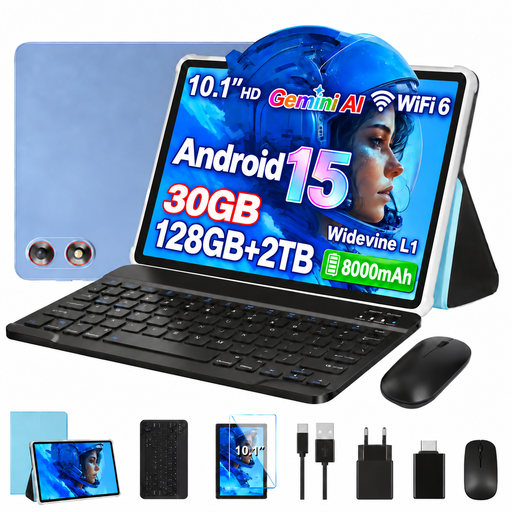
The 10.1-inch touchscreen is a compact option for reading and tapping through questions at a café table.
Listed in the title: Wi‑Fi 6, 128 GB storage, 8 GB RAM and 22 GB virtual RAM. A keyboard and mouse are also listed in the title.
 No image available
The 11-inch screen is worth considering if you’d like to read questions on a larger tablet display.
Listed in the title: 90 Hz IPS display, 128 GB storage, 5 GHz Wi‑Fi and 8,000 mAh. The RAM specification is 3 GB RAM plus 13 GB virtual RAM.
 No image available
If you’re looking for a compact Wi-Fi device, check before buying that your practice platform works with this specific iPad version.
The listing says it supports Apple Pencil Pro and Apple Pencil (USB‑C). According to the listing, an Apple Pencil isn’t included.
 No image available
The keyboard mentioned in the title could be useful for longer typing sessions; check whether you’ll actually need it for your set of questions.
The listing states that it has an 11.2-inch screen, 8 GB RAM and 128 GB ROM.
 No image available
If you’re considering this Surface model, check that your practice platform is compatible with the specific device and the input method you need.
The product name lists Snapdragon Plus, 24 GB and 1 TB. A keyboard isn’t listed among the stated items in the package.
Not necessarily. As MoodleDocs explains, whether you can complete a quiz offline in Moodle depends on the course settings. Download an authorised practice test and check without a connection that you can start an attempt and sync it later. Other platforms have their own rules.
Install the exam app you need, sign in and try a complete set of questions using the input method you plan to use. If you’re using Moodle, also check whether certain question types or a required Safe Browser prevent you from using the mobile app.
Don’t assume public Wi-Fi is automatically secure. Germany’s Federal Office for Information Security warns of the risks of using public Wi-Fi in cafés and advises against sending confidential data without protection. This is a security recommendation, not a ban on using Wi-Fi.
First, check whether the stylus or power adapter you need is included. For goods purchased by consumers from business sellers in the EU, Your Europe says the statutory legal guarantee is generally at least two years from receipt; distance sales generally come with a 14-day withdrawal period. A voluntary manufacturer’s warranty doesn’t replace these statutory rights.