If you’re playing on your own, a compact tablet is usually the better choice. If you want to look at the cards together on one screen, you’ll probably need a larger display and more space. First, check whether your chosen game works offline: mobile data is only useful if the app actually needs a connection, and it can’t make up for a lack of signal. Before you set off, check the specific app, device variant and charging options.
Who is a tablet suitable for?
Passengers playing on their own
If you’re playing in a cramped seat and want to put the device away afterwards, a compact tablet could be a practical choice. IMTEST considers tablets around 8 to 9 inches particularly suitable for use on the go; the Samsung Galaxy Tab A11, at 8.7 inches, is one example.
Passengers without a reliable signal
If you want to play even when reception is poor, install your chosen app before the journey and test it without a connection. Choosing a mobile data variant alone doesn’t mean the game will work offline.
Passengers playing together
If several people will be looking at the same screen, a larger display can give you more room for cards and controls. Samsung, Lenovo and Apple all offer documented options in the 11-inch class; also check whether the app lets you play together on one device.
What should you look for when buying?
First, check your chosen app and its offline mode. Then consider the display size, connectivity and charging options for your journey.
| What matters |
What to check before buying |
Who is this important to? |
| Playing without a connection |
Check whether the specific app and game mode work offline; install and test them before you set off. |
If I want to play on routes without reliable reception, offline mode matters more than a mobile data option. Around 33% of consumers prioritise offline use in this scenario. |
| Comfortable to use in your seat |
Compare how your app looks on a compact 8.7-inch display and an 11-inch display. |
If I’m holding the tablet on my own in a confined space, a manageable size matters most, even if that means having less room for cards. Around 27% of consumers prioritise this. |
| Looking at the cards together |
Check whether the game supports playing together on one device, and whether a larger tablet will fit in the car. |
If several passengers are looking at the same cards, I want a layout that’s easy to see. Around 20% of consumers prioritise being able to view the game together. |
| Power for the journey |
Check the charging port, included accessories and available charging options in the vehicle; test the app before a longer journey. |
If I want to play on longer journeys, I’d rather check the power options beforehand than rely on a battery capacity figure alone. Around 20% of consumers prioritise this. |
Common misconceptions
-
A ‘gaming tablet’ guarantees offline card games
A device’s technical specifications don’t tell you whether a particular app works without a connection or which game modes are available offline.
Check that your chosen game is available for the operating system, then test it without a connection before you set off.
Depending on the game, mobile data or paid features may be relevant; check the terms for the specific app.
-
Wi-Fi doesn’t automatically mean mobile data
Wi-Fi and mobile data variants have different specifications. Lenovo doesn’t offer every selectable feature in combination with all the others.
If the game needs to be online, check the full model number and the connectivity options for the specific variant.
A game that requires an internet connection may need a mobile data variant and a suitable data plan.
-
Battery capacity doesn’t guarantee play time
The 7,040 mAh capacity quoted for the Samsung Galaxy Tab A11+ doesn’t tell you how long your particular app will run with your settings.
Check the charging accessories and test the battery life with your chosen app before relying on it for a longer journey.
If you want to charge the tablet in the vehicle, you’ll need a suitable power supply.
-
Leaving an unused tablet loose in the car
Loose objects can become a hazard if the vehicle moves suddenly. The ADAC specifically lists tablets among the items that should be put away in a bag after use.
Put the device away after playing and make sure it doesn’t obstruct the driver’s view.
Brands worth considering
Samsung
The Galaxy Tab A11 range offers a compact 8.7-inch option and a larger 11-inch model.
- Samsung lists a refresh rate of up to 90 Hz for the Tab A11, along with 64 GB or 128 GB storage options.
- Samsung lists a 7,040 mAh battery and charging at up to 25 W for the Tab A11+. These are manufacturer specifications for this model, not measured play time; also check that the specific variant meets your connectivity needs.
Lenovo
The Tab M11 is an 11-inch Android option; LTE is listed as a configuration option on Lenovo’s German configurator.
- Lenovo lists a 1920 × 1200-pixel display and 7,040 mAh battery for selected M11 configurations.
- Lenovo says that not all features can be combined. Check the display, storage and LTE specifications for the specific variant.
Apple
The iPad (A16) is in the 11-inch class and is worth considering if your chosen game is available for iPadOS.
- Apple lists 128, 256 and 512 GB variants, as well as separate Wi-Fi and Wi-Fi + Cellular models.
- A larger display doesn’t guarantee that a particular card game app supports playing together on one device.
Tablets at Joybuy
This selection includes compact Android tablets as well as larger Android and iPad models. For each variant, check whether your chosen app is available and what type of connection it needs.
 No image available
Samsung Galaxy Tab A11+ X230, 11 inches, Wi-Fi, 6 GB RAM, 128 GB
The 11-inch format is a larger display option if several passengers want to look at the same screen.
Wi-Fi model; if a game requires an internet connection and you’re outside Wi-Fi coverage, you’ll need a suitable connection.
The product title lists 6 GB RAM and 128 GB storage.
View at Joybuy
 No image available
Apple iPad Air, 11 inches, M4, Wi-Fi, 128 GB
A larger iPad option if your chosen card game is compatible with iPadOS.
Wi-Fi model with 128 GB storage; you’ll need a suitable connection to play games that require an internet connection while you’re out and about.
The product description lists iPadOS 26.
View at Joybuy
 No image available
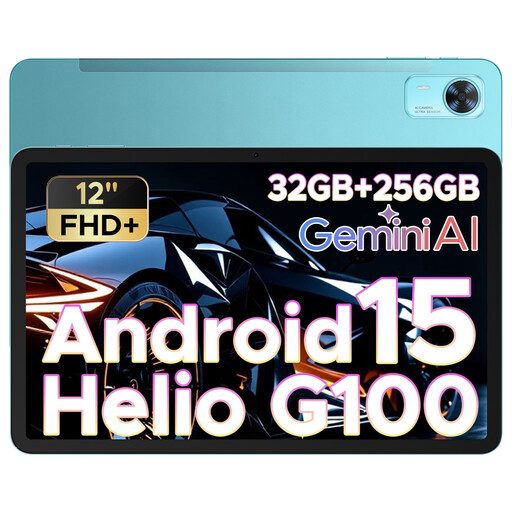
DOOGEE Tab E3+, 12 inches, FHD+, 90 Hz
The 12-inch format gives you a larger view, but takes up more space than a compact tablet.
The product title lists a SIM card slot; if your game needs to be online, check the actual connectivity options and data plan.
The product title lists Android 15, 32 GB + 256 GB/2 TB and 8,800 mAh.
View at Joybuy
 No image available
Honor Pad X8a, 11 inches, Wi-Fi, 4 GB RAM, 128 GB
The 11-inch display gives you a larger view if there’s enough room for the device in the car.
Wi-Fi model; for games that require an internet connection, check that a suitable connection is available while you’re on the move.
The product title lists 90 Hz, 8,300 mAh and Android 14.
View at Joybuy
 No image available
ALLDOCUBE iPlay 70 mini Ultra, 8.8 inches, 12 GB RAM, 256 GB
The 8.8-inch format is a more compact option if you want a tablet that’s easy to handle in a cramped seat.
The product title lists Android 14 and 7,300 mAh.
According to the product title, no power adapter is included, so you’ll need to provide a compatible charger separately.
View at Joybuy
Frequently asked questions
Can I play card games on a tablet while driving?
No. Under Section 23 of the German Road Traffic Regulations (StVO), drivers must not use a tablet to play card games; the rules also cover electronic entertainment devices. This applies to drivers, not passengers.
Do I need LTE or 5G for card games?
Not necessarily: whether you need a connection depends on the specific game. Check whether the app works offline; if it needs to be online, check the mobile data variant and test the connection along your route.
How should I store the tablet when nobody is playing?
Put it away in a bag after use and don’t leave it loose in the car. The ADAC recommends putting hand luggage, including tablets, in a bag; the device must also not obstruct the driver’s view.
What should I check about the app and charging before the journey?
Install your chosen app and test the game mode you need before you set off. If offline play matters, test it without a connection too. Also check whether the specific device variant includes a charger, and whether you’ll need mobile data or paid app features for online functions.


