What should you look for when buying?
Compact everyday tablet
A good fit if: You mainly want the tablet for short puzzle breaks and want it to be easy to pack. Samsung lists an 8.7-inch display for the Galaxy Tab A11.
The trade-off: The smaller screen leaves less room for the board and controls than an 11.2-inch tablet.
Larger all-round tablet
A good fit if: You want a larger view of the board and plan to use the tablet for other content too. Xiaomi lists an 11.2-inch screen for the Pad 8.
The trade-off: According to the manufacturer, the Xiaomi model mentioned weighs 485 g, making it larger and heavier than the compact class.
Compact gaming tablet
A good fit if: You also plan to play demanding games. Lenovo and REDMAGIC offer compact tablets with gaming features.
The trade-off: Gaming processors, cooling systems and high refresh rates don’t prove an advantage when solving chess puzzles.
iPad mini with iPadOS
A good fit if: You want to use a particular iPadOS chess app and it’s available on the device. Apple lists an 8.5-inch screen and a weight of 255 g for the Wi-Fi model.
The trade-off: Before buying, check that the app you want is available and that your specific version works offline.
First, check whether your chess app works offline, then consider how portable the tablet is and how clearly it displays the board. Extra gaming features are mainly important if you also plan to play games that need that level of performance.
| What matters |
What to look for when buying |
Who is this important to? |
| Solving puzzles offline |
Check the operating system and app version. Download puzzles while connected, then test the app in aeroplane mode. |
If I want to keep playing when I lose my connection, I test offline access before travelling. Around 31% of consumers prioritise chess puzzles that don’t rely on a reliable internet connection. |
| Easy to pack |
Compare the weight and dimensions of the specific model, not just its screen size. |
If I want to carry and pack my tablet easily at the gate, a compact design matters more than the largest possible view of the board. Around 25% of consumers put portability first when travelling. |
| Board view and room for controls |
Check how the board appears in your app; a high refresh rate doesn’t prove that puzzles will be easier to solve. |
If I want to see the board and controls clearly, I look at the usable screen area and how the app displays. Around 19% of consumers prioritise a large, easy-to-read view of the board. |
| Device and app costs |
Compare the specifications of the specific model with the terms of the puzzle service you plan to use. Lichess describes its features as free; Chess.com offers different puzzle allowances depending on membership. |
If I don’t want to pay for features or app functions I won’t use, I check the device and puzzle service separately. Around 19% of consumers focus mainly on these costs. |
| Performance for other games |
Check the requirements of your other games against the exact device configuration; manufacturer specifications aren’t an independent real-world test. |
If I want to play more demanding games as well as chess, I check their requirements specifically. Around 6% of consumers make extra gaming performance their main buying priority. |
Tablets for chess puzzles at Joybuy
The models below have larger displays for anyone who wants more room to see the board and controls. They take up more space than a compact tablet, so test the chess app you want to use offline before travelling.
 No image available
Samsung Galaxy Tab A11+ X230, 11-inch, Wi-Fi 6, 6 GB RAM, 128 GB, Grey
The 11-inch format could suit you if you want more room to view the chessboard and controls than you’d get on a compact tablet.
The product name lists Wi-Fi 6, 6 GB RAM and 128 GB of storage.
View at Joybuy
 No image available
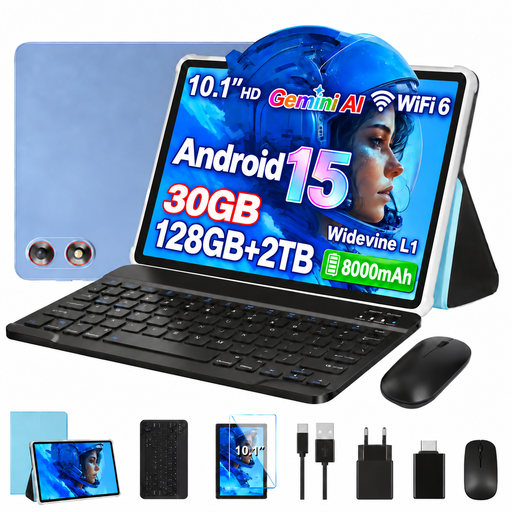
GOODTEL G10, 10.1-inch, Android 15, 8 GB RAM plus 22 GB virtual RAM, 128 GB, keyboard and mouse
The 10.1-inch display is an option if you’re looking for more viewing space than a compact tablet offers.
The product name lists Android 15, 8 GB RAM plus 22 GB virtual RAM, 128 GB of storage and expandability up to 2 TB. A keyboard and mouse are also listed. Before buying, check that your chess app works offline with this specific device configuration.
View at Joybuy
 No image available
Xiaomi Pad 7 with keyboard, Grey, 8 GB RAM, 128 GB, 3.2K display
The 11-inch format could suit you if you prefer a larger view of the board for chess puzzles and can make room for the extra size when travelling.
The product name lists 8 GB RAM, 128 GB of storage, a 3.2K display with a 144 Hz refresh rate and an 8,850-mAh battery. The keyboard is listed in the product title.
View at Joybuy
 No image available
TECLAST P50, 11-inch, Android 15, 8 GB RAM, 128 GB, 4G LTE
The 11-inch format is an option if more viewing space matters to you than having a particularly compact device.
The product name lists Android 15, 8 GB RAM, 128 GB of storage, 4G LTE, a 90 Hz refresh rate and a 7,000-mAh battery. Check that the specific chess app, including its offline features, meets your needs.
View at Joybuy
 No image available
TECLAST P50TCase, 11-inch, Android 16, 90 Hz IPS display, 128 GB
The 11-inch display could suit you if you want more room for the chessboard and can carry a larger device.
The product name lists Android 16, a 90 Hz IPS display, a T7250 processor, 16 GB RAM (3 GB plus 13 GB virtual RAM) and 128 GB of storage.
View at Joybuy
Frequently asked questions
Can I solve chess puzzles on a tablet without internet access?
That depends on the app you have installed and its version, not just the tablet. Lichess offers puzzles in its mobile app; the developer project explains that puzzle sets can be made available offline in batches. A bug report dated 30 October 2026 concerns loading these sets in a specific app version. Download puzzles in advance and test your installation without a connection.
Do I need a mobile data version for chess puzzles?
Not necessarily, if your app reliably provides puzzles that you’ve downloaded for offline use. You’ll need a connection for new online puzzles; whether Wi-Fi or mobile data is right for you is a separate decision. Follow the airline’s rules on wireless connections while on board.
How should I prepare my tablet before flying?
Install the chess app you want, download puzzles while you have a connection, then test them without internet access. Charge the tablet beforehand. Xiaomi says that a power adapter isn’t included with the Pad 8.
Can I take a tablet and power bank on a plane?
The EASA recommends carrying portable electronic devices with lithium batteries in your hand luggage rather than your checked baggage. According to the EASA, spare batteries and power banks must go in hand luggage and be protected against short circuits. Airlines may have additional restrictions, so check the rules for your specific journey.
Are chess puzzles free after I buy a tablet?
That depends on the provider. Lichess describes its features as free. Chess.com’s help pages list three standard puzzles per day for Basic members and unlimited puzzles for Premium members. Check the terms of the service you want to use.


