For highlighting sources and jotting down quick thoughts, a lightweight tablet with a compatible stylus is a good fit. For longer drafts of your arguments, look for a suitable keyboard, enough screen space and the software you need. Download documents to the app you use before periods without a connection, and check your organisation’s security requirements for customer data rather than relying on the operating system or marketing claims alone to judge suitability.
Who prepares their case on the move?
People who annotate documents
You read sources between meetings and note down counterarguments directly on the document. Stylus compatibility and a handy size are especially important; Apple and Samsung each describe stylus options for the tablet models mentioned.
People who write drafts
You develop longer lines of argument and switch between documents. A suitable keyboard, enough screen space and the software you actually need are key; Lenovo and Microsoft list keyboard options for the models described.
People who work with customer data on the move
You need access to documents without a connection and must take account of the security requirements that apply to your work when handling personal data. Microsoft describes offline features for OneDrive, while the German Federal Office for Information Security provides advice on access locks and encryption.
What should you look for when buying?
First, consider whether you’ll mainly annotate by hand or type longer texts. Then check offline access and the requirements for customer data.
| Priority |
What to look for when buying |
Who is this important for? |
| Annotating documents |
Check stylus compatibility, what’s actually included and the annotation and export features of the app you plan to use. |
If I want to annotate sources directly and jot down quick thoughts while I’m out, I look for a compatible stylus and a suitable app; around 31% of consumers put this kind of highlighting and note-taking first. |
| Writing longer drafts |
Check keyboard compatibility and what’s included, the app features you need and the overall size of the set for carrying around. |
For longer drafts, I want to type comfortably and compare documents; around 25% of consumers prioritise writing and comparing. |
| Working offline |
Test with the app you use whether files can be opened offline, edited if needed and synchronised later. |
If I can’t count on being online between meetings, I want to make my documents available in advance and test how they work offline; around 25% of consumers prioritise offline access. |
| Protecting customer data |
Check your organisation’s requirements, along with the available access locks and encryption. |
If I handle customer data, I must comply with my organisation’s security and access requirements; around 19% of consumers put protecting customer data first. |
Pitfalls when buying a tablet for life on the move
-
Confusing stylus compatibility with included accessories
A tablet may support a stylus without one being included in the offer. Apple says the iPad Air does not come with a Pencil; Lenovo lists the Tab Pen Plus as included with the specified Idea Tab Pro offer.
Check the model, compatible stylus and contents of the specific offer together.
A separately purchased stylus or keyboard can add to the size of your mobile set-up.
-
Assuming cloud access means you’ve tested the offline workflow
Depending on the app you use, you may need to make files available offline explicitly. Reading and editing may have different requirements; on OneDrive for iOS, offline folders may require a Microsoft 365 subscription.
Before your meeting, test how files work without a network connection, then check that they synchronise afterwards.
-
Assuming a similarly named offer is the same model
One offer described by Joybuy as the Galaxy Tab S11 also showed a different device in the page text. In this case, the title alone wasn’t enough to identify the product clearly.
Compare the full model number, storage, connectivity variant and other product details on the product page.
Key brands to consider
Apple
The 11-inch iPad Air (M4) could suit reading and handwritten annotations on the move, provided the apps you need are compatible with iPadOS.
- Apple lists a weight of 464 g for the Wi-Fi model and support for Apple Pencil Pro and Apple Pencil (USB-C).
- The stated contents do not include a Pencil. Check the stylus, app features and what’s actually included in the offer separately.
Samsung
According to Samsung, the Galaxy Tab S11 combines an 11-inch format with S Pen support, making it relevant for Android users who work mainly with a stylus.
- Samsung describes the S Pen and DeX as features of the model range.
- These manufacturer details don’t prove that a particular document app or business environment will support your preferred workflow. Check what’s included with the specific variant too.
Lenovo
The Idea Tab Pro gives you more screen space if you can comfortably carry its size between meetings.
- Lenovo lists a 12.7-inch display for the Idea Tab Pro, an offer that includes the Tab Pen Plus, and support for a detachable keyboard.
- The stated stylus inclusion applies to the specified offer; check the keyboard variant and what’s included with the specific configuration.
Microsoft
The 12-inch Surface Pro for Business is a Windows option if a specific work task requires Windows.
- Microsoft lists Windows 11 Pro and compatibility with the Slim Pen and a matching keyboard. According to the specifications, the device weighs 686 g, without the input accessories, which you should check separately.
- Check that the programmes you need are compatible with the Snapdragon processor, and consider the weight of the complete set-up.
Joybuy products for notes and drafts
This selection includes tablets for reading on the move, handwritten notes and longer drafts, including offers with a keyboard or stylus.
 No image available
10.1-inch Android tablet with keyboard and stylus
For longer drafts and handwritten notes on the move, if you’re looking for a 10.1-inch format.
The product title lists Android 16, 36 GB RAM, 256 GB storage, TF card expansion, a keyboard and a Touch Pen.
View at Joybuy
 No image available
Xiaomi Pad 7 with keyboard, grey
For longer texts on the move, if a keyboard suits the way you work.
The product title lists 8 GB RAM, 128 GB storage, a 3.2K 144 Hz display and a Snapdragon 7+ Gen 3.
View at Joybuy
 No image available
HONOR Pad X8a Wi-Fi, 11-inch
For reading documents on the move, if you’re looking for an 11-inch tablet.
The product title lists 4 GB RAM, 128 GB storage, a 90 Hz display and Android 14.
View at Joybuy
 No image available
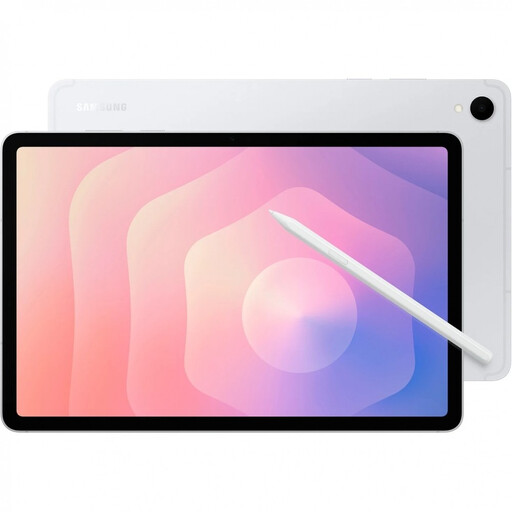
Samsung Galaxy Tab S11 X736 5G, silver
For handwritten notes on the move, provided the specific variant and the stylus you need suit your workflow.
The product title lists 11 inches, 12 GB RAM and 128 GB storage. Samsung describes an S Pen for the Galaxy Tab S11 range; check what’s included with this variant.
View at Joybuy
 No image available
TECLAST ArtPad Pro with stylus and keyboard
For longer drafts and handwritten notes, if you have room for a larger screen.
The product title lists a 12.7-inch 2K display, 256 GB storage, Android 15, a stylus, a protective case and an English Bluetooth keyboard. Its larger format takes up more space on the move than a more compact tablet.
View at Joybuy
Frequently asked questions
Do I need a tablet with mobile connectivity to access documents on the move?
Not necessarily: a suitable app can keep files available offline once you’ve prepared them. Microsoft describes this option for OneDrive on Android and iOS; check in advance that your specific file opens without a connection and can be edited as needed.
What should I set up before my first client meeting?
Download the documents you need, test that you can access them offline and set up a screen lock. The German Federal Office for Information Security recommends using a screen lock on tablets; if you’re handling work data, your organisation’s requirements also apply.
Which accessories should I consider when comparing tablets?
Check the specific offer rather than relying only on stylus or keyboard compatibility: Apple’s stated iPad Air package doesn’t include a Pencil, and Microsoft says the Slim Pen and keyboard for the Surface Pro are sold separately. Lenovo explicitly lists the Tab Pen Plus with the specified Idea Tab Pro offer.
Is a tablet automatically suitable for personal customer data just because I’ve bought it?
No, that doesn’t mean it has blanket approval. According to the European Data Protection Board, the GDPR requires technical and organisational measures to provide a level of security appropriate to the risk when processing personal data; the organisation responsible must assess the specific use.


