Start by considering the task you need to carry out. For reading PDFs and making handwritten notes, an iPad or Android tablet could work, provided your contract app supports the process. If you need a specific desktop application, a Windows 2-in-1 is worth considering. Test the app, licence, file access and stylus with an approved sample file, and check your organisation’s storage and security requirements before using confidential contracts.
Which tablet is right for you?
Reviewing PDFs between appointments
If you read contracts and mark up key passages while you’re out and about, a compact device with suitable stylus support could be important. Apple lists Pencil support for the iPad Air, while Samsung and Lenovo offer styluses for their respective tablet ranges. Also check that your contract app supports the tasks you need to complete.
Editing documents as part of a desktop workflow
If you need a particular Office or Windows application to work with the contract file, check that the specific software and licence are compatible. Microsoft says you can install Office and email on the Surface Pro just as you would on a desktop computer. If you’re considering a Snapdragon model, check separately that it supports the applications you need.
Teams working with confidential files
If you work across different locations and handle confidential contracts, first check which apps, accounts and storage locations are approved. The Federal Office for Information Security lists screen locks and updates as important security measures; encryption options vary depending on the operating system and version.
What should you look for when buying?
First decide whether you only need to annotate a PDF or edit the contract file in the application it was designed for. Then you can weigh up screen size, access between appointments and your organisation’s security requirements.
| What matters |
What to check when buying |
Who it matters to |
| Readability and portability |
View a typical contract page on the screen you’re considering and take the weight into account. Apple lists the Wi-Fi iPad Air models at 464 g for 11 inches and 616 g for 13 inches; Samsung lists a 10.9-inch display for the Galaxy Tab S10 FE, and Lenovo lists a 12.7-inch display for the Idea Tab Pro. |
When I review pages between appointments, I need a view that’s easy for me to read without the device becoming awkward to carry or hold. Around 34% of consumers put readability and portability first. |
| PDF annotations |
Use an approved sample file to mark it up, save it and open it again; also check what’s included with the specific version. |
If handwritten notes are part of my review, I want to be sure they’re saved in the file and visible to other people involved. Around 25% of consumers prioritise stylus-based PDF annotation. |
| Editing the contract file |
Use an approved test file to check the file format, application, licence, and editing and sharing features. |
If I need more than a PDF viewer, my existing software workflow must also support the original contract file. Around 25% of consumers prioritise editing within their existing software workflow. |
| Accessing files on the go |
Check in advance whether an approved file can be made available offline and how changes will sync later. If needed, choose the specific Wi-Fi or Cellular version. |
If there’s no reliable Wi-Fi at my next appointment, I still want to be able to access the approved file using the right process. Around 8% of consumers prioritise access without reliable Wi-Fi. |
| Protecting confidential files |
Check the requirements for accounts, apps and storage locations, then review the screen lock, updates and the encryption available for your operating system and version. |
If I work with confidential contracts, I want to access and save them only through a method approved for my work. Around 8% of consumers put the protection of confidential files first. |
Common pitfalls
-
Assuming stylus support means a stylus is included
A compatible stylus isn’t automatically included with the tablet. Samsung and Lenovo list styluses for their respective product ranges; Apple lists Apple Pencil support for the iPad Air, but doesn’t include the stylus in the stated tablet contents.
Check the stylus model and what’s included with the specific offer, separately from the tablet itself.
If the right stylus isn’t included, you’ll need to buy one separately.
-
Assuming that opening a file means you can edit it fully
Microsoft says the features available in its mobile Microsoft 365 apps depend on the plan and device. Any Windows application you need must also work on the specific device version.
Test the complete editing and sharing process using the file and licence you’ll need.
-
Seeing a larger screen as an advantage in every respect
A larger display can make it easier to view a contract page, but the Wi-Fi iPad Air models listed by Apple also differ in weight: 464 g for 11 inches and 616 g for 13 inches.
Consider how you’ll view a typical contract page and carry the device every day, rather than comparing screen size alone.
-
Moving confidential files into a personal workflow without checking first
A personal account or a familiar storage location may not meet the requirements for contract documents. The GDPR requires appropriate technical and organisational measures that are proportionate to the risk when processing personal data.
Before using your first customer document, check which accounts, apps and storage locations are approved, as well as the required device settings.
Key brands at a glance
Apple
The iPad Air is an option if your contract process works on iPadOS and you want to choose between 11 and 13 inches.
- Apple lists support for Apple Pencil Pro and Apple Pencil (USB-C) for both screen sizes.
- The stylus isn’t listed as included with the iPad. You’ll need to check that the apps you use are compatible with your workflow.
Samsung
The Galaxy Tab S10 FE is an Android option with a 10.9-inch display, according to Samsung.
- Samsung lists an S Pen as included with this product range.
- The stylus information doesn’t confirm compatibility with every contract app or what’s included with every retailer’s version.
Lenovo
The Idea Tab Pro is a larger Android option with a 12.7-inch display, according to Lenovo.
- Lenovo lists a Tab Pen Plus as included, along with support for a detachable keyboard.
- This information doesn’t confirm your contract app’s features or what’s included with every retailer’s version.
Microsoft
The 11th Edition Surface Pro is a Windows 2-in-1 option if you need an Office workflow similar to using a desktop computer.
- Microsoft says you can install Office and email on the Surface Pro just as you would on a desktop computer.
- If you’re considering a Snapdragon model, check that the applications you need and any accessories are suitable for your specific workflow.
Joybuy product selection
This selection includes Windows, iPad and Android tablets for reading contracts and working on the go. Screen size, operating system and mobile network specifications vary by model.
 No image available
Microsoft Surface Pro 11 for Business, 13-inch OLED, Core Ultra 7 266V, 16 GB/512 GB SSD, Windows 11 Pro, Platinum
If you need to edit contract files as part of a Windows workflow, this model offers Windows 11 Pro in a 2-in-1 design.
13-inch OLED; Intel Core Ultra 7 266V; 16 GB RAM; 512 GB SSD.
Check that the application you need for your contract process works on this version.
View at Joybuy
 No image available
TECLAST P50T, 11-inch, Android 16, 128 GB
If you’re looking for an Android tablet to view documents between appointments, the product name specifies an 11-inch screen.
Android 16; 128 GB storage; Dual-SIM 4G; 90 Hz IPS display.
Check that your contract app supports the editing and sharing process you need.
View at Joybuy
 No image available
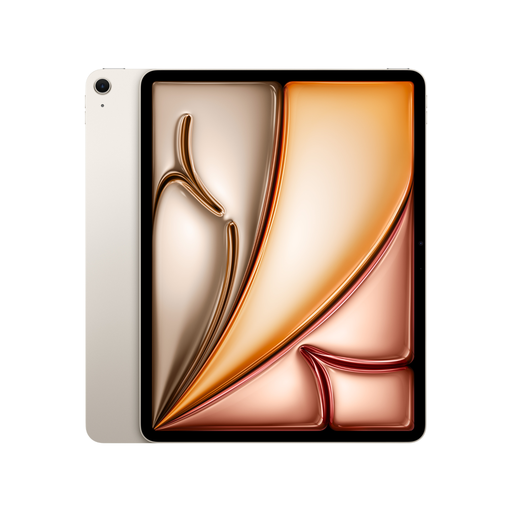
Apple 13-inch iPad Air (M4, 2026), Wi-Fi, 128 GB, Starlight
If you’d like a larger iPad screen for viewing contract pages, this 13-inch model could be a good option, provided your app supports the process on iPadOS.
128 GB storage; Apple lists the 13-inch Wi-Fi model at 616 g and says it supports Apple Pencil Pro and Apple Pencil (USB-C).
The Apple Pencil isn’t listed as included; also check that your contract app has the features you need.
View at Joybuy
 No image available
Apple 11-inch iPad Air (M4, 2026), Wi-Fi, 128 GB, Blue
If you want a more compact iPad for reading and annotating contracts, this model could suit you, provided your app supports the process.
128 GB storage; Apple lists the 11-inch Wi-Fi model at 464 g and says it supports Apple Pencil Pro and Apple Pencil (USB-C).
The Apple Pencil isn’t listed as included; check your contract app’s features too.
View at Joybuy
 No image available
TECLAST T65, 13.4-inch, Android 16, Dual-SIM 4G, 128 GB
If you’re looking for a larger display and mobile connectivity, the product name specifies a 13.4-inch screen and Dual-SIM 4G.
Android 16; 128 GB storage; 120 Hz display.
Check that your contract app supports the review and sharing steps you need on this device.
View at Joybuy
Frequently asked questions
Do I need a tablet with a stylus for contract notes?
Only if handwritten annotations are part of your review process. Use an approved sample file to test whether your app saves the notes and lets other people involved see them; stylus support on the device alone doesn’t guarantee this.
How should I prepare my tablet for an appointment without reliable Wi-Fi?
Before your appointment, check as part of your approved document process whether the file you need can be stored locally and how changes will sync afterwards. If you need your own mobile connection, look for the specific Cellular rather than Wi-Fi version.
What should I bear in mind when using confidential contract files?
Use only the accounts, apps and storage locations approved for your work. The Federal Office for Information Security recommends measures including a screen lock and up-to-date software; also check which encryption is suitable for your operating system and version.
Does German law require a specific tablet for reviewing contracts on the go?
The data protection rules considered here don’t specify a tablet model that everyone must use. If personal data is processed, the GDPR requires appropriate technical and organisational measures proportionate to the risk. Check with the relevant person or team which devices, apps and storage locations are approved for your workflow.


