Reviewing contracts while travelling
If you want to read contracts and attachments at your hotel desk, a device around 11 inches offers a balance between portability and screen space. Apple lists the iPad Air in 11- and 13-inch sizes.


If you mainly read contracts and often take your tablet with you, a compact device around 11 inches is a sensible starting point. For regularly comparing pages and attachments, a larger display gives you more room but takes up more space. IMTEST recommends 12 to 14 inches for regular document editing. Also check your PDF workflow, the accessories you need, and which file and network use is permitted for confidential documents.
If you want to read contracts and attachments at your hotel desk, a device around 11 inches offers a balance between portability and screen space. Apple lists the iPad Air in 11- and 13-inch sizes.
If you highlight clauses or write longer comments, check the stylus, app and export process together. Apple Support explains how to annotate PDFs on supported iPads; Samsung lists PDF import and annotation in Samsung Notes.
If a contract contains confidential or personal information, where it can be stored and how it can be accessed over a network are important factors when choosing and using a device. The German Federal Office for Information Security warns against transmitting confidential data over public Wi-Fi without protection.
A good fit if: you mainly read individual pages, highlight passages and often take your device with you.
The trade-off: there’s less room to view documents side by side; with iPad models and Samsung Notes, the precise PDF workflow depends on the device, app and file.
A good fit if: you often want to view long pages, attachments or notes side by side at a desk.
The trade-off: a larger display means a less portable device; Samsung’s PDF features in Notes don’t automatically work with every file or meet every organisation’s approval requirements.
A good fit if: your contract workflow calls for a specific Windows application or lengthy typed comments.
The trade-off: Microsoft lists the Surface Slim Pen and keyboard as sold separately; the operating system alone doesn’t confirm that your company’s application is approved.
| Buying priority | What to check before buying | Who does this matter most to? |
|---|---|---|
| Displaying contract pages clearly | Try a sample page in the app you plan to use and decide whether you want to see one page or a document and notes at the same time. IMTEST suggests 12 to 14 inches as a guide for regular document editing. | If I want to read attachments and contract pages clearly without carrying an unnecessarily large device, how they look in my actual workflow matters to me. Around 31% of consumers prioritise readability. |
| Highlighting clauses and sharing changes | Test importing, annotating, saving and exporting an uncritical sample file. Apple Support and Samsung describe PDF features in supported apps; check which format the other party needs. | If I need to highlight clauses by hand or return longer comments, I want the file to remain usable after export. Around 25% of consumers say annotation is their top priority. |
| Protecting confidential files while travelling | For work documents, check the permitted storage location and whether the device is approved. The German Federal Office for Information Security advises against transmitting confidential data over public Wi-Fi without protection. | If my contract contains confidential or personal information, I need to know which file and network routes are approved before opening it in a hotel. Around 25% of consumers say confidentiality is their top priority. |
| Balancing travel weight and essential accessories | Compare the complete set-up, including any stylus and keyboard you need. Apple lists the Wi-Fi iPad Air at 464 g for the 11-inch model and 616 g for the 13-inch model; these device figures don’t include accessories. | If I regularly take my tablet with me when travelling, I want to weigh up the extra screen space against the weight and accessories I’ll need. Around 19% of consumers prioritise portability and the overall package. |
Screen size doesn’t tell you whether comments will be saved correctly or whether the documents you need will display properly in the app you use.
Test an uncritical sample page, including the annotation and export process. Choose a larger screen based on how often you’ll actually need the extra space.
What’s included varies by model and configuration. Microsoft lists the Surface Slim Pen and keyboard as sold separately; a bundle explicitly listed for one item number doesn’t automatically apply to other item numbers.
Compare the listed contents of the specific configuration you’ve chosen with your workflow.
The German Federal Office for Information Security highlights the risks of transmitting confidential data over public Wi-Fi networks.
Before travelling, check where you’re allowed to store files and which protection measures to use. For work documents, follow the approved settings and procedures.
The iPad Air is available in 11- and 13-inch sizes, giving you different options for balancing portability and workspace.
The Galaxy Tab S11 is a more compact 11-inch option, while the Tab S11 Ultra has a 14.6-inch display.
Surface Pro is a Windows 2-in-1 option for workflows that need a compatible Windows application or longer typing sessions.
The Android tablets listed range from the 11.1-inch Yoga Tab to larger Yoga Tab Plus models.
The following Joybuy products include compact tablets around 11 inches and 13-inch Surface Pro models for Windows workflows.
 Image unavailable
The 11-inch format is suited to compact use while travelling; check the PDF and app workflow with your contract file.
Listed in the product title: 11 inches, 2176 × 1600, 16 GB RAM (8+8 virtual), 256 GB ROM and EVA case.
 Image unavailable
The 11-inch format is a compact option for reading individual contract pages; check that the app and file you need are compatible.
Listed in the product title: 11-inch display, 90 Hz, Android 15, 8 GB RAM and 128 GB storage.
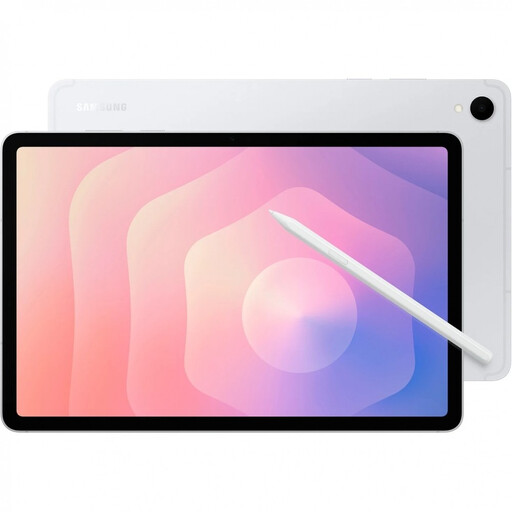 Image unavailable
The 11-inch format is a compact place to start for reading; if you want to annotate with a stylus, check stylus support and the PDF workflow for this specific configuration.
Listed in the product title: 11 inches, 12 GB RAM, 128 GB storage and 5G.
 Image unavailable
This configuration is a 13-inch option for a compatible Windows workflow; check that the specific application is approved and confirm the PDF export process.
Listed in the product title: 13 inches, Snapdragon X Plus, 16 GB and 512 GB.
 Image unavailable
This 13-inch model could suit you if your contract workflow calls for a compatible Windows device; confirm in advance that the specific company application is approved.
Listed in the product title: 13-inch OLED, Core Ultra 7 266V, 16 GB, 512 GB SSD and Win11 Pro.
If you mainly read individual pages, a tablet around 11 inches is a sensible starting point. If you often compare attachments or want to view a document and notes at the same time, try a larger display and weigh the extra space against portability.
It depends on the device, app and file: Apple explains how to annotate PDFs in supported iPad apps, while Samsung describes importing and editing PDFs with the S Pen in Samsung Notes. Test importing, saving and exporting an uncritical sample file, especially if the other party needs a specific format.
Check what’s included with the specific configuration and factor in any stylus and keyboard you need. Microsoft lists the Surface Slim Pen and Keyboard as sold separately; a bundle explicitly listed for one Lenovo item number doesn’t automatically apply to other models.
You can’t assume that every contract or company device is automatically approved for this. The German Federal Office for Information Security warns against transmitting confidential data over public Wi-Fi without protection and lists local encryption or a VPN as ways to protect it. Check the approved workflow for the specific contract with the relevant person or team.