First, check whether the specific course portal and the file formats you need work with the operating system you’ve chosen. For short replies, a tablet may be all you need; if you’re writing a lot or annotating PDFs, you’ll want a suitable keyboard or compatible stylus. For confidential feedback, you should also use the secure access method recommended by your organisation.
Which tablet is right for you?
People who read course feedback on a portal
If you mainly read feedback and write short replies, access to the specific portal and a clear, easy-to-read display are especially important. Test the sign-in and reply functions on the device you plan to use.
Teachers who annotate PDFs
If you mark up feedback directly in PDFs, check how the tablet, stylus and app work together. Samsung Germany describes how to annotate PDFs in Samsung Notes; whether the process suits you also depends on the app and device you use.
People who do a lot of typing while travelling for work
If you’re writing longer replies in your hotel room, the keyboard and its layout can make all the difference to your workflow. If feedback contains personal data, you should also follow your organisation’s security requirements.
What should you look for when buying?
First, check that you can access the course portal and work with the file formats you need. Then decide whether you’ll mainly be reading, adding handwritten annotations or typing longer replies, and choose a screen size and input options to suit those tasks.
| What to consider |
What to look for |
Who should pay particular attention? |
| Portal and file formats |
Test signing in, replying and exporting the PDFs or documents you need in the browser or app you plan to use. |
If I rely on a particular course portal in my hotel room, I want to check access and the file formats I need in advance. Around 26% of consumers put portal access first. |
| Handwritten annotations |
Check stylus compatibility, as well as PDF importing, annotating and exporting in the app you actually use. Samsung Germany describes how to annotate PDFs in Samsung Notes. |
If I need to mark up feedback directly in PDFs, I make sure the stylus and app work together. Around 21% of consumers prioritise handwritten annotations. |
| Privacy in your hotel |
Check with your organisation which access method is approved. Germany’s Federal Office for Information Security advises against transmitting confidential data over unsecured third-party Wi-Fi. |
If course feedback can be linked to individuals, a secure workflow matters to me. Around 21% of consumers put the protection of confidential content first. |
| Screen space and portability |
Check how your feedback looks on the screen size you’re considering, and compare the specifications for the exact model. Apple Germany lists an 11-inch display and a weight of 477 g for the Wi-Fi version of the iPad (A16); Xiaomi Germany lists a 12.1-inch display for the REDMI Pad 2 Pro. |
If I want to read documents comfortably in my hotel room and take the device with me when I’m out and about, I weigh up screen space against luggage space. Around 16% of consumers prioritise readability and portability. |
| Keyboard and typing |
Check whether a suitable keyboard is included with the specific model and whether its layout is right for the way you type. |
If I write a lot of longer replies, I want to be able to type without any fuss. Around 16% of consumers pay particular attention to a suitable keyboard and typing experience. |
Common pitfalls
-
Assuming stylus support means you have everything you need
Compatibility and what’s included can vary between models and offers. A stylus is only useful for annotating if it works with both the device and the app you use.
Check the exact model and test the process you need with one of your own PDFs or a short piece of text.
You may need to buy a compatible stylus or keyboard separately. Check in advance which accessories you’ll need for your workflow.
-
Assuming hotel Wi-Fi is a secure way to work
A tablet alone won’t protect confidential feedback while it’s being transmitted. Germany’s Federal Office for Information Security advises avoiding access to confidential data over third-party Wi-Fi wherever possible.
Follow your organisation’s guidance and use the secure access method it recommends.
-
Assuming screen size or a ranking guarantees portal compatibility
A general tablet ranking won’t automatically tell you whether a device can access your specific course portal. A larger screen may display documents differently, but that alone says nothing about whether it supports the workflow you need.
Test signing in, replying and exporting the required file formats before settling on a screen size or operating system. CHIP’s test centre describes its ranking as a general list of the best tablets, not a test for course feedback.
Key brands at a glance
Apple
An iPadOS option for using portals, reading and, if needed, using a stylus.
- Apple Germany lists an 11-inch display for the iPad (A16), which supports certain Apple Pencil models.
- The Pencil isn’t listed as included. Also check that the portal and your preferred keyboard suit the way you work.
Samsung
An Android option for stylus input and working with PDFs in Samsung Notes.
- Samsung Germany describes the S Pen for the Galaxy Tab S10 FE and PDF annotations in Samsung Notes.
- Check that the features on the specific device and operating system version suit your export workflow.
Microsoft
The 12-inch Surface Pro is a Windows convertible for Windows applications you need to use and longer typing sessions.
- Microsoft lists a detachable Surface Pro 12-inch keyboard with a German QWERTZ layout.
- Check that the applications you need are compatible and confirm the exact keyboard configuration.
Xiaomi
An Android option with a larger screen for reading documents.
- Xiaomi Germany lists a 12.1-inch display with a resolution of 2560 × 1600 pixels for the REDMI Pad 2 Pro.
- According to Xiaomi, a power adapter isn’t included. Display specifications don’t confirm that a particular course app will work.
Lenovo
An Android option with an 11.5-inch display; accessories depend on the specific Tab Plus variant listed.
- Lenovo lists an 11.5-inch display for the Tab Plus; one specific bundle includes a case and Tab Pen Plus.
- Don’t assume that every Tab Plus variant comes with the same bundle.
Joybuy products
The following products include Android tablets for reading, taking notes and typing, as well as a Surface Pro for workflows that use Windows applications. For each model, check access to your specific course portal and whether it has the input options you need.
 No image available
Android 16 tablet, 10.1-inch, 256 GB, keyboard and Touch Pen
Could suit short replies or note-taking, as long as Android works with the course portal you use.
The product title lists 36 GB RAM, 256 GB ROM, 1 TB TF, a 6000-mAh battery and Bluetooth 5.0.
View at Joybuy
 No image available
Xiaomi Pad 7 with keyboard, grey, 8 GB RAM, 128 GB ROM
The included keyboard could be useful for longer typing sessions, provided the specific course portal works on the device.
The product title lists a 3.2K display with a 144 Hz refresh rate and a Snapdragon 7+ Gen 3.
View at Joybuy
 No image available
TECLAST ArtPad Pro, 12.7-inch, 2K, T-Pen and English Bluetooth keyboard
This bundle could be suitable for annotating PDFs and typing longer replies, provided the stylus, app and course portal work together.
The product title lists 20 GB RAM (8 GB + 12 GB virtual), 256 GB storage and Android 15. According to the product title, the keyboard has an English layout.
View at Joybuy
 No image available
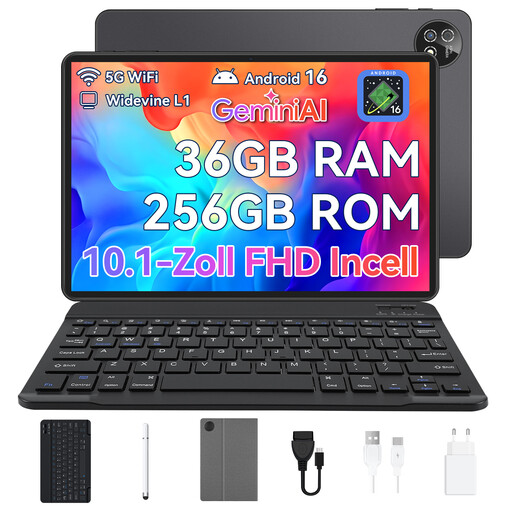
Android 16 tablet, 10.1-inch, 256 GB, keyboard, mouse and protective case
This set could be useful for short typing tasks and navigation, if the included input devices suit your workflow.
The product title lists 36 GB RAM, 256 GB storage and the colour black.
View at Joybuy
 No image available
Microsoft Surface Pro 12, Snapdragon Plus, 24 GB, 1 TB, Platinum
If you need a specific Windows application, check that it’s compatible with your chosen configuration before buying.
The product title lists 24 GB and 1 TB. Also check whether the keyboard you want is included with the specific configuration.
View at Joybuy
Frequently asked questions
Do I need a stylus to give feedback on PDFs?
No, not if you only need to read or fill in text fields. For handwritten annotations, the tablet, compatible stylus and app need to work together; Samsung Germany describes how to annotate PDFs in Samsung Notes.
How can I work with confidential feedback in a hotel?
First, check your organisation’s requirements and use its approved access method. Germany’s Federal Office for Information Security advises avoiding access to confidential data over third-party Wi-Fi wherever possible. If you have no alternative, it recommends using a VPN connection where possible.
What are my rights when buying a tablet online?
For qualifying online purchases from a trader in the EU, you generally have 14 days from delivery to withdraw from the contract; exceptions apply. If goods are faulty, you have statutory rights against the seller. Your Europe, the European Union’s information service, explains these consumer rights.


