For reviewing a design together at a small table, a handy tablet of around 11 inches is a sensible starting point. Compare the device dimensions, including its case or stand, with the space available. For making edits, check that the stylus is compatible and that it works with your annotation app. A stated colour gamut alone does not constitute an approved print proof.
Which size is right for you?
Presenting designs at a small table
If you want to show layouts or images to someone else, it’s important to have a view that fits comfortably on the table and makes details easy to see. Apple lists the 11-inch iPad Air’s dimensions as 247,6 × 178,5 mm; a case and stand will take up extra space.
Gathering feedback directly on a design
If you want to mark up sections or note changes during a discussion, make sure the stylus, annotation app and design file work well together. Samsung lists an S Pen for the Galaxy Tab S11; it’s also worth testing your own file and workflow.
Discussing colour-critical print designs
If you plan to use the tablet’s display as the basis for approving a print, you’ll need to consider the on-screen image and the final print separately. Adobe explains that RGB screen colours can differ from CMYK print colours.
What should you look for when buying?
First, check that the tablet and its stand will fit on the table. Then decide whether your priority is viewing details together, adding annotations or preparing a print approval.
| Consideration |
What to check before buying |
Who is it important for? |
| Space and readability |
Compare the device dimensions, not just the screen diagonal, and allow room for a case or stand. |
If you want to look at layouts together at a small table without losing space for your hands and paperwork, a compact setup is essential. Around 29% of consumers put space and readability first. |
| Colour display and print proof |
Check the colour gamut and screen variant of the specific model, and clarify the proofing workflow for print approval. |
If you need to assess colours on screen but approve a printed version, don’t assume the two will match. Around 23% of consumers prioritise colour and proofing considerations. |
| Making edits during a discussion |
Check the stylus model, what’s included and compatibility with your files and apps. |
If you want to mark up a design during a meeting, you’ll need a stylus and app workflow that works smoothly. Around 18% of consumers prioritise annotations. |
| Presenting without a network connection |
Open the file locally in advance, then test viewing and annotations without a network connection. |
If you can’t count on having a reliable connection during your meeting, make sure the presentation is available locally. Around 18% of consumers prioritise being able to present without a network connection. |
| Total equipment cost |
Consider the tablet and the accessories you actually need together, and check what’s included with the specific variant. |
If your workflow requires a stylus or stand, consider the complete setup rather than just the tablet. Around 12% of consumers put total cost first. |
Common misconceptions
-
A wide colour gamut means the print proof is approved
A display’s colour gamut alone doesn’t prove that the on-screen image will match the final print. Adobe highlights the potential differences between RGB screen display and CMYK printing.
Use the tablet to discuss the design, then arrange formal print approval through a suitable proofing workflow.
Print approval may require a separate proof and additional checks.
-
The screen diagonal is the only thing that determines how much space you need
The device, case, stand, hands and paperwork all take up space on the table.
Compare the device dimensions and try out your planned setup on a similarly small surface.
-
Stylus support means a stylus is included
Apple lists support for certain Apple Pencil models for the iPad Air. The listed contents include the iPad Air and a USB-C charging cable.
Check whether the right stylus is included with the variant you’ve chosen and whether it works with your annotation app.
If a compatible stylus isn’t included, you’ll need to factor in the extra cost for handwritten edits.
Key brands at a glance
Apple
The iPad Air and iPad Pro are compact 11-inch options for design reviews. Apple lists the Air’s dimensions as 247,6 × 178,5 mm and the Pro’s as 249,7 × 177,5 mm; both support P3.
- According to Apple, nanotexture glass is available on the iPad Pro only with the 1 TB or 2 TB models.
- iPad Air support for Apple Pencil doesn’t mean a Pencil is included with the tablet.
Samsung
The Galaxy Tab S11 is an 11-inch option for presentations with stylus annotations. Samsung lists a Dynamic AMOLED 2X display and an S Pen.
- The manufacturer’s specifications make this model worth considering for meetings where you want to mark up a design directly.
- The display specifications don’t prove colour accuracy for print approval.
Xiaomi
The Pad 8 Pro is an 11.2-inch alternative with a high resolution and a separate matte glass version available with certain storage options.
- Xiaomi lists a resolution of 3200 × 2136 pixels and DCI-P3.
- According to Xiaomi, no power adapter is included. The display specifications don’t guarantee accurate print colours.
Lenovo
The Tab P12 with Matte Display is a larger alternative if extra screen space matters more to you than having the smallest possible device.
- For the ZAD50005SE variant, Lenovo lists a 12.7-inch display with a resolution of 2944 × 1840 pixels and an included Pen.
- The larger format takes up more table space, and a matte finish doesn’t guarantee colour-accurate proofing.
Tablets for reviewing designs
The following Joybuy products include both compact and larger tablet formats for reviewing designs together at a table.
 No image available
GOODTEL G11 Android 15, 11-inch
The 11-inch format is a compact choice for viewing designs together when table space is limited.
Display: 2176 × 1600 pixels. Storage: 256 GB ROM.
An EVA case is mentioned in the product description.
View at Joybuy
 No image available
10.1-inch Android tablet with keyboard and touch pen
Its compact size and the Touch Pen mentioned in the product title make it suitable for presentations with handwritten annotations.
The product title also mentions a keyboard and 256 GB ROM.
View at Joybuy
 No image available
Apple 11-inch iPad Air M4 (2026), Wi-Fi, 128 GB
The 11-inch format is a compact starting point for reviewing designs together. Apple lists the device dimensions as 247,6 × 178,5 mm.
Apple lists P3 and support for Apple Pencil Pro and Apple Pencil (USB-C).
According to the listed contents, the Apple Pencil is not included.
View at Joybuy
 No image available
TECLAST ArtPad Pro, 12.7-inch
The larger display gives you more viewing space, but takes up more room on a small table than an 11-inch tablet.
The product title lists a 2K display, T-Pen support and 256 GB of storage. It also lists a Bluetooth keyboard and stylus as included.
View at Joybuy
 No image available
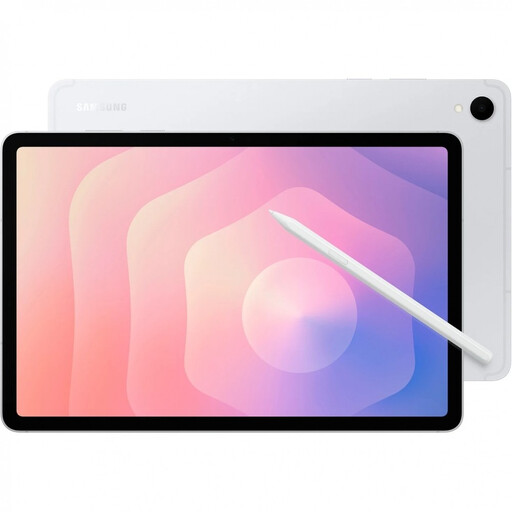
Samsung Galaxy Tab S11 X736 5G, 11-inch, 128 GB
The 11-inch format is designed for compact design reviews; the product description lists an included S Pen for annotations.
The product name lists 128 GB of storage and the colour Silver.
View at Joybuy
Frequently asked questions
Is an 11-inch tablet big enough for two people at a small table?
An 11-inch tablet can work if you’re happy to zoom in and the tablet and its accessories fit on the table. If you need to see lots of details at once, a larger screen may be more suitable. Try your own file on the device you plan to use.
How should I prepare for the presentation?
Open the final test file on the device before your meeting. If you can’t count on a reliable network connection, test the display and any annotations you need without a connection. Also try out the case or stand you plan to use on a similarly small surface.
Can a tablet replace an approved proof for CMYK printing?
A stated display colour gamut alone isn’t enough. Adobe explains that an RGB screen image can differ from a CMYK print, and that colour management can’t eliminate these differences entirely. An appropriate proofing workflow is needed for formal approval.
What return and faulty goods rights apply in Germany?
For a qualifying distance contract with a consumer, there is generally a right to cancel. According to the information on §§ 312g, 355 and 356 BGB on Gesetze im Internet, the standard cancellation period is 14 days. For an ordinary purchase of goods, it begins when the goods are received, provided the other requirements are met. The statutory rights against the seller for faulty goods are separate from a voluntary guarantee. You shouldn’t assume that consumer protection rules apply to a purchase for your own commercial or self-employed activities.


