Joybuy products for writing on the go
The Joybuy products below have been selected for typing on the go, reading PDFs and working on your manuscript. For each model, check that the operating system, keyboard and accessories suit your specific citation workflow.
 No image available
Xiaomi Pad 7 with keyboard, 8 GB RAM, 128 GB storage, Grey
A suitable keyboard is important for longer writing sessions, and the product title lists a keyboard.
The product is described as featuring a 3.2K display, 144 Hz, Snapdragon 7+ Gen 3 and an 8.850 mAh battery.
The product description lists 8 GB RAM, 128 GB storage and 45 W TurboCharge.
View at Joybuy
 No image available
Microsoft Surface Pro 12 Snapdragon Plus, 24 GB RAM, 1 TB, Platinum
As a Windows tablet, it may suit manuscript work if the software you need runs on this specific configuration.
The product description lists a 12-inch touchscreen in a 3:2 aspect ratio and a weight of 686 g.
The listed package contents don’t include a keyboard; check what accessories you’ll need for your writing setup.
View at Joybuy
 No image available
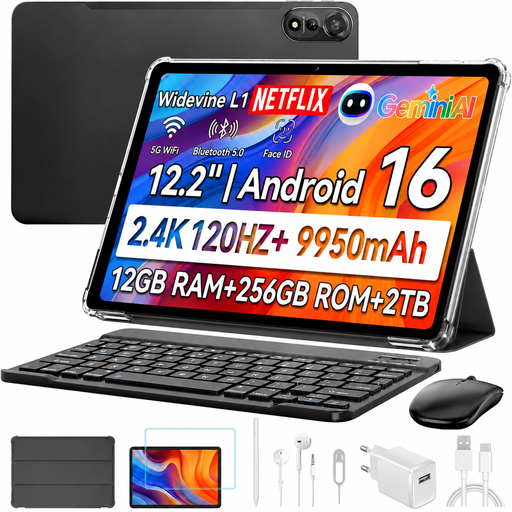
Blackview MEGA 12 5G, 12.2 inches, 12 GB RAM, 256 GB, keyboard and stylus
The input devices listed in the product title are suited to a mobile writing and annotation setup.
The title lists a 12.2-inch display with 2.4K resolution, 12 GB RAM, 256 GB storage and Android 16.
The keyboard, stylus and mouse are listed as included in the product title. For live Zotero citations in a word-processing document, Zotero describes a further step on a computer after working on Android.
View at Joybuy
 No image available
TECLAST ArtPad Pro, 12.7 inches, 2K, 256 GB, Android 15
For reading and writing on the go, the product title lists a keyboard and stylus. Check whether the English keyboard layout suits your everyday writing.
The specifications list 8 GB RAM plus 12 GB virtual RAM, as well as 256 GB storage.
The stylus, protective case and English Bluetooth keyboard are listed as included in the product title; the stylus is described as having 4,096 pressure levels.
For live Zotero citations in a word-processing document, Zotero describes a further step on a computer after working on Android.
View at Joybuy
 No image available
Apple 11-inch iPad Air M4 (2026), Wi-Fi, 256 GB, Blue
The iPad Air may suit mobile research and PDF annotations if you plan to complete the citation step later on a computer.
The product description lists an 11-inch display with an anti-reflective coating, 256 GB storage and a weight of 464 g.
Apple Pencil Pro, Apple Pencil (USB-C) and Magic Keyboard are listed as compatible. The listed package contents don’t include a keyboard or Pencil; check which accessories you’ll need for your configuration.
Zotero explains that transferring mobile iOS annotations into a word-processing document with live citations involves a further step on a computer.
View at Joybuy
Frequently asked questions
Can I use Zotero on a tablet for my manuscript in the same way as on a computer?
Don’t assume that the mobile app’s availability means it offers the same features. Zotero for iOS and Android documents research and PDF annotation; for transferring these into a word-processing document with live Zotero citations, Zotero describes a further step on a computer. Test your specific chapter and citation workflow.
What should I set up before my first writing session?
Check the keyboard connection and layout, open your working files and sync a test annotation with your main computer. Download any PDFs you’ll need before working offline; Zotero notes that automatic PDF downloads may be limited on Android.
Are the keyboard, stylus and charger included?
It depends on the specific configuration. Microsoft lists the keyboard and Slim Pen for the Surface Pro 12-inch (2nd Edition) as sold separately; Lenovo lists a Pen, German keyboard pack and charger with the Complete Bundle reviewed. Samsung lists an S Pen, but no charging adapter, with the Galaxy Tab S10 FE. So check the package contents and accessories you’ll need for the exact model you’re considering.
How can I protect drafts when using public café Wi-Fi?
The Federal Office for Information Security advises caution when using unfamiliar Wi-Fi networks and suggests a VPN as one way to reduce the risk of data being intercepted over public hotspots. This is security advice, not a requirement to buy a particular tablet or mobile data plan.
How useful are battery-life figures?
The European Commission points out that actual battery life depends on factors including apps, screen brightness and network conditions. So compare battery-life figures only under similar test conditions, and leave some charge in reserve for longer sessions away from a power socket.


