For protected library titles, your own PDFs and multiple apps, an iPad or Android tablet is a sensible place to start. Before you buy, check the specific borrowing method and your annotation app. If you mainly read your own DRM-free files and prefer a focused reading environment, an e-paper device could suit you. However, DRM, PDF navigation and accessory support vary by model.
Which device is right for you?
PDF readers who make notes in the margins
You read longer articles with a fixed page layout and want to annotate passages. Screen size, PDF navigation and a reliable way to export your annotations are key. Onleihe Help, Apple Support and Samsung Germany are among the sources offering guidance.
Library borrowers
You use digital library titles, so first check whether the app, browser access or DRM method works with your device and the title in question. Onleihe Help explains the access requirements for Onleihe.
Focused, keen readers
You mainly read your own unprotected files and prefer an interface designed for reading and writing. This means fewer apps and more limited access to protected e-books. reMarkable Support explains which file types are supported.
What should you look for when buying?
First decide what matters most to you: readable PDFs, access to borrowed titles, handwritten notes or a focused reading environment.
iPad or Android tablet
A good fit if: you want to use library apps, your own PDFs and other reading apps on one device. Onleihe Help says the Onleihe app requires at least iOS 15.1 or Android 10.
The trade-off: An LCD screen gives you access to apps, but may offer more opportunities for distraction than a dedicated e-reader. With an iPad, check that the Pencil is compatible and note that it may need to be bought separately. Samsung says an S Pen is included with the Galaxy Tab S10 FE.
E-paper for your own files
A good fit if: you mainly read your own DRM-free PDFs or EPUBs and a wide choice of apps is less important. The reMarkable Paper Pro supports PDF and EPUB imports.
The trade-off: reMarkable does not support DRM-protected e-books. If you read PDFs with fixed page layouts, also check that zooming and navigation suit the way you read.
E-reader for borrowed titles
A good fit if: you mainly want to read library titles on a device that’s compatible with the title and access method you use.
The trade-off: PDF titles on certain e-readers are subject to specific DRM and account requirements. As Onleihe Help explains, Onleihe e-books cannot be opened on Kindle e-readers.
| Buying criterion |
What to look for |
Who should consider it? |
| Reading longer PDFs |
Check a typical page with footnotes at its original size; pay attention to text size, zoom and navigation. |
If I want to read long articles with footnotes without constantly zooming in, I’ll check one of my own PDF pages. Around 33% of consumers say readability for longer PDFs is their top priority. |
| Access to library titles |
Check the app, operating system and store requirements, as well as the title’s format and DRM, before you buy. Onleihe Help says the Onleihe app requires at least iOS 15.1 or Android 10. |
If you want to read borrowed or protected texts, check access for the specific title first. Around 27% of consumers prioritise library titles when buying. |
| Highlighting and exporting |
Check the stylus and what’s included; highlight and annotate a PDF, export it, then open the file again. |
If I want my notes in the margins to remain available and reusable, I’ll test the whole process with one of my own files. Around 27% of consumers prioritise text annotations. |
| Focused reading |
Make sure the device’s features match the file formats, apps and lighting you need. |
If you mainly read your own files and want as few extra features as possible, a more focused reading environment may suit you. Around 13% of consumers say focused reading is their top priority. |
Common pitfalls
-
Assuming PDF support means you can access borrowed e-books
Your own PDFs and DRM-protected borrowed titles are subject to different access rules. So a device that opens PDFs won’t necessarily display every library title.
Start by checking a title you actually want to read, including its format, copy protection and intended access method.
-
Judging the stylus and export options by the device name alone
Stylus compatibility, what’s included and export features depend on the specific device and app. You may need to buy a compatible stylus separately; some advanced reMarkable features require Connect.
Use one of your own files to test highlighting, writing, exporting and reopening the PDF.
-
Assuming a small screen will suit densely laid-out PDFs
With fixed page layouts, you may need to zoom and pan frequently. Onleihe Help notes that navigation is slower on E Ink devices.
Check a representative PDF page, including its footnotes, at a comfortable reading size.
-
Relying on an outdated Adobe ID guide
Onleihe Help confirms that the previous Adobe ID method for external reader software was discontinued on 23.06.2026 and replaced by the ByteBooks ID.
Set up a new account using the library service’s latest instructions.
Key brands at a glance
Apple
The iPad (A16) is a versatile 11-inch tablet for your own PDFs and compatible reading apps. Apple lists the Wi-Fi model’s weight as 477 g.
- Apple Support explains how to annotate PDFs and confirms support for Apple Pencil (USB-C) and Apple Pencil (1st generation).
- According to the iPad specifications, a Pencil is not included. Also check that the app and the specific library title you want to use are supported.
Samsung
The Galaxy Tab S10 FE has a 10.9-inch display, while the 13.1-inch Galaxy Tab S10 FE+ offers a larger alternative.
- Samsung lists the Wi-Fi Galaxy Tab S10 FE at 497 g and says an S Pen is included. Samsung Notes can export notes as PDFs.
- Being able to export PDFs doesn’t mean every protected library title can be annotated in Samsung Notes. Check the process with the specific title and app you’ll be using.
reMarkable
The Paper Pro is an e-paper device for reading and writing, with an 11.8-inch colour display and PDF and EPUB import.
- The manufacturer documents PDF annotation support and an adjustable reading light.
- DRM-protected e-books are not supported. According to reMarkable Support, converting imported PDFs into editable notebooks requires Connect.
PocketBook
The InkPad X Pro is an e-note device with a 10.3-inch E Ink display, stylus and PDF support.
- The manufacturer lists Android 8.1 and support for several file formats, including PDF.
- Onleihe Help says the Onleihe app requires at least Android 10. PDF support alone doesn’t tell you whether a protected title can be opened on the device.
Suitable products at Joybuy
This selection includes Android tablets for reading longer texts and making notes, as well as an E Ink device. For library loans, check that the app, title and DRM are compatible with each device.
 No image available
TECLAST T65 tablet
The listed screen size could make this a good option for reading longer texts at a library desk. Check footnotes and PDF zoom using one of your own files.
13.4 inches; 120 Hz; Android 16; folio case listed as included in the product title.
View at Joybuy
 No image available
TECLAST ArtPad Pro 2025
If you want to write by hand as well as read, check that the stylus and PDF export fit the way you plan to use the device.
13.4-inch 2K display; the product title lists a T-Pen with 4096 pressure levels and Android 15.
View at Joybuy
 No image available
iFLYTEK AINOTE 2
This could suit readers looking for an E Ink screen for reading and note-taking. Before you buy, check that your library access and the titles you need will work on it.
The product title lists a 10.65-inch E Ink display.
View at Joybuy
 No image available
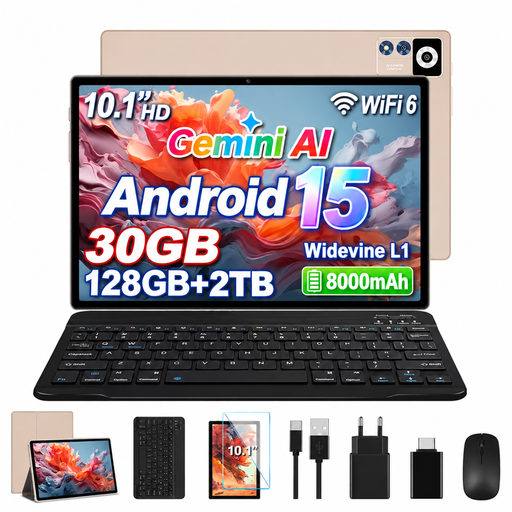
YESTEL T13 tablet
If you’re considering an Android tablet for your own texts, check a typical PDF page with footnotes on the screen.
10.1-inch IPS display with 1280 × 800 resolution; Android 15.
View at Joybuy
Frequently asked questions
Can I open any library PDF on any tablet or e-reader?
No. With Onleihe 3, access depends on the title’s format, copy protection and your device. Onleihe Help says the Onleihe app requires at least iOS 15.1 or Android 10 and a supported app store. PDF titles on certain e-readers are subject to specific ByteBooks and DRM requirements. Check the specific title before you buy.
How can I check whether my notes in the margins will still be there after I’ve finished reading?
Import a typical PDF of your own into the app you plan to use, highlight some text, add a note and then open the exported file. For protected library loans, the features you can use may depend on the service and title.
Do I need an Adobe ID for the Onleihe app?
Not in every case. Onleihe Help confirms that the previous Adobe ID method for external reader software was discontinued on 23.06.2026 and replaced by the ByteBooks ID for the new authorisation process. Check which app or e-reader method is intended for your title.
What are my rights if a tablet I bought from a retailer is faulty?
If you buy as a consumer from a trader in the EU, you have a statutory guarantee of at least two years from the date you receive the goods. This is separate from any voluntary manufacturer’s warranty. If there’s a fault, contact the seller.


