Readers without access to a charger
If you want to read for many hours during a flight, compare battery-life claims only on the basis of their stated test conditions. An e-reader may also be worth considering.


If you’d like to use apps as well as read, a compact tablet could be a good fit. Consider how easy it will be to use at your seat, and make sure you’ve downloaded your reading material in advance. If you mainly read longer texts, an e-reader may suit you better. However, manufacturers’ battery-life claims aren’t directly comparable reading tests for a flight.
If you want to read for many hours during a flight, compare battery-life claims only on the basis of their stated test conditions. An e-reader may also be worth considering.
If you’ll often be holding the device yourself, weight and size are important factors, alongside screen area.
If you want to use your existing library and your device for other tasks too, check that your reading app is compatible and that your titles will be available offline.
A good fit if: You want to read and use other apps, and will often hold the device in one hand.
The trade-off: Compare the weight and screen size of the exact model. A tablet’s battery-life figures don’t guarantee a particular reading time during a flight.
A good fit if: You’d like a larger screen for other content as well as reading.
The trade-off: The extra screen space may come at the expense of portability when you’re holding the device for a long time at your seat.
A good fit if: You mainly read longer texts and don’t need a wide range of tablet apps.
The trade-off: Check that your specific books, loans and file formats will work on the system you choose.
Think about what matters most to you: reading for longer, a device that’s easy to hold, offline access to your library or extra tablet features.
| Priority | What to check when buying | Who is it important to? |
|---|---|---|
| Reading time | Check the conditions behind the battery-life claim and whether you’ll need access to a charger. | If you want to read for many hours without relying on a power socket, the battery life in your real-world use matters. Around 31% of consumers prioritise reading time. |
| Portability | Compare the weight and screen size of the exact model. | If you’ll be holding the device for a long time at your seat, a lighter weight may matter more than a large screen. Around 25% of consumers prioritise portability. |
| Offline access | Check that your app and file formats are supported, along with any library loans you use; download titles in advance. | If you want to read specific stories from your library, make sure you can open them in your app without an internet connection. Around 25% of consumers prioritise access to their library. |
| Other uses | Decide which other apps or content you need, then check the storage capacity of the exact model. | If you want to use your device for apps and media as well as reading, make sure it has the right features. Around 19% of consumers prioritise multi-purpose use and cost. |
Different manufacturers’ claims aren’t based on the same reading test, with identical brightness and usage. They can’t be used to guarantee a particular flight time.
Use battery-life claims as a guide, check the stated usage conditions and consider whether you’ll need access to a charger.
File formats, ways of importing books and library loans all vary. A format listed as supported doesn’t guarantee that a specific title, or the rights to use it, will be available.
Before choosing a device, check one of the titles you actually want to read — especially if it’s a library loan or a protected file.
A larger screen can be useful for other media, but if you’ll be holding the device for a long time at your seat, weigh this against its weight and dimensions.
Compare the weight of the exact models and first decide whether you need tablet features beyond reading.
The iPad mini is a compact multi-purpose tablet for readers who also want to use iPad apps.
The Galaxy Tab A11 is a compact Android tablet, with the larger A11+ also available in the range.
The Tab M9 is designed for readers who want to enjoy other media as well as stories.
The 5th-generation tolino shine is an e-reader alternative if e-books matter more to you than a wide range of apps.
The Kindle Paperwhite is another e-reader alternative to a multi-purpose tablet.
This selection includes tablets for reading stories and enjoying other digital content. If you’ll be holding your device for a long time, consider the screen size and the specifications of the exact model.
 No image available
The stated storage capacity may be useful if you have a large digital media library.
8 GB RAM and 256 GB storage.
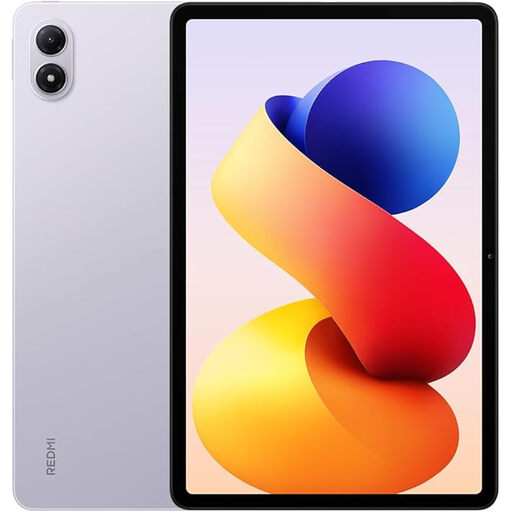 No image available
The stated storage capacity may be useful for stories and other saved content.
6 GB RAM and 128 GB storage. The product name states that it comes with a two-year official warranty.
 No image available
The keyboard may be useful if you’d like to do some typing as well as reading while you travel.
8 GB RAM, 128 GB storage, 3.2K display with 144 Hz; the product name states that a keyboard is included.
 No image available
The stated storage capacity may be useful for stories and other saved content. If you’ll be holding it for a long time, consider the larger screen size.
11-inch display, 482 g, 6 GB RAM and 128 GB storage.
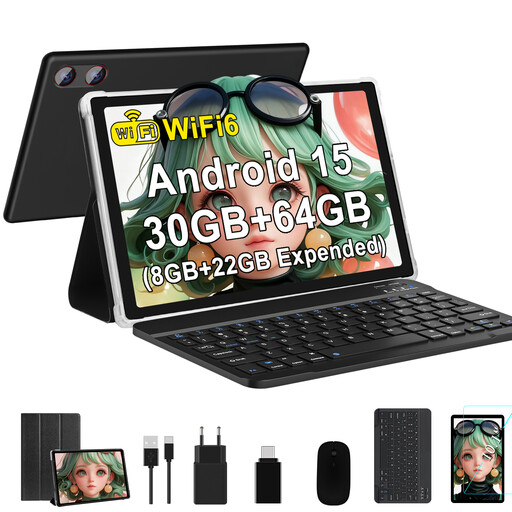 No image available
This tablet may suit you if you want to use other apps as well as read. Bear in mind the stated screen size if you’ll be holding it for a long time.
10.1-inch display, Android 15 and 64 GB storage. The product name lists 8 GB RAM plus 22 GB virtual RAM.
Before you leave, download the titles you want in your reading app or library, then try opening them with your connection switched off. Apple explains how to use downloaded and manually added books in the Books app; tolino provides instructions for downloading borrowed Onleihe titles. Availability and usage rights depend on the specific title.
According to the European Union Aviation Safety Agency (EASA), tablets and e-readers can normally be used for reading on board. Follow your airline’s and crew’s instructions on flight mode and device use, including during particular stages of the flight.
The EASA recommends carrying your tablet in your hand luggage rather than your checked baggage. Separate power banks are subject to stricter rules: they must go in your hand luggage, not your checked baggage. Also check your airline’s rules and follow any restrictions on using them on board.
No. When you buy from a business seller in the EU, you’re generally entitled to a minimum two-year legal guarantee from the date you receive the goods. This is your claim against the seller. A voluntary manufacturer’s warranty comes with its own terms.