If you mainly read continuous text while lying down, weight, grip and a comfortable text display matter most. For academic papers with fixed page layouts and margin notes, a larger screen may be more important. Before choosing, check a typical file and the whole process for making notes: devices and apps vary in the formats and protected content they support, and in whether notes can be exported.
Which device is right for you?
Readers of PDF papers
If you read pages with a fixed layout or scanned pages, you’ll want to make out footnotes and margins without having to zoom in constantly. Larger screens can show more of a page, but when reading in bed, you’ll need to weigh that against the device’s weight and how comfortable it is to hold.
One-handed readers
If you hold the device yourself for long periods while lying down and mainly read continuous text, weight and grip are important. According to tolino, the tolino vision color weighs 200 g and has a grip bar and page-turn buttons. Apple lists the iPad mini (A17 Pro, 2024) at 293 g for the Wi-Fi model.
Readers who annotate
If you highlight arguments and want to find or reuse handwritten notes later, check file and stylus compatibility, as well as how exporting actually works. PocketBook lists PDF and EPUB support for the InkPad One and says a stylus is included; support for protected files varies by device and format.
What should you look for when buying?
First, check whether you mainly read reflowable text or PDFs with a fixed layout. Then consider how comfortable the device is to hold, how you’ll make and manage notes, and whether you can access the sources you actually use.
| What matters |
What to check before buying |
Who is this important to? |
| PDF pages and footnotes |
Test a typical page with footnotes and margins; check zoom and page navigation. |
If I read papers with a fixed page layout, I want to see footnotes and margins without constantly zooming in. Around 29% of consumers put being able to read full PDF pages clearly first. |
| Comfortable to hold |
Compare the weight of the model with the case you plan to use, as well as its grip and page-turn buttons. |
If I mainly read continuous text and hold the device myself while lying down, I want it to be comfortable to grip and turn pages. Around 29% of consumers prioritise a comfortable grip and low weight. |
| Notes and export |
Use one of your own files to test highlighting, handwritten notes and exporting; check whether a stylus is included. |
If I annotate arguments by hand, I want to be able to find or reuse my notes later. Around 24% of consumers consider annotations and how to export them a priority. |
| Opening your own sources |
Check the file format, copy protection and access to your library or apps using a specific source. |
If I use specific e-books, library loans or online sources, I want to know whether my device and preferred way of taking notes will work with them. Around 18% of consumers put access to the sources they actually use first. |
Common misconceptions
-
A screen size in inches doesn’t guarantee that a PDF page will be easy to read
7-inch, 10.3-inch and 10.9-inch screens offer different amounts of space. Screen size alone doesn’t tell you whether the text and footnotes in your particular file will be easy to read.
Before deciding, open a representative paper with footnotes and check the zoom, page navigation and how you’ll hold the device.
-
Stylus compatibility doesn’t necessarily mean one is included or that you can export your notes
The stylus for the tolino vision color is sold separately. With Kobo, exporting handwritten notes depends on the PDF being unprotected and allowing annotations.
Check what’s included and test the entire process of taking and exporting notes with a file you actually use.
-
Similar product names can refer to different versions
A Joybuy product page has “X520 Galaxy Tab S10 FE” in the title, but lists SM-X210NDBAEUB as the “Model number”. Samsung identifies the German version reviewed as SM-X520NZAREUB, so the model identity on the product page in question has not been confirmed.
Before buying, compare the full model number and the features that matter to you with the details for the specific version listed by the manufacturer.
Relevant brands for this reading use case
Samsung
The Galaxy Tab S10 FE is a larger Android tablet for reading PDFs and using apps. Samsung lists a 10.9-inch screen and an included S Pen for model SM-X520NZAREUB.
- Could suit readers who want to combine PDF work and app use on one tablet.
- The stylus specification doesn’t confirm that you can export notes from every PDF app.
PocketBook
The InkPad One is a large-format E Ink reader for PDFs and EPUBs, with support for handwritten notes. PocketBook lists a 10.3-inch greyscale screen, a weight of 400 g and an included stylus.
- PDF and EPUB support, along with the included stylus, could be useful for reading and note-taking.
- Consider the weight and greyscale screen alongside how comfortable it is to hold and whether you need colour.
tolino
The vision color is a compact reader for longer reading sessions, with a grip bar and page-turn buttons. The specifications list a 7-inch screen and a weight of 200 g.
- Its compact design could be appealing if you read reflowable text one-handed.
- The smaller screen may be limiting for full-page academic PDFs; the stylus is sold separately.
Apple
The iPad mini is a handy tablet range for readers who want to combine reading apps with other tablet features. For the iPad mini (A17 Pro, 2024), Apple lists an 8.3-inch screen and a weight of 293 g for the Wi-Fi model.
- The specifications for the 2024 model can help you assess whether a compact tablet is right for you.
- Apple lists 6 November 2026 as the availability date for the iPad mini with A20 Pro; the specifications for the two generations aren’t interchangeable.
Kobo
Kobo describes different ways to reuse handwritten notes on stylus-compatible e-readers. What you can do depends on the file format and whether it is protected.
- According to Kobo, handwritten notes can be exported from unprotected PDFs, provided the file allows annotations.
- DRM-protected PDFs and files that don’t allow annotations are excluded; handwritten notes in EPUBs can’t be exported this way.
Tablets for digital reading
The following Joybuy products are tablets for digital reading and handwritten notes. For PDFs, check the specific file and app; for models with a stylus, check exactly what’s included.
 No image available
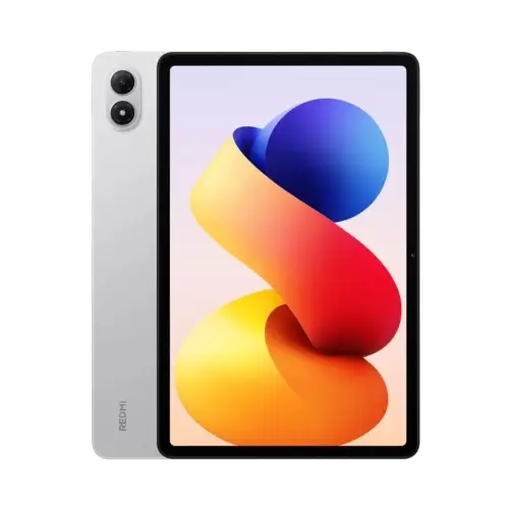
REDMI Pad 2 Pro Wi-Fi, 8GB+256GB, Silver
As a Wi-Fi tablet, it could be suitable for reading with compatible e-reader and PDF apps. Check how your typical file appears on the specific device.
This version is listed as 8GB+256GB.
Joybuy
 No image available
TECLAST ArtPad Pro 2025, 13.4-inch, 2K, T-Pen
The listed larger screen size could be useful for checking pages with a fixed layout. Also consider whether you’ll hold the device or prop it up in bed.
The title lists a 13.4-inch 2K screen and a T-Pen with 4096 pressure levels. The RAM is listed as 20GB (8+12 Virtual).
Joybuy
 No image available
iFLYTEK AINOTE 2, 10.65-inch E Ink, with protective case
As an E Ink tablet listed with a stylus, this version could be useful for digital reading and handwritten notes. Check how it works with your specific file.
The title lists a 10.65-inch E Ink screen. The product description says a stylus is included; the protective case is listed as an extra in the product name.
Joybuy
 No image available
TECLAST P50TCase, 11-inch Android 16 tablet kit
If you’re looking for a tablet for digital reading, check that your preferred e-reader or PDF app works on this specific version.
The product title lists an 11-inch IPS screen with a 90 Hz refresh rate.
Joybuy
 No image available
TECLAST ArtPad Pro, 12.7-inch, 2K, T-Pen and keyboard bundle
The screen size and included stylus could be useful for larger digital pages and handwritten notes. Check how you’ll hold it in bed before buying.
The title lists a 12.7-inch 2K screen and an included T-Pen. According to the title, the bundle also includes a protective case and an English Bluetooth keyboard.
Joybuy
Frequently asked questions
How can I test handwritten PDF annotations and exporting them?
Try the whole process with one of your own files. According to Kobo, handwritten notes can be exported from unprotected PDFs if the file allows annotations; DRM-protected PDFs and files that don’t allow annotations are excluded.
Can I annotate any borrowed or protected literary criticism file?
No. PDF support or having a stylus isn’t enough. Kobo doesn’t support handwritten notes in DRM-protected PDFs, so check the specific file you’ve borrowed, its terms of use and how you want to take notes.
Do I need to keep the lighting turned up while reading in bed?
No, adjust the lighting to suit where you’re reading and the file itself. According to its specifications, the tolino vision color has an adjustable colour temperature; this doesn’t demonstrate any effect on sleep or your eyes.
Can I return a device bought online in Germany?
For a distance purchase from a business seller, you generally have a 14-day right to cancel, starting from the day of delivery. EU consumer information lists some exceptions and notes that you may have to pay return costs in certain circumstances; purchases from private individuals are treated differently.
What should I bear in mind when charging beside the bed?
The Verbraucherzentrale advises against charging batteries overnight in the bedroom next to your head. For the first charge of a new device or charger, it recommends using a non-flammable surface and staying nearby.


