For longer edits, the essentials are a suitable document app, the right editing permissions and a compatible keyboard. A more compact tablet may be enough for quick corrections and handwritten annotations. Choose an operating system that fits the way you handle files and work, and open any documents you’ll need before setting off if you have to work offline. A larger screen gives you more room to work, but takes up more space at a train seat. Also check that the keyboard, stylus and licence you need are available for your chosen configuration.
Which tablet is right for you?
Commuters who do a lot of typing
If you edit longer sections of meeting minutes, look for a compatible keyboard and a document app with the editing features you need. Check that the app lets you edit your template and find out which licence you’ll need.
Travellers who work offline
If you want to keep editing meeting minutes when your connection drops in and out, open the files you need before your journey and check that they sync when you’re back online. Microsoft Support recommends downloading and opening documents before working offline.
Teams working on the move
For work-related meeting minutes, your device, storage location and connection method must comply with your organisation’s requirements. Germany’s Federal Office for Information Security points out that you can’t assume the same IT security infrastructure will be available on the move as in the office.
What should you look for when buying?
| Criteria |
What to check before buying |
Who is it important to? |
| Longer documents and formatting |
Check keyboard compatibility, as well as your document app’s features and licence terms. |
If I need to rework longer passages, I want to type comfortably and be able to edit the template. Around 29% of consumers prioritise typing and formatting. |
| Working offline |
Check that your app and files are available offline, and open cloud documents before your journey. |
If my connection drops while I’m travelling, I want to carry on working on a prepared file and sync my changes later. Around 23% of consumers say offline working is their main concern. |
| Space at your train seat |
Compare the device dimensions and the space required by the keyboard case you plan to use. |
If the table at my seat is small, I need a work surface that’s still practical to use. Around 18% of consumers prioritise portability and the space a device takes up. |
| Protecting work-related content |
Check with your organisation which apps, storage options and connection methods are approved for work documents. |
If my meeting minutes contain confidential information, I want to use only an approved workflow. Around 18% of consumers put security requirements first. |
| Handwritten annotations |
Check which stylus models are supported, what’s included and which annotation features your document app offers. |
If I want to mark up sections of the minutes by hand, the stylus needs to work with my device and app. Around 12% of consumers prioritise handwritten annotations. |
Avoid common buying mistakes
-
Forgetting to check accessories and editing permissions
Keyboards and styluses may be sold separately, depending on the configuration. Some mobile features in document apps may also depend on screen size and the licence you use.
Check what’s included with the exact model and make sure your licence covers the app features you need.
-
Assuming train Wi-Fi will always be available
Deutsche Bahn lists Wi-Fi on ICE trains, some Intercity trains and selected regional services, but availability and speed can vary. Without preparing in advance, you may not be able to open cloud files offline as planned.
Open the documents you need before you set off, then check after your journey that your changes have synced.
-
Automatically opting for a larger screen
Extra screen space can be useful for documents, but a larger tablet and keyboard take up more room at your seat.
Think about your usual seat and whether you’ll mainly be typing or proofreading when choosing a device.
-
Assuming stylus support means one is included
Supported stylus models and what’s included vary. For example, Apple lists an adapter for pairing and charging the 1st generation Apple Pencil with the iPad (A16).
Check which stylus works with the exact tablet you’re considering and whether any adapters you need are included.
Key brands at a glance
Apple
The iPad (A16) is an iPadOS option for reading and proofreading, with the option to add a keyboard or annotate.
- Apple lists a weight of 477 g for the Wi-Fi model, along with support for the Magic Keyboard Folio and certain Apple Pencil models.
- Accessory compatibility doesn’t tell you what’s included. Also check that the apps and licence terms meet your needs.
Samsung
Samsung describes the Galaxy Tab S10 Lite as a 10.9-inch Android tablet supplied with an S Pen.
- The S Pen included by Samsung is useful for handwritten annotations.
- Check the specific listing to see whether a keyboard is included and whether your document app has the features you need.
Lenovo
The German Idea Tab Pro Flex Bundle is aimed at buyers looking for a larger Android screen supplied with a stylus and German keyboard pack.
- Lenovo lists this bundle as including a 12.7-inch tablet with 8 GB RAM and 256 GB storage, as well as a pen and keyboard.
- The larger screen takes up more space at a train seat. These details apply to the bundle listed, not to other configurations.
Microsoft
The Surface Pro 12-inch (2nd Edition) is a Windows 11 option for workflows that require a Windows environment.
- Microsoft says the model can be used in both tablet and laptop modes.
- The keyboard and Slim Pen are sold separately. The battery life quoted by Microsoft isn’t a measurement taken while editing a specific set of meeting minutes.
Joybuy products for editing meeting minutes
Android tablets for working on the move, including models whose product titles mention a keyboard. Check the exact configuration and what’s included before buying.
 No image available
MEBERRY M8, 10.1 inches, 128 GB, with keyboard
If you want to type longer passages, the product title says a keyboard is included.
The title lists a 10.1-inch HD IPS display, 30 GB (8 GB + 22 GB virtual memory) RAM, 128 GB ROM, plus a case and mouse.
View at Joybuy
 No image available
VANWIN YC101T310K30, 10.1 inches, with keyboard
If you’re looking for a tablet with a keyboard for longer typing sessions, the product title lists a keyboard and case.
The title lists Android, a Unisoc T310 Octa Core, 32 GB RAM and 256 GB/1 TB TF storage.
View at Joybuy
 No image available
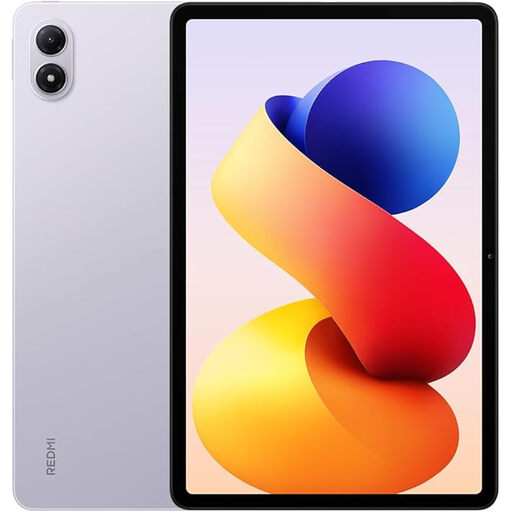
Redmi Pad 2 Pro, Lavender Purple, 6 GB RAM, 128 GB ROM
If you mainly want to read and proofread meeting minutes on the move, check which input method suits the way you work.
The product title lists 6 GB RAM and 128 GB ROM. It doesn’t mention a keyboard, so check what’s included with the specific configuration.
View at Joybuy
 No image available
Xiaomi Pad 7, Grey, with keyboard, 8 GB RAM, 128 GB ROM
If you want to type longer passages, the product title lists a keyboard for this tablet.
The product title also lists a 3.2K display with 144 Hz, a Snapdragon 7+ Gen 3 and an 8,850 mAh battery.
View at Joybuy
 No image available
Teclast P50, 11 inches, Android 15, 8 GB RAM, 128 GB storage
If you mainly proofread meeting minutes, check whether the input method you plan to use will cover your editing needs.
The product title lists an 11-inch display, Android 15, 8 GB RAM, 128 GB storage and dual-SIM 4G LTE.
The product title doesn’t mention a keyboard, so check whether a suitable one is available for the way you work.
View at Joybuy
Frequently asked questions
Can I edit a Word document I’ve already started on the train without an internet connection?
Yes, provided you’ve opened the cloud file online at least once before your journey, as Microsoft Support explains. Check that your changes have synced when you’re back online; the editing permissions included with your licence still apply.
Do I need a Microsoft 365 subscription to edit Word documents on a mobile device?
That depends on factors including screen size, storage location, the features you want and your specific plan. Microsoft says an eligible subscription is required for devices over 10.1 inches, certain business storage options and advanced features. Check your plan’s terms before buying.
How should I prepare my tablet and document for a train journey?
Set up a compatible keyboard or supported stylus, then open the document online before you travel so you can check that it’s available offline. Don’t rely on train Wi-Fi alone: Deutsche Bahn lists varying availability across train types, and speeds can vary too.
What should I bear in mind when working on confidential meeting minutes on a train?
Germany’s Federal Office for Information Security warns against sending confidential data over public Wi-Fi without protection. If your meeting minutes contain work-related or personal information, check with your organisation which storage and connection methods are approved, and what device requirements apply.
What are my rights if a tablet bought as a consumer is faulty?
According to information from the European Union, purchases from a business seller are generally covered by a legal guarantee of at least two years from the date you receive the item; the seller is responsible for this. A voluntary manufacturer’s warranty is separate. For a private online purchase, you generally have a 14-day right to cancel, although exceptions apply. These consumer rights don’t automatically apply to business purchases.


