For longer slide text and layout changes, make sure the presentation app you need works well with a suitable keyboard. For quick edits, a more compact tablet may be more practical. Open files before your journey so you can work offline, and check which features your account unlocks and whether a keyboard or software subscription needs to be purchased separately.
Which tablet is right for you?
For editing slides with lots of text
You rewrite and reorganise several slides during your journey, so you need a suitable presentation app and a keyboard that’s comfortable to use. Microsoft Support explains how to edit slides in the mobile PowerPoint apps; a Lenovo bundle for the Idea Tab Pro specifically lists a German keyboard pack.
For working with files offline
You want to pick up where you left off with a presentation while travelling, even without an internet connection. Microsoft Support recommends opening a cloud file online at least once before editing it offline.
For travelling with limited table space
You edit slides at your seat and need to weigh screen size against the device’s weight and the space it takes up when open. Apple lists different weights for the 11- and 13-inch Wi-Fi models of the iPad Air (M4); Deutsche Bahn notes that tables are available at many, but not all, ICE seats.
What should you look for when buying?
iPadOS tablet
A good fit if: you want to use PowerPoint for iPad or an iPad app you already use, and are choosing between the more portable 11-inch and larger 13-inch iPad Air.
The trade-off: Apple lists the 11-inch Wi-Fi model of the iPad Air (M4) at 464 g and the 13-inch Wi-Fi model at 616 g. Check keyboard compatibility and Microsoft 365 features for the specific configuration you’re considering.
Android tablet
A good fit if: you want to edit slides in PowerPoint for Android and choose between touch, stylus and keyboard input. Samsung lists an S Pen for the Galaxy Tab S11; a Lenovo Idea Tab Pro bundle includes a German keyboard pack.
The trade-off: Microsoft Support lists free core editing on Android devices up to 10.1 inches. If you’re considering a larger tablet, check which features your subscription unlocks.
Windows 2-in-1
A good fit if: you need a Windows working environment or a desktop application specifically for your slides.
The trade-off: Microsoft lists Windows 11 Pro, a keyboard connector and stylus compatibility for the 12-inch Surface Pro for Business. Check the exact configuration and the cost of the keyboard, stylus and software.
| What you need |
What to check before buying |
Who should pay particular attention? |
| Edit slides efficiently |
Check that the app and your account support the editing tasks you need to do; confirm keyboard compatibility and what’s included in the box. |
If I’m writing longer passages and reorganising slides while travelling, I need a suitable app and a keyboard that’s comfortable to use. Around 36% of consumers put these editing capabilities first when choosing a tablet for working on slides on the train. |
| Work without a reliable internet connection |
Open the presentation online before setting off and test offline access in the app you’ll be using. |
If my connection might drop while I’m travelling, I still want to be able to work on an existing file. Around 29% of consumers prioritise offline working. |
| Balance space and weight |
Compare the dimensions and weight of the exact model, including the keyboard, with the seat you normally use. |
If table space is limited, I need to be able to use the device comfortably when it’s open. Around 21% of consumers focus above all on the space it takes up and its weight. |
| Estimate the total cost |
Check what’s included, which keyboard is compatible and what your Microsoft 365 plan entitles you to. |
If I’m putting together a complete working set-up, I want to know whether I’ll need to pay extra for input devices or software. Around 14% of consumers put the total cost first. |
Avoid common misconceptions
-
Assuming train Wi-Fi means you’ll always have access to the cloud
Deutsche Bahn says Wi-Fi is available across its entire ICE fleet, but only on some Intercity trains and selected regional trains. That means a file available online only may not always be accessible while you’re travelling.
Before your journey, open the presentation online in the app you’ll be using and check whether you can then edit it offline.
-
Assuming a tablet deal includes everything you need to work
What’s included and which app features you can use may vary by offer, device and account.
For the exact model, check separately which accessories are included and which software features your account unlocks.
-
Assuming a bigger screen is automatically the better choice
A larger working area comes with more device weight and may take up more space. Deutsche Bahn says tables are available at many, but not all, ICE seats.
Try the device with the keyboard open at the seat you typically use.
Key brands at a glance
Apple
The iPad Air (M4) is available in 11- and 13-inch sizes and, according to Apple, supports Apple Pencil Pro.
- Apple lists the Wi-Fi models at 464 g for the 11-inch device and 616 g for the 13-inch device.
- Check the right keyboard separately; the PowerPoint features available also depend on your Microsoft 365 plan.
Samsung
The Galaxy Tab S11 is an Android option for editing slides using touch and a stylus.
- Samsung lists an S Pen and DeX for the 11-inch Galaxy Tab S11 5G.
- Check whether a keyboard is included with the model you choose and which PowerPoint features your account unlocks.
Lenovo
The Idea Tab Pro is a larger Android option; one specifically named bundle combines the tablet, a stylus and a German keyboard pack.
- Lenovo lists a 12.7-inch device, a Tab Pen Plus and a German keyboard pack in this bundle.
- The bundle contents apply to this offer; a larger screen doesn’t automatically mean the device will fit on every train table when open.
Microsoft
The Surface Pro is a Windows 2-in-1 option if you need a Windows working environment for presentations.
- Microsoft lists Windows 11 Pro, a keyboard connector and stylus compatibility for the 12-inch Surface Pro for Business.
- These specifications don’t confirm what’s included with a particular retail configuration or whether it supports every third-party app you need.
Joybuy products for working on slides on the train
The options below include Android tablets with keyboards and a Windows 2-in-1 for slide work where typing and your choice of working environment matter.
 No image available
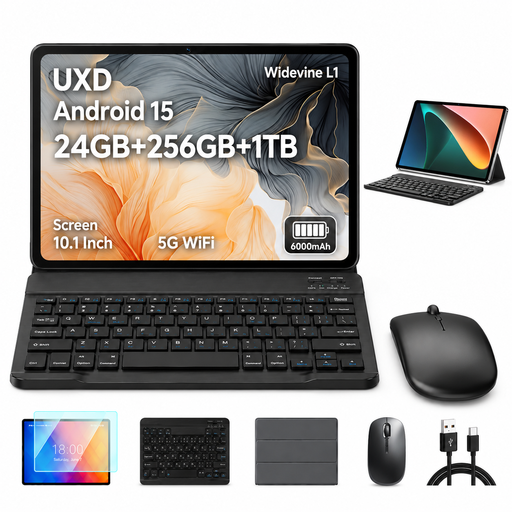
UXD A5 10.1-inch Android tablet, 24 GB RAM, 256 GB, keyboard set
An option if you’re looking for an Android tablet with a keyboard for typing on a smaller screen.
10.1 inches; 24 GB RAM (16 GB + 8 GB virtual); 256 GB ROM, expandable up to 1 TB; keyboard, mouse and case according to the product name.
View at Joybuy
 No image available
Microsoft Surface Pro 11 for Business, 13-inch OLED, Core Ultra 7 266V, 16 GB/512 GB SSD, Windows 11 Pro, EP2-20248
A Windows 2-in-1 option if you need a Windows environment for your presentation work.
13-inch OLED; Core Ultra 7 266V; 16 GB RAM; 512 GB SSD; Windows 11 Pro; Platinum.
View at Joybuy
 No image available
Android 16 tablet, 13.4 inches, 256 GB, keyboard set
An option if you’re looking for a larger Android screen and a keyboard for working on slide text.
13.4-inch FHD+; 256 GB storage, expandable up to 2 TB; keyboard, mouse, passive stylus, case and stand according to the product name.
View at Joybuy
 No image available
Xiaomi Pad 7 with keyboard, Grey, 8 GB RAM, 128 GB ROM
An Android option if you want to edit slides using a keyboard.
3.2K display; 8 GB RAM; 128 GB ROM; keyboard according to the product name.
View at Joybuy
 No image available
TECLAST ArtPad Pro, 12.7 inches, 2K, 8 GB RAM, 256 GB, English Bluetooth keyboard
An option if you’re considering a larger Android tablet with a keyboard and stylus for longer typing sessions.
12.7 inches; 2K display; 8 GB RAM plus 12 GB virtual RAM; 256 GB storage; English Bluetooth keyboard and stylus according to the product name.
View at Joybuy
Frequently asked questions
Can I edit an existing PowerPoint file on the train without an internet connection?
Yes, if you’ve opened the cloud file online at least once in the mobile Office app you’re using, or saved it to your device. Microsoft Support explains that changes can be synchronised once your connection is restored. Try the process with your file before travelling.
Is train Wi-Fi reliable enough to work with?
It’s still best to plan for offline working. According to Deutsche Bahn, Wi-Fi is available across the entire ICE fleet, but only on some Intercity trains and selected regional trains. So open important files in your chosen app before setting off.
Is PowerPoint editing free on a large tablet?
Not in every case. Microsoft Support lists free core editing on Android devices with screen sizes of 10.1 inches or less; additional features may require an eligible Microsoft 365 subscription. Check which features you actually need for your device and account.
What should I set up before my first journey?
Install the presentation app you plan to use, sign in with the account you need, open the file online beforehand and then test it offline. Also check that any keyboard you buy separately is compatible with the exact tablet model.


