If you want to use book apps and other tablet features as well as read, a compact tablet with adjustable brightness is a sensible starting point. Before buying, though, check that it gives you access to the specific reading app and edition you want. If you mainly read long novels, a front-lit e-reader may be a good fit; Kindle e-readers cannot open Onleihe e-books. Manufacturer claims about reading modes or brightness do not show how much a device will disturb someone sleeping in the room.
Which option is right for you?
Sharing a room in the evening
If you read beside someone who is asleep, with little ambient light, look for a device that lets you adjust screen brightness and sound. Xiaomi lists a reading mode and dimming for the REDMI Pad SE 8.7, but this does not prove that other people will be undisturbed.
Long reading sessions in bed
If you hold a device yourself while reading long stretches of a novel, weight and how it feels in your hand matter just as much as screen size. Lenovo lists an 8.7-inch display and a weight of around 320 g for the Tab One ZAF00255SE; according to Apple, the 11-inch iPad (A16) weighs 477 g as a Wi-Fi model.
Library users and classic readers
If you want to read specific editions from Onleihe or other book sources, check app access, file format and the rights for the particular edition. Onleihe describes EPUB as adaptable to screen size and PDF as having a fixed layout.
What should you look for when buying?
Tablet
A good fit if: You want to use book apps and other tablet features as well as read novels. Check in advance that you can access the editions you want.
The trade-off: A reading mode or adjustable brightness does not show how much the screen will disturb someone who is asleep.
Front-lit e-reader
A good fit if: Long novels and a device designed primarily for books matter more to you than a wide choice of tablet apps.
The trade-off: An e-reader is no substitute for a general-purpose tablet. According to Onleihe, Onleihe e-books cannot be opened on Kindle e-readers.
| Buying consideration |
What to look for |
Who is it important to? |
| Screen brightness and consideration for others |
Check the lowest brightness you can comfortably read at, the reading mode, and whether you can turn off app sounds and notifications. |
When I read beside someone who is asleep in the evening, I want to be able to make out the text without giving off unnecessary light or sound. Around 36% of consumers put adjustable screen brightness and consideration for others first. |
| Comfort while reading |
Compare the weight and dimensions of the exact model, and check that the font size and line length work for you. |
When I read in bed for a long time, I want the device to be comfortable to hold, even if that means less text fits on each page. Around 29% of consumers prioritise comfort for longer reading sessions. |
| Access to book editions |
Check a specific title you want, its edition and file format, and your library access if applicable. |
When I want to read a particular library book or edition of a classic, it needs to be available and usable on the device. Around 21% of consumers put access to the editions they want first. |
| Page layout and other uses |
If possible, open a sample page and check that a fixed layout is easy to read at your preferred screen size. |
When I use fixed-layout editions or other tablet features as well as reading novels, a larger screen may matter more than having a device that is as light as possible. Around 14% of consumers prioritise layout display and multi-purpose use. |
Avoid common misconceptions
-
‘Easy on the eyes’ does not automatically mean ‘won’t disturb anyone’
A reading mode or dimming feature listed by the manufacturer does not measure how much the display affects someone else in the bedroom.
Check the lowest brightness you can comfortably read at, and turn off app sounds and notifications. Don’t treat manufacturer claims as a test of the effect on other people in the room.
-
You can’t determine Onleihe compatibility just from ‘tablet’ or ‘Kindle’
Onleihe does not offer an Onleihe 3 app for Fire tablets, but it does provide web access through the Silk browser. Kindle e-readers cannot open Onleihe e-books; this restriction does not apply to Fire tablets.
Tell Fire tablets apart from Kindle e-readers, and check which access method your library provides for the specific device.
-
An old novel doesn’t automatically mean every edition is free to use
The age of the original work alone does not tell you whether a specific translation or edition can be used freely.
Check the copyright, translation and edition details, as well as the terms of use from the source.
A guide to relevant brands
Xiaomi
The REDMI Pad SE 8.7 is a compact Android option if a dedicated reading mode matters to you.
- Xiaomi lists a reading mode and dimming for this model.
- The manufacturer’s claims do not show how much reading at night will disturb someone else.
Lenovo
The Tab One ZAF00255SE is a compact option if weight and comfort when holding it in bed matter to you.
- Lenovo lists an 8.7-inch screen and a weight of around 320 g for this configuration.
- The stated screen brightness of 480 cd/m² does not tell you the lowest setting available for night-time reading.
Samsung
The Galaxy Tab A11 is a compact Android option if listening through wired headphones matters to you too.
- Samsung lists an 8.7-inch screen, 1,340 × 800 pixels and a 3.5 mm jack for the model reviewed.
- These specifications do not demonstrate any particular benefit for night-time lighting.
Apple
The iPad (A16) is a larger, multi-purpose option if extra screen space matters to you.
- Apple lists True Tone and a larger screen; the Wi-Fi model weighs 477 g.
- Neither True Tone nor the screen size proves that someone who is asleep will be less disturbed.
Joybuy products for reading
The products below range from Android tablets for reading and other uses to an e-book reader. Before buying, check that your reading app or specific edition is available on the device you choose.
 No image available
Xiaomi Pad 8, Pine Green, 8 GB RAM, 256 GB storage
For digital books and other tablet uses; the product description lists e-books as one type of content you can store.
8 GB RAM; 256 GB storage. Described as an Android tablet.
View at Joybuy
 No image available
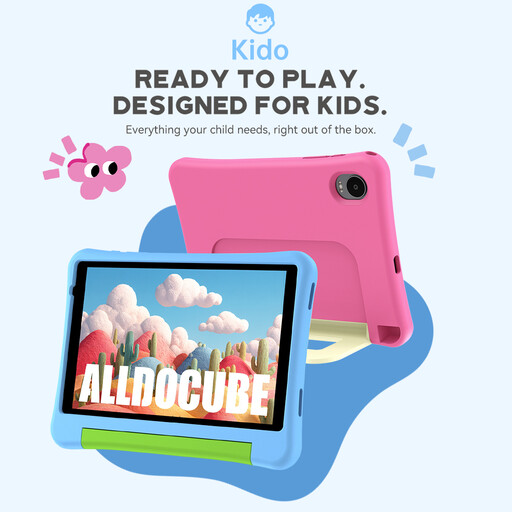
Alldocube Kido children’s tablet with pink protective case, 8-inch screen, Android 15, 3 GB + 32 GB
This compact Android tablet has a 3.5 mm jack for private listening.
8-inch screen; Android 15; 3 GB RAM + 32 GB storage; 3.5 mm jack. The product title states that no power adapter is included.
View at Joybuy
 No image available
Apple iPad Air 11-inch (M4, 2026), Wi-Fi, 128 GB, Blue
If you want a larger screen for books and other tablet tasks, this 11-inch model is one option.
11-inch screen; Wi-Fi; 128 GB; weighs 464 g according to the product details.
View at Joybuy
 No image available
TECLAST P50TCase 11-inch Android 16 tablet kit, 90 Hz IPS, 128 GB ROM
This 11-inch tablet offers a larger screen; the product title also lists a 3.5 mm headphone jack.
Android 16; 90 Hz IPS display; 16 GB RAM (3 GB + 13 GB virtual); 128 GB ROM; 3.5 mm jack.
View at Joybuy
 No image available
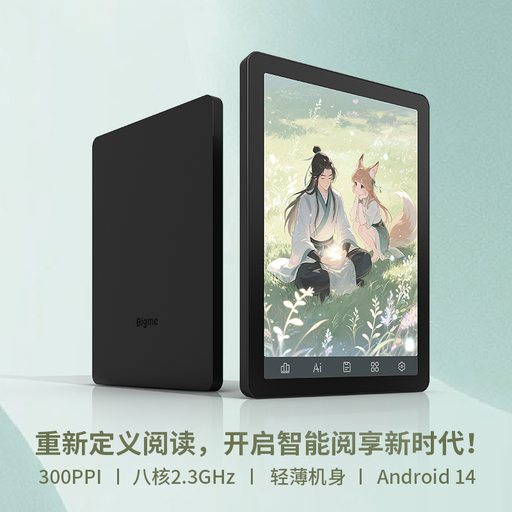
Bigme B6 e-book reader, 6-inch E Ink, Android 14, 4 + 64 GB
Sold as an e-book reader rather than a general-purpose tablet; its adjustable front light is designed for reading in low ambient light.
6-inch E Ink display; front light with 36 brightness levels; Android 14 with Google Play built in; 4 + 64 GB.
View at Joybuy
Frequently asked questions
Which edition of a classic is easy to read on a small tablet?
For plain novel text, an EPUB edition that adapts to the screen is a sensible starting point. If you have a scan or a PDF with a fixed page layout, check a sample page at your preferred screen size. Onleihe describes EPUB as adaptable to screen size and PDF as having a fixed layout.
What do I need to use Onleihe 3 on a tablet?
If your library offers Onleihe 3, you’ll need a valid library card and the relevant login details, according to Onleihe. The app is available through Google Play or the Apple App Store. Check that your device runs Android 10 or later, or iOS 15.1 or later. For Fire tablets, Onleihe lists web access through Silk.
Are older classic novels automatically free and available to share?
No. Under § 64 UrhG, copyright generally expires 70 years after the author’s death. Whether a particular translation or edition can be used freely needs to be checked separately; the title of the work alone isn’t enough to tell you.
What are my rights if my tablet is faulty?
Your statutory rights against the seller are separate from any voluntary guarantee. The Verbraucherzentrale also explains repair rules that came into force on 31 July 2026 and apply to tablets among other products. Which requirements apply depends on the specific purchase and fault.


