The outline typist
You want to capture arguments as headings and bullet points that you can move around. Look for a keyboard designed for your exact tablet model, and a writing app that lets you edit your outline.


For planning an essay in the library, choose a tablet that suits the way you prefer to work. A compatible keyboard is useful for headings and bullet points, while a compatible stylus is better for freehand sketches. If you want to view sources alongside your outline, weigh the extra screen space against the added bulk when carrying it around. Also check what accessories are included, how files can be transferred and whether your sources will be available without reliable Wi-Fi.
You want to capture arguments as headings and bullet points that you can move around. Look for a keyboard designed for your exact tablet model, and a writing app that lets you edit your outline.
You like to develop your thoughts first with handwritten notes, arrows or annotations. Check that the stylus, tablet and notes app work well together, and whether the stylus is included with the version you choose.
You want to read a source and work on your outline at the same time. Screen size and split-screen support for the apps you actually use are important factors when choosing a tablet.
First, decide whether you’ll mostly type your outline or sketch it out. Then check whether the screen size and offline workflow suit the way you work with sources.
| Priority | What to check before buying | Who will find it most important |
|---|---|---|
| Typing an outline | Keyboard compatibility and German layout; what’s included and whether the outline file can be edited. | If I want to organise headings and bullet points directly as text, a compatible keyboard is my top priority. That’s why around 33% of consumers prioritise a keyboard for an outline they can edit straight away. |
| Sketching ideas | Compatible stylus model and what’s actually included; exporting notes to the writing workflow you’ll use later. | If I like to sketch out arguments or mark up passages first, the stylus and notes app need to suit the way I work. For around 27% of consumers, handwriting is the top priority. |
| Keeping sources and text in view | Try the screen size and split-screen view with the PDF and writing apps you use. | I want to compare passages in a PDF directly with my outline, and I’m happy to use more desk space to do so. Around 20% of consumers prioritise viewing sources and text side by side. |
| Working without a power socket or Wi-Fi | Compare battery life with the way you plan to use the tablet; make sure the sources you need are available offline and test file synchronisation. | If power or Wi-Fi isn’t reliably available, I want to be able to keep working with my sources. That’s why around 20% of consumers prioritise working without a reliable power or internet connection. |
Samsung says the Galaxy Tab S10 FE comes with an S Pen. Apple lists compatible Pencil models for the iPad (A16), but says the Pencil is not included with the tablet.
Check what’s included with the version you’ve chosen, and confirm stylus compatibility separately.
Buying a stylus separately, or getting other connection accessories, could mean extra costs.
Keyboards and cases are often designed for specific tablet models. A similar screen size doesn’t guarantee that an accessory will fit the version you’ve chosen.
Check the full model name, system requirements and the keyboard layout you want.
An incompatible case or accessories you need to buy later could make your planned workflow more difficult.
The battery capacity given by the manufacturer doesn’t, on its own, tell you how long a particular combination of PDFs, writing app and screen brightness will last.
Think about how you’ll use the tablet, and make sure the sources you need are available when you don’t have a reliable connection.
The iPad (A16) is a more compact iPadOS option if you want to create an outline using the on-screen keyboard, a compatible Pencil or a suitable keyboard accessory.
The Galaxy Tab S10 FE is a 10.9-inch option that comes with a stylus for handwritten sketches.
The Tab P12 is a larger Android option if you want to view sources and your outline in multiple windows.
The Pad 7 is an Android option with an 11.2-inch display if viewing sources is your main priority.
The ProArt PZ13 is a Windows tablet or detachable option if your choice depends on using a particular desktop programme.
The Joybuy products below are Android tablets for digital essay planning; some versions listed include a keyboard or stylus. Before buying, check what comes with the specific version and whether the input method suits your workflow.
 No image available
This 11-inch Wi-Fi tablet could work for digital essay planning; check whether the offer includes a keyboard that suits your needs.
11 inches; 6 GB RAM; 128 GB storage; Wi-Fi.
 No image available
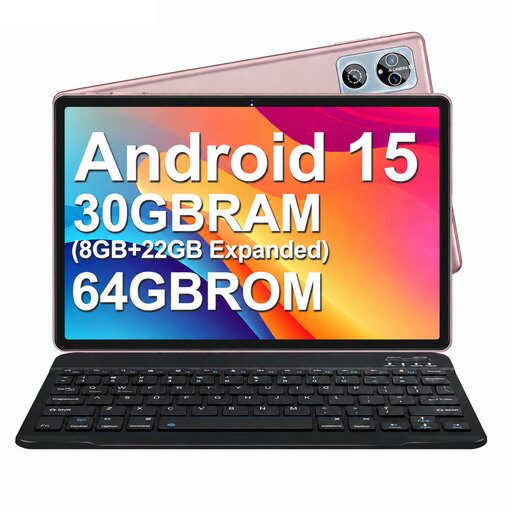
The product title lists a keyboard and mouse, making this an option if you want to type headings and bullet points on your tablet.
10.1-inch HD IPS display; Android 15; 8 GB RAM plus 22 GB virtual RAM; 64 GB storage; keyboard, mouse, protective case and OTG listed in the product title.
 No image available
The product title lists a keyboard and a 13.4-inch display; check that this larger version will suit your space at the library table and be comfortable to carry.
13.4 inches; FHD+ display; 24 GB RAM, comprising 8 GB RAM and 16 GB virtual RAM; 256 GB storage; keyboard, mouse, passive stylus and stand case listed in the product title.
 No image available
This version lists a keyboard and a 3.2K display, so it could suit typed outlines with sources open alongside them.
8 GB RAM; 128 GB storage; 3.2K display with 144 Hz; keyboard listed in the product title.
 No image available
The product title lists a T-Pen and a keyboard, which could suit you if you want to combine sketches with typed outlines.
12.7-inch 2K display; T-Pen with support for 4096 levels of pressure sensitivity; stylus and protective case listed in the product title; Bluetooth keyboard with English layout.
No. If you organise headings and bullet points directly as text, the writing app and keyboard are the key things to check. A compatible stylus is most useful if you want to sketch out ideas first or mark up passages.
Check that the accessories match the exact tablet version. Apple says the Magic Keyboard Folio for the iPad (A16) requires iPadOS 18.3 or later; according to Apple, a first-generation Apple Pencil also needs an adapter to pair and charge with this iPad.
Before visiting the library, decide which editable file format you’ll use and make the sources you need available for your planned offline workflow. Test file transfer or synchronisation with a document to check that it works as expected.
According to Verbraucherzentrale, goods ordered online can generally be returned within 14 days of receipt under the right of withdrawal; the type of contract and any exceptions should be considered on a case-by-case basis. Your statutory rights if a product is faulty are separate from a voluntary guarantee.
Check the specifications for the exact version and the device’s CE marking. The European Commission notes that manufacturers are responsible for ensuring their products meet the applicable EU requirements and carry the CE marking.