For a wired Ethernet connection, a compact USB-C Ethernet adapter is usually all you need, provided your tablet supports wired Ethernet and there’s a usable LAN port in your room. If you want to charge your tablet through the same port, consider an adapter with Power Delivery pass-through or a USB-C hub. In either case, check compatibility with your tablet and your accommodation’s network sign-in requirements. A Gigabit rating on an adapter doesn’t guarantee the same speed from your internet connection.
Who might need a LAN adapter for a tablet?
Tablet with a spare USB-C port
If you just want to connect your tablet to the LAN in your room, a single adapter may be enough. First, check whether your specific tablet supports wired Ethernet: having a USB-C port alone doesn’t guarantee that it does. Apple Support Germany describes accessories for USB-C iPad models, while operating system support varies between adapter models.
Charge your tablet while working and connected to the LAN
If you work at your desk for extended periods and have only one usable USB-C port, an adapter with charging pass-through or a hub could be a good fit. Belkin and TP-Link offer models with Power Delivery; check separately that the feature works with your tablet and power adapter.
Student accommodation with specific network sign-in requirements
If internet access requires you to sign in or use a particular type of connection, the instructions for your building are key. Published examples from studierendenWERK BERLIN, Studierendenwerk Trier and Studierendenwerk Kassel describe different connection and setup processes.
What should you look for?
USB-C single adapter
A good fit if: You only need a LAN connection, your tablet supports the adapter and you don’t need to charge through the same port at the same time.
Consider: The adapter occupies the USB-C port; TP-Link’s German specification for the UE300C doesn’t explicitly mention iPadOS or Android.
Ethernet adapter with charging pass-through
A good fit if: You want to charge your tablet and connect it to the LAN through the same USB-C port.
Consider: Check that your tablet and power adapter support it. Belkin describes the INC019btBK as a USB-C Ethernet and charging adapter for USB-C tablets.
USB-C hub with Ethernet and PD
A good fit if: You need extra connections at your desk as well as LAN and charging.
Consider: A hub gives you more ports, but also more cables, than a single adapter. Check that the combination you want works with your specific tablet.
| What you need |
What to check before buying |
Who it matters most to |
| Tablet and connection compatibility |
Check your tablet model, port and operating system support for the specific adapter. Apple Support Germany highlights the importance of having a USB-C port on the iPad model in question. |
If I mainly want an adapter for my desk that works with my specific tablet, I’ll check the model details first. Around 36% of consumers would put tablet compatibility first. |
| Usable LAN port in your room |
Check your building’s instructions for the type of connection and any required login details or authentication. The examples from studierendenWERK BERLIN and Studierendenwerk Trier show that the process can vary. |
If I need to rely on the LAN port in my room, I want to know whether I need to sign in and which port I’m allowed to use. Around 29% of consumers would first check the network access available in their room. |
| Charge and use LAN at the same time |
Look for a clearly labelled PD input or charging pass-through, and check that your tablet and power adapter support it. A stated wattage doesn’t guarantee the actual charging power delivered to your tablet. |
If I work at my desk for extended periods and want to charge my tablet while using the LAN, I need a suitable charging connection. Around 21% of consumers would prioritise charging and using LAN at the same time. |
| Suitable transfer speed |
Compare the adapter’s specifications with the standards supported by your tablet and the connection in your room. A Gigabit interface alone doesn’t tell you what internet speed you can expect. |
If a fast connection matters to me, I want to consider the speed of the entire connection rather than focus only on the figure on the adapter. Around 14% of consumers would put transfer speed first. |
Common buying misconceptions
-
“A LAN socket in my room means any adapter will work straight away.”
The adapter connects to the Ethernet port, but it can’t provide network access if it hasn’t been enabled or you need to sign in. The instructions from studierendenWERK BERLIN and Studierendenwerk Trier describe different procedures.
Before buying, check your accommodation’s latest instructions and the type of connection you’re expected to use.
Using the wrong type of connection may mean extra setup is needed.
-
“Gigabit on the adapter means Gigabit internet in my room.”
The Gigabit rating describes the adapter’s interface, not the internet speed you’ll actually get. UGREEN notes that routers, cables and computers can also limit speed.
Compare the adapter’s rating with your room’s connection and the standards supported across the whole setup. Don’t choose based on the highest figure alone.
-
“I can use LAN and charge through the same USB-C port without checking anything else.”
A standard Ethernet adapter doesn’t automatically include a charging port. With an adapter that has PD pass-through or a hub, the combination you want depends on whether your tablet and power adapter support it.
If you want to charge while using the LAN, check the PD pass-through, power adapter and compatibility with your specific tablet model.
Brands to consider
TP-Link
The UE300C and UH6120C suit different desk setups: one is a single Ethernet adapter, while the other is a USB-C hub with extra ports.
- TP-Link lists iPadOS and Android for the UH6120C and specifies Ethernet, PD and additional ports.
- TP-Link’s German specification for the UE300C doesn’t explicitly mention iPadOS or Android. Check compatibility with the specific tablet model you have.
Belkin
According to the manufacturer, the INC019btBK combines Ethernet and charging pass-through in a compact 2-in-1 USB-C solution.
- Belkin lists USB-C tablets as a compatible device category, along with Gigabit Ethernet and up to 100 W PD pass-through.
- These manufacturer specifications don’t guarantee that it will work with every tablet. Check compatibility with your specific device and power adapter.
KabelDirekt
The USB-C Ethernet adapter described on the German manufacturer’s website is a single adapter for tablet setups that don’t need a multi-port hub.
- KabelDirekt specifies a built-in 10-cm cable, speeds of up to 1 Gbit/s and the iPad Pro as an example of a compatible device.
- The iPad Pro example doesn’t establish compatibility with other tablet models.
Anker
The Anker 555 is a multi-port hub with Ethernet and PD, designed for desks where you need extra connections.
- Anker lists Ethernet, USB, HDMI and card ports, along with up to 85 W PD pass-through.
- The manufacturer’s description highlights MacBooks. Check compatibility with your specific tablet before choosing it.
UGREEN
The German manufacturer’s overview explains the differences between USB-A and USB-C Ethernet adapters, and recommends USB-C hubs if you need additional connections.
- The overview notes that operating system, USB standard and other network hardware are all worth considering when choosing an adapter.
- The product overview doesn’t confirm that a specific UGREEN model is compatible with your tablet.
USB-C adapters and hubs at Joybuy
This selection includes USB-C Ethernet adapters and hubs for a wired tablet connection in student accommodation. Check that your chosen model is compatible with your tablet and your accommodation’s connection requirements.
 No image available
HOCO UA37 Type-C Ethernet adapter, 1000 Mbps
For a USB-C tablet when you want a wired network connection. According to the description, Android use depends on OTG support.
RJ45 with 10/100/1000 Mbps; described as suitable for tablets and weighing 23 g.
Joybuy
 No image available
WOZINSKY USB-C hub, 14-in-1
For a tablet setup that needs a wired network connection and extra ports. The product description lists iPadOS and Android.
The description lists RJ45 Gigabit Ethernet, PD, USB ports, HDMI, and SD and TF card readers. To charge through the hub, the description specifies that you’ll need a compatible USB-C PD charger.
Joybuy
 No image available
D-Link DUB-E130 USB Type-C network adapter
For a setup that connects a USB-C port to a wired Ethernet network. Check compatibility with your tablet before buying.
The product specifications list USB 3.0, RJ45 and 10/100/1000 Mbps, as well as Windows and MacOS.
Joybuy
 No image available
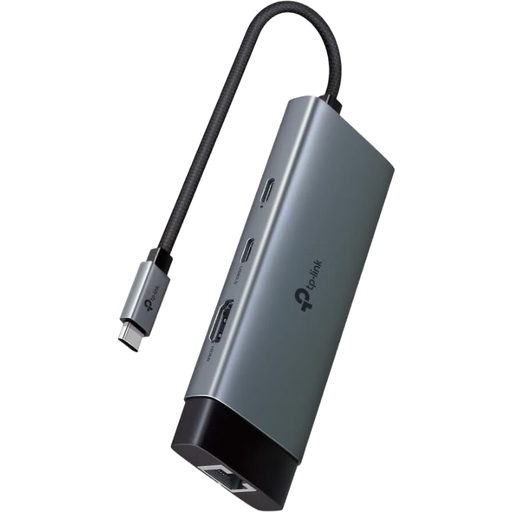
TP-Link UH6120C USB-C hub with 100 W PD
For a tablet at your desk when you need extra ports as well as wired LAN. The product description lists iPadOS and Android.
The specifications list Gigabit Ethernet, 100 W PD, HDMI with 4K at 60 Hz, one USB-C port and two USB-A ports.
Joybuy
Frequently asked questions
Will any USB-C Ethernet adapter work with my tablet?
No. Check your specific tablet’s port and the operating system and device support documented by the manufacturer. TP-Link lists iPadOS and Android for the UH6120C, but this doesn’t guarantee compatibility with every tablet.
What should I check if my tablet has no internet in student accommodation, even when it’s connected by cable?
First, check your accommodation’s instructions to see whether you need to sign in or use a particular type of connection. The Berlin example describes connecting to a network socket and recommends automatic DHCP if you have connection problems; the Studierendenwerk Trier instructions require authentication for the systems listed there. If an iPad doesn’t recognise an accessory, Apple Support recommends unlocking the device and reconnecting the accessory.
Will I also need a charger or an Ethernet cable?
An adapter with PD pass-through doesn’t replace a suitable power adapter. Also check whether an Ethernet cable is included with your chosen product or needs to be bought separately.
What are my rights if an adapter isn’t suitable for an online order in Germany?
Consumers generally have a right to cancel a distance purchase; the Verbraucherzentrale states that the usual period is 14 days from receiving the goods. Legal conditions and exceptions apply. Check the retailer’s cancellation policy before ordering, and remember that a voluntary manufacturer’s warranty is separate.


