What should you look for when buying?
First check the app and offline features, then consider the size and screen area. This will help you work out which features you actually need before choosing a device.
| What matters |
What to check when buying |
Who is this particularly important for? |
| App and offline access |
Check the operating system, the specific app version and which features are available without a connection. |
If I need to access questions or my progress without Wi-Fi, reliable access is essential. Around 33% of consumers put this first. |
| Portability |
Compare the size and weight of the exact version, ideally including the case you plan to use. |
If I often take my tablet between appointments and only get it out for a short time, a format that’s easy to carry matters to me. Around 27% of consumers prioritise portability. |
| Screen space and notes |
Try a typical longer question in your app; for handwritten notes, check stylus compatibility and what’s included. |
If I want to work through longer texts, diagrams or solutions, I need enough room on the screen. Around 20% of consumers prioritise screen space or handwritten solutions. |
| Charging during the day |
Check the conditions behind battery-life claims and see what charging accessories are included. |
If I study at intervals throughout the day and can’t always charge my tablet, it’s important to plan charging around my routine. Around 20% of consumers prioritise studying without frequent recharging. |
Tablet models at Joybuy
The models below include larger Wi-Fi tablets as well as devices with a listed mobile network option. Before choosing, check that your specific exam app is supported and see which features are available offline.
 No image available
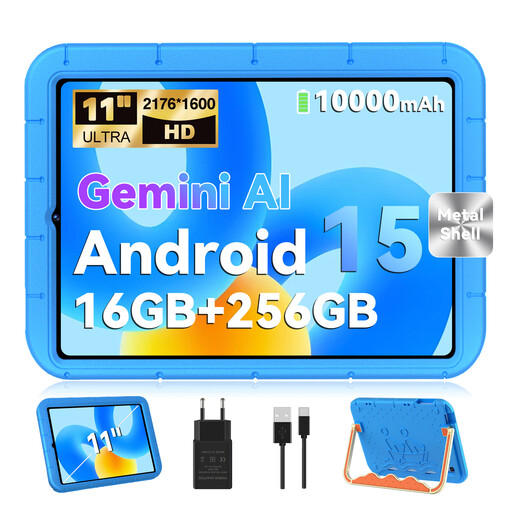
GOODTEL G11 Android tablet, 11-inch
The 11-inch display is an option if you want more room to work through longer questions; check how they appear in your app.
The offer lists Android 15, GMS certification, an 11-inch display, 2,176 × 1,600 pixels, 16 GB RAM (8 + 8 virtual), 256 GB storage and 10,000 mAh.
View at Joybuy
 No image available
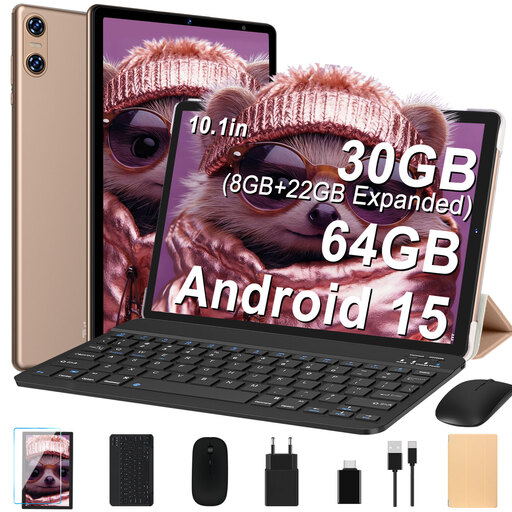
YESTEL T10 2-in-1 tablet, 10.1-inch
The 10.1-inch format is a more compact option for short practice sessions between appointments; try it out to see whether your questions are easy to read.
The offer lists Android 15, GMS, a 10.1-inch display, 1,280 × 800 pixels, 128 GB storage, plus a keyboard, mouse and case.
View at Joybuy
 No image available
Apple iPad Air 11-inch (M4, 2026), Wi-Fi, 128 GB
The 11-inch display and listed Apple Pencil support could be useful for longer questions or taking notes; check that your app is compatible.
This offer is listed as a Wi-Fi model with iPadOS, an 11-inch display and 128 GB storage. Built-in mobile connectivity isn’t specified in the model name.
View at Joybuy
 No image available
TECLAST T65, 13.4-inch, Dual-SIM 4G
The listed 4G connection could be useful if your study features need internet access while you’re out and about; also check whether a suitable data plan fits your routine.
The offer lists Android 16, a 13.4-inch display, Dual-SIM 4G and 128 GB storage.
View at Joybuy
 No image available
TECLAST ArtPad Pro, 12.7-inch, 2K
The larger display and T-Pen listed with the offer could suit you if you want to work through longer tasks by hand; check that your app supports stylus input.
The offer lists Android 15, a 12.7-inch display, 2K, Dual-SIM 4G LTE, 256 GB storage and a T-Pen.
View at Joybuy
Frequently asked questions
Do I need a tablet with a SIM card to answer exam questions?
Not necessarily. If your app makes the questions you need and your progress available offline, Wi-Fi may be enough. If you need built-in mobile internet when you’re out and about, specifically check for a Cellular, LTE or 4G version, and find out whether you’ll need a suitable data plan.
How can I get a tablet ready for short practice breaks?
Check that your specific exam app is available for the device, then try a typical practice session without an internet connection. This lets you check in advance whether questions and your progress work offline in the way you need.
What should I check about accessories and what’s included?
Check whether a charger, cable and stylus are included with the specific offer. Xiaomi states that the REDMI Pad 2 doesn’t include a charger; Apple lists supported Pencil models separately. A battery capacity figure alone doesn’t tell you how long your exam app will run.
What are my rights when buying a tablet in Germany?
When you buy from a business seller as a consumer, faulty goods are generally covered by a statutory guarantee for at least two years from the date you receive them. This is separate from any voluntary manufacturer’s warranty. For eligible online distance sales, you generally have a 14-day right to cancel, starting from delivery. Additional conditions apply to exceptions and return costs; guidance from Your Europe should not automatically be applied to purchases made as a business or from a private individual.


