Choose a tablet based on your file format and how you work. A handy device with a suitable PDF app should be enough for PDF plans. For DWG files and formal mark-ups, test the specific app and its offline workflow first. A larger screen gives you more room to view plans, but is less convenient on the train. The stylus, what’s included in the box and the exact device variant also matter.
Which format is right for you?
Professionals reviewing plans on work trips
If you need to open an up-to-date floor plan and read the details between your train journey and the site, check the file format, offline access and whether the screen is easy to handle. Autodesk explains that a drawing must first be downloaded to your mobile device before it can be used offline.
People tasked with making revisions
If you need to mark up parts of a plan or pass on feedback, the features of the specific PDF or DWG app and a suitable stylus are key. Adobe describes comments, mark-ups and drawings in Acrobat on mobile devices. Test the export and sharing workflow you need with a sample file.
Travellers short on space
If you often hold your tablet or work in a cramped seat, you’ll need to weigh screen space against weight and ease of handling. Apple lists the 11-inch iPad Air with Wi-Fi at 464 g; for a larger model, check the weight and dimensions of the exact variant too.
What should you look for when buying?
First, check that your plan app works with your file format and offline workflow. Then use one of your own sample files and consider your usual seating arrangements to decide which screen size is right for you.
| What matters |
What to check before buying |
Who it matters most to |
| Plan readability |
Open one of your own files at a typical zoom level; compare the screen size and resolution of the exact variant. |
If you need to make out fine details in a plan while on the move, how your own file looks matters more than screen size alone. Around 31% of consumers put readability first. |
| Ease of handling on the move |
Compare the weight and dimensions of the exact variant with the space available at your seat. |
If you often hold your tablet or use it in a cramped train seat, a larger device may be impractical. Around 25% of consumers say ease of handling matters most when travelling and moving between locations. |
| Offline access |
Download the actual PDF or DWG plan before your journey, open it offline and test how it syncs afterwards. |
If you need access to the right plan on site, don’t rely on having an internet connection while you’re travelling. Around 25% of consumers prioritise reliable file access. |
| Mark-ups and stylus |
Test the mark-ups you need in your plan app, and check stylus compatibility and what’s included with the exact variant. |
If revisions need to be documented and shared, app features and a compatible stylus are essential. Around 19% of consumers prioritise marking up and sharing revisions. |
Common buying and usage mistakes
-
Assuming stylus support means one is included
A tablet may support certain styluses without one being included in the box. Apple lists the iPad Air tablet and USB-C charge cable as included items; Lenovo lists a Pen with a specific Idea Tab Pro configuration.
Before buying, check what’s included with the exact variant and whether it’s compatible with the stylus model you need.
-
Mistaking a cloud link for an offline copy
According to Autodesk, you need an internet connection to download an AutoCAD drawing for the first time. Any changes made offline will only sync once you reconnect.
Before your journey, open and test the file without an internet connection. After working on it, check its sync status.
-
Treating similar model names as proof that a device is the same
A Joybuy product page labelled Galaxy Tab S10 FE listed the model number SM-X210NDBAEUB; Samsung lists SM-X520NZAREUB as the model number for the Galaxy Tab S10 FE covered here. A similar product name alone therefore doesn’t confirm that it’s the same variant.
Compare the full model number, specifications and what’s included with the specific offer variant.
Key brands at a glance
Apple
The iPad Air gives you a choice of a more compact or larger screen size.
- Apple lists the Wi-Fi versions of the 11-inch and 13-inch iPad Air at 464 g and 616 g respectively, and supports certain Apple Pencil models.
- The listed contents don’t include an Apple Pencil. The hardware specifications alone don’t tell you whether the tablet is suitable for your app and file format.
Samsung
According to Samsung, the Galaxy Tab S10 FE and FE+ offer different screen sizes and a focus on stylus use.
- Samsung lists a 10.9-inch screen for the Tab S10 FE and a 13.1-inch screen for the FE+; an S Pen is included with the Tab S10 FE.
- These details don’t prove that every retail variant has the same model number or includes the same items. Check app compatibility separately too.
Lenovo
The Idea Tab Pro is an option if a 12.7-inch screen suits your needs.
- Lenovo lists a 12.7-inch screen and offers a configuration that includes a Pen.
- The fact that a Pen is included with a particular offer doesn’t mean it comes with every Idea Tab Pro variant.
Joybuy products for viewing larger floor plans
These Joybuy options focus on larger screens; two ArtPad Pro offers list a stylus. For your work, check the file format, offline workflow, what’s included and the required CE marking for the specific wireless variant.
 No image available
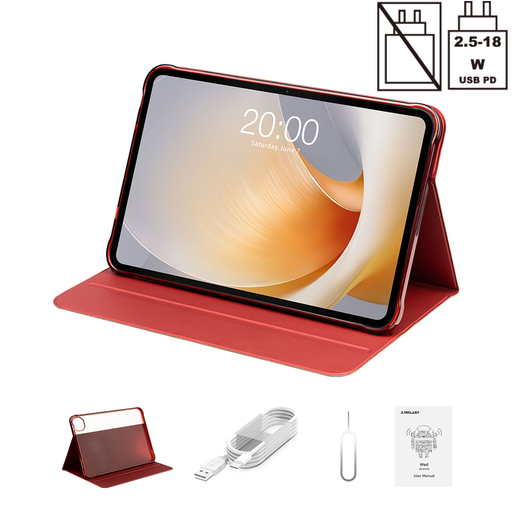
TECLAST T65 Plus, 13.4 inches, 120 Hz
The 13.4-inch screen may suit larger plan views; check whether the device is easy to handle in your usual train seat.
The title lists Android 15, 120 Hz and an included protective case.
View at Joybuy
 No image available
Teclast T65, 13.4 inches, 120 Hz
The 13.4-inch screen gives you a larger stated diagonal; compare the dimensions with the space where you plan to review your plans.
The title lists Android 16 and an included folio case.
View at Joybuy
 No image available
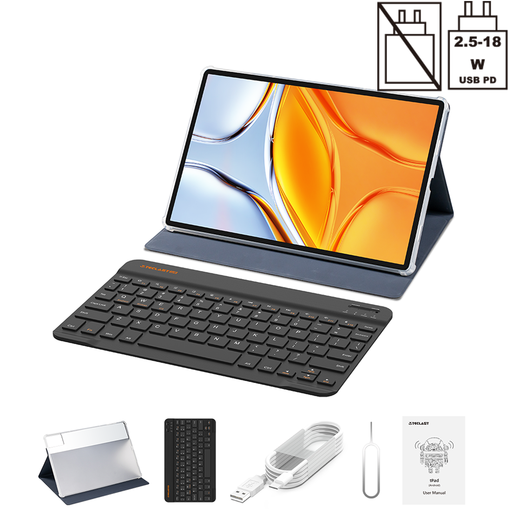
Teclast T70, 14 inches, 2.2K
The 14-inch screen may be a good fit for reviewing larger sections of a plan, as long as there’s enough space for the device at your seat.
The title lists Helio G100, 128 GB storage and a folio case with keyboard.
View at Joybuy
 No image available
Teclast ArtPad Pro 2025, 12.7 inches, 2K
This variant lists a T-Pen and may be worth considering if you want to try making mark-ups with a stylus.
The title lists 4096 pressure levels, 256 GB storage and dual-SIM 4G LTE.
View at Joybuy
 No image available
TECLAST ArtPad Pro, 12.7 inches, 2K, with accessories
The title lists a stylus pen; check with your plan app whether you can use it to make and share the revisions you need.
The listed contents include a stylus pen, protective case and English Bluetooth keyboard; it also has 256 GB storage and Android 15.
View at Joybuy
Frequently asked questions
Do I need to be online all the time to use DWG plans?
Not for a drawing you’ve already saved for offline use in the mobile AutoCAD app. According to Autodesk, you need an internet connection for the initial download; changes made offline will only sync once you reconnect. Test the workflow with your file before your journey.
Can I mark up a PDF directly on my tablet?
Yes. Adobe describes comments, mark-ups and drawings in Acrobat on mobile devices. You should test with a sample file to check that your specific sharing and export workflow works too.
Is train Wi-Fi suitable for confidential project plans?
Treat train Wi-Fi as a public network. The German Federal Office for Information Security recommends avoiding access to confidential data over third-party Wi-Fi networks wherever possible and using a VPN if you have no alternative. Your client’s or employer’s policies may also apply.
What should I check when buying a device and looking for CE marking?
Under § 19 FuAG, radio equipment must carry the required CE marking before it is placed on the market. So check the marking on the exact variant; the model name alone doesn’t prove that a particular offer variant meets the requirements. The German Federal Network Agency explains the obligations for retailers.


