Reviewing plans together
You discuss labels and details with other people around the kitchen table. Weigh up how easy the screen is to see against the tablet’s size and portability.


A larger display is useful when you’re reviewing fine details on a plan together. If you often hold your tablet, a lighter model may be better suited to how you’ll use it. You’ll also need to consider the file format and the right app. For annotations, check that the stylus is compatible and confirm what’s included in the box. If you can’t rely on a connection where you’re meeting, open the specific file offline beforehand and test your workflow.
You discuss labels and details with other people around the kitchen table. Weigh up how easy the screen is to see against the tablet’s size and portability.
You want to note questions or changes during a meeting. Check that the stylus is compatible with the specific model, and find out how the app saves and shares your annotations.
You need access to a particular plan file or specialist app on site, and can’t always rely on an internet connection. Try the file in the app you intend to use and check how it works offline.
| What matters when buying | What to check | Who is it important to? |
|---|---|---|
| Seeing plan details together | Open a typical plan in the app you intend to use and check how easy it is to read from a normal viewing distance. Apple lists 11- and 13-inch iPad Air M4 models; Samsung lists 10.9- and 13.1-inch Galaxy Tab S10 FE and FE+ models. | When several people are checking labels around a table, I want to be able to see the details clearly. Around 33% of consumers prioritise readability. |
| Making a note of changes | Check that the stylus is compatible with the exact variant and included in the box, and find out how the plan app saves and shares annotations. | When I’m noting questions or changes during a discussion, a compatible stylus and a reliable saving process matter to me. Around 25% of consumers prioritise annotations. |
| Opening files and working offline | Check whether the plan is a PDF, DWG or another file format. Test opening, annotating and saving it in the app you need, including offline if that matters for your meeting. | When I need to work on a specific plan file on site, I want to know it will open in my app. Around 25% of consumers say file access is their main concern. |
| Portability and working environment | Compare the size and weight of the specific variant. Check protection ratings only in the conditions they were tested for. | When I take my tablet to a meeting or hold it often, portability and suitability for the environment matter to me. Around 17% of consumers prioritise portability and the working environment. |
Apple lists compatible Pencil models for the iPad Air M4, but doesn’t include a Pencil in the stated box contents. Samsung lists an S Pen for the Galaxy Tab S10 FE and FE+, while Lenovo lists a Tab Pen Plus for the Idea Tab Pro.
Check the box contents for the exact variant before choosing a device for handwritten notes on plans.
Apple lists 11- and 13-inch iPad Air M4 models. The right choice depends on whether a more portable size or a larger viewing area matters more to you.
Samsung lists a 10.9-inch Galaxy Tab S10 FE and a 13.1-inch FE+; an S Pen is listed for the models described.
Lenovo lists a 12.7-inch display and an included Tab Pen Plus for the Idea Tab Pro.
The 13-inch Surface Pro, 12th Edition, is a Windows 2-in-1 for workflows that require a compatible Windows app.
The Joybuy products featured here are Android tablets with large displays; some variants mention a stylus or other accessories in the product name. Before buying, check that the plan app you need and your file format are supported.
 No image available
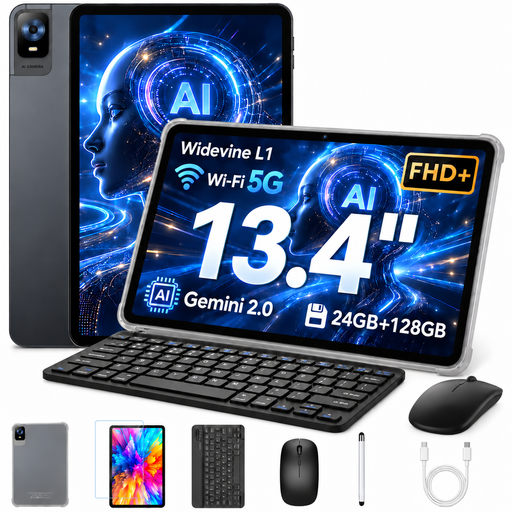
The 13.4-inch display is useful for viewing plans together around a table.
FHD IPS display with 1920 × 1200 resolution; 20 GB RAM (8 GB + 12 GB virtual); 256 GB storage. The product name says a keyboard, mouse and stylus are included.
 No image available
The 13.4-inch display gives you a large viewing area for plans around a table.
FHD+ display with 1920 × 1200 resolution; 8 GB RAM plus 16 GB virtual RAM; 128 GB storage, expandable up to 1 TB according to the product name. A keyboard, mouse, protective case and stylus are listed in the product name.
 No image available
The 13.4-inch display is designed for a large-format view around a table.
120 Hz display; Android 16; 128 GB storage. The product name says a folio protective case is included.
 No image available
The 13.4-inch 2K display is designed for viewing plans together; the product name also mentions a T-Pen.
20 GB RAM (8 GB + 12 GB virtual); 256 GB storage; Android 15. The product name lists 4096 pressure sensitivity levels for the T-Pen.
 No image available
The 12.7-inch 2K display gives you a large viewing area; the product name lists a stylus for notes and drawings.
20 GB RAM (8 GB + 12 GB virtual); 256 GB storage; Android 15. The product name says a T-Pen with 4096 pressure sensitivity levels, a protective case and an English Bluetooth keyboard are included.
No, not just because the file is in DWG format: Autodesk describes a mobile AutoCAD app for viewing and editing DWG files. Try a sample file to check whether the app and workflow meet your needs; requiring a specialist Windows app is a separate consideration.
Open the correct version of the file in the app you intend to use beforehand, then test it without a connection. Autodesk documents a situation in which files won’t open offline in AutoCAD Mobile on Android, and suggests marking files as available offline as a workaround.
No, what’s included depends on the model. Apple doesn’t list a Pencil in the stated box contents for the iPad Air M4; Samsung lists an S Pen for the Galaxy Tab S10 FE models mentioned, and Lenovo lists a Tab Pen Plus for the Idea Tab Pro. Check the details for the exact variant.
You’ll need to follow the data protection obligations that apply to the processing in question. According to the Federal Commissioner for Data Protection, controllers and processors must take appropriate technical and organisational measures to guard against risks including unauthorised access and loss. This doesn’t mean you’re generally required to buy a particular tablet model.