If you mainly read continuous text and often hold your tablet, a compact model may suit you best. A larger display gives you more room for biographies with photos or fixed-layout PDF pages. For Onleihe, you should also check app access and the operating system version. If you want to read without reliable Wi-Fi, test offline use with the specific app and a borrowed title first.
Which tablet is right for you?
Readers using a digital library service
If you want to borrow music biographies using your library account, first check that your preferred borrowing method works on the device. Onleihe lists compatible operating system versions and access to the relevant app store as requirements for its app.
Readers of books with photos and fixed layouts
If your biographies include photos, captions or fixed-layout PDF pages, the available screen space is an important factor in your choice. Onleihe says ePub text adapts to the screen size, while PDFs retain fixed line and page breaks.
Readers who hold their tablet for long periods
If you don’t always use a stand while reading, the size and weight of the specific model matter. Manufacturer specifications can help you compare devices, but they can’t replace the feel of holding one.
What should you look for when buying?
First check how you’ll borrow your books and what format your chosen biographies are in. Then you can decide whether portability or more room for full pages matters most.
| What matters |
What to check before buying |
Who is this important to? |
| Library access |
Check the tablet’s app store and operating system version. For the Onleihe 3 app, Onleihe specifies Android 10 or later with the Google Play Store, or iOS 15.1 or later with the Apple App Store. |
If I want to read e-books borrowed through my library, I first check that my device has the required access. Around 36% of consumers put library access first. |
| PDFs and image pages |
Check whether the biography is available as an ePub or PDF, and whether you can view a sample page comfortably on the device you’re considering. A larger display gives you more room, but doesn’t guarantee that every PDF page will be readable without zooming in. |
If photos, captions and fixed layouts matter, I want to be able to see the page clearly. Around 29% of consumers prioritise PDFs and image pages. |
| Portability |
Compare the weight and dimensions of the exact model. A compact design leaves less room for fixed-layout book pages. |
If I read for a long time while holding my tablet, size and weight are especially important to me. Around 21% of consumers put portability first. |
| Reading without Wi-Fi |
If you want to read offline, download a title in advance and then try it without an internet connection. Onleihe notes that offline use doesn’t work reliably on every device. |
If I can’t count on having an internet connection at the library, I want to know in advance whether my borrowed title will open offline. Around 14% of consumers prioritise reading without reliable Wi-Fi. |
Avoid common misconceptions
-
“E-book” doesn’t automatically mean it will work well on every screen size
With ePub, text can adapt to the screen size. A PDF, however, keeps its fixed line and page breaks, and Onleihe considers smaller mobile devices less suitable for this format.
Before choosing a screen size, check the format of the biography you want and, if possible, look at a sample page.
-
Downloading a title doesn’t guarantee you’ll be able to read it offline
Onleihe says downloaded media don’t currently work reliably without an internet connection on every device.
If you need to read without Wi-Fi, test a borrowed title in offline mode before visiting the library.
Brands and suitable ranges
Samsung
The Galaxy Tab A11 is a compact 8.7-inch Android option if you mainly read reflowable text.
- Samsung lists a resolution of 1.340 × 800 pixels for the Galaxy Tab A11, along with versions offering 4 GB RAM and 64 GB storage, or 8 GB RAM and 128 GB storage.
- The smaller display may offer less room for fixed-layout PDFs. Check that the specific version is compatible with Onleihe.
Xiaomi
The REDMI Pad SE 8.7 is a compact model, while the 11-inch REDMI Pad 2 has a larger display. These are different models.
- Xiaomi lists a resolution of 1.340 × 800 pixels and a weight of up to 373 g for the REDMI Pad SE 8.7, based on its own lab data. The REDMI Pad 2 is listed at 2.560 × 1.600 pixels.
- These manufacturer specifications don’t prove which model is easier to read on. Weigh up screen space and portability for the format of the book you’ll be reading.
Apple
The iPad (A16) is a larger iPadOS option for reading text and viewing image pages.
- Apple lists a 10.86-inch diagonal display for the Wi-Fi model, measured as a rectangle, with a resolution of 2.360 × 1.640 pixels.
- According to Apple, the Wi-Fi model weighs 477 g. Bear this in mind if you plan to hold the tablet for long periods.
Lenovo
The Tab M11 is a larger-format Android option with an 11-inch display, worth comparing if you read biographies in PDF format.
- Lenovo lists an 11-inch display.
- The range includes different versions and bundles. Check the specifications of the device on offer and the app requirements for your chosen borrowing method.
Joybuy tablets for image-rich pages
The following Joybuy models have larger displays for image-rich biographies and fixed-layout PDF pages. For Onleihe, also check the operating system version and app access for the specific model.
 No image available
SAMSUNG Galaxy Tab A11+ X230, 11 inches, Wi-Fi, 6 GB RAM, 128 GB
The 11-inch display gives you more room for biographies with fixed layouts than a compact model.
Display: 11 inches. Wi-Fi. 6 GB RAM and 128 GB storage.
Joybuy
 No image available
Teclast ArtPad Pro 2025, 13.4 inches, 2K display
The large display could be a good choice for image-rich biographies and fixed-layout pages if you’re less concerned about having a compact device.
Display: 13.4 inches, 2K. Android 15.
Joybuy
 No image available
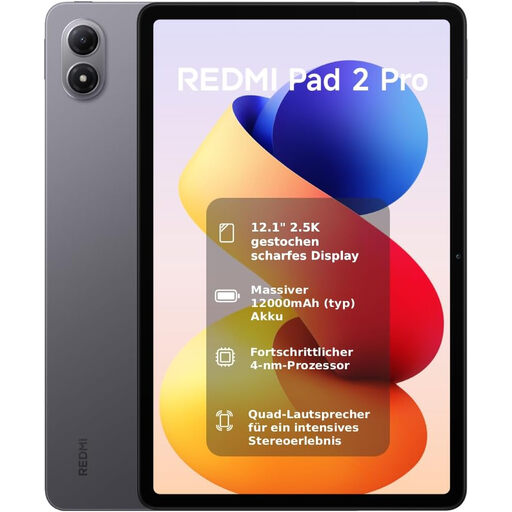
Xiaomi REDMI Pad 2 Pro, 6+128 GB, 12.1 inches, 2.5K display
The 12.1-inch display gives you room for pages with photos and fixed layouts. Compare its size with the format you prefer to read on.
Display: 12.1 inches, 2.5K, 120 Hz. Storage: 6+128 GB.
Joybuy
 No image available
Honor Pad X8a, 11 inches, Wi-Fi, 4 GB RAM, 128 GB
The 11-inch format gives you more screen space for book pages than a compact tablet.
Display: 11 inches. Wi-Fi. 4 GB RAM and 128 GB storage. Android 14.
Joybuy
 No image available
HONOR Pad 10, 12.1 inches, Wi-Fi, 256 GB
The 12.1-inch display gives you more room for biographies with photos and fixed-layout pages.
Display: 12.1 inches, 2.560 × 1.600 pixels. Wi-Fi. 256 GB storage. Android 15.
Joybuy
Frequently asked questions
What does a tablet need to run the Onleihe 3 app?
For the Onleihe 3 app, Onleihe specifies Android 10 or later with the Google Play Store, or iOS 15.1 or later with the Apple App Store. You’ll also need a valid library card and its associated password to sign in. Check whether your library offers the title you want, too.
Can I download a music biography before visiting the library and read it offline?
The Onleihe app supports downloads, but Onleihe 3 says downloaded media don’t work reliably without an internet connection on every device. Download the specific title in advance and test it in offline mode.
What are my rights if my tablet is faulty?
When you buy from a business, the rules explained by the European Union provide for a statutory minimum guarantee of two years from the date you receive the goods. Your point of contact is the seller. This rule doesn’t apply to purchases from private individuals.
Can I bypass the copy protection on a borrowed e-book?
Under the conditions set out in § 95a UrhG, circumventing effective technical protection measures without the rights holder’s consent is prohibited. For protected Onleihe titles, use a supported access method instead.


