If you often hold your reader in your hand, a compact tablet is a good place to start. For PDFs with fixed page layouts or notes in the margins, a larger display may work better for the way you read at a table. The key is to test your actual file in the app you plan to use: check text selection, dictionary or translation tools, and the languages and offline features you need. Manufacturer specifications for the display and battery are no substitute for trying these features out.
Who is a tablet reader in a café suitable for?
Readers who look up words
When reading texts in another language, you may want to highlight words, translate them or look them up in a suitable app. Apple Support explains how to download certain languages for the Translate app on iPad. Also check that your reader app and files support the way you want to use them.
Readers short on space
If you often hold your tablet or read at a small café table, the dimensions and weight of the specific model are important points to compare. A more compact device may suit your space better, but it offers less room for pages with a fixed layout.
Readers with PDFs and notes in the margins
If your reader has fixed page layouts, exercises or small labels, a larger display can make it easier to read at a table. Before choosing a larger, heavier device, check a typical page at your preferred text size.
What should you look for when choosing one?
First, check that your reader file works with the dictionary or translation feature you want to use. Then compare portability and screen space for the way you usually sit and read.
| What matters |
What to check before buying |
Who should pay particular attention? |
| Files and look-up features |
Open your own EPUB or PDF file in the app you plan to use, then test text selection, the dictionary and translation. Apple Support notes that certain languages can be downloaded for the Translate app; check that your language is available. |
If I want to look up words as I read, the file needs to work in my app, and I need to be able to do so without Wi-Fi. Around 36% of consumers prioritise look-up features and file compatibility. |
| Easy handling at a café table |
Compare the weight and screen size of the same model. Apple lists the iPad mini at 255 g for the Wi-Fi version and 263 g for the Wi-Fi + Cellular version; Lenovo lists the Tab One at around 320 g. |
If I often read holding my tablet or have little table space, I want to assess its weight and size in the position I usually read in. Around 29% of consumers prioritise portability. |
| Fixed-layout PDF pages |
Look at a typical page at a readable text size and check whether you can access exercises or notes in the margins without zooming in frequently. Apple lists the iPad (A16) with an 11-inch display and a weight of 477 g for the Wi-Fi version. |
If I read PDFs with fixed page layouts or exercises, more screen space at the table may matter more than having the smallest possible device. Around 21% of consumers prioritise being able to read these pages clearly. |
| Offline use and battery life |
Check which apps and content you need, and download them in advance. Lenovo lists up to 12.5 hours of YouTube streaming for the Tab One; this manufacturer figure does not indicate battery life when reading. |
If I want to read in a café without a power socket, I need to make content available in advance and assess battery figures in the context of how I’ll actually use the tablet. Around 14% of consumers prioritise battery life and preparing for offline use. |
Common mistakes when choosing
-
Choosing based on screen size alone
Screen size alone won’t tell you whether your reader will be easy to read. A small display may mean frequent zooming for fixed-layout PDFs, but more screen space doesn’t automatically make reading more comfortable.
Open a typical reader page, including any exercises and notes in the margins, at your preferred text size.
Frequent zooming or scrolling can interrupt your reading.
-
Assuming an Android-like interface means Google Play is available
Fire tablets don’t support Google Play. A familiar-looking interface doesn’t automatically mean your preferred reader or dictionary app is available.
Before deciding, check that the apps you need are available in the app store for the specific model on offer.
-
Assuming a particular battery life or charging accessories are included
Manufacturer battery-life figures are based on specific types of use. What’s included in the box can also vary by model.
Check the stated test conditions and what’s included with the exact model. If you want to read in a café without Wi-Fi, download your content before you go.
Brands to consider
Apple
The iPad range includes compact and larger devices, so you can compare models for different ways of reading.
- Apple lists the iPad mini at 255 g for the Wi-Fi version and the iPad (A16) at 477 g for the Wi-Fi version.
- The Translate app supports downloads of certain languages. Check separately that your language and preferred reader app support the offline set-up you need.
Samsung
The Galaxy Tab A11 is a compact Android tablet range; make sure you’re comparing the right specification.
- Samsung lists the Tab A11 with an 8.7-inch display and a resolution of 1,340 × 800 pixels.
- It’s available with either 64 or 128 GB of storage, so the same model name may refer to different storage capacities.
Lenovo
The Tab One is a compact option if portability and ease of handling are important to you.
- Lenovo lists the Tab One as measuring 8.7 inches and weighing around 320 g.
- The figure of up to 12.5 hours is based on YouTube streaming; it isn’t a battery-life figure for reading.
Tablets for reading in a café
The Joybuy products below include compact tablets and larger 11-inch models. Choose a screen size that suits your reader file, and check app availability, file support and offline features for the specific model.
 No image available
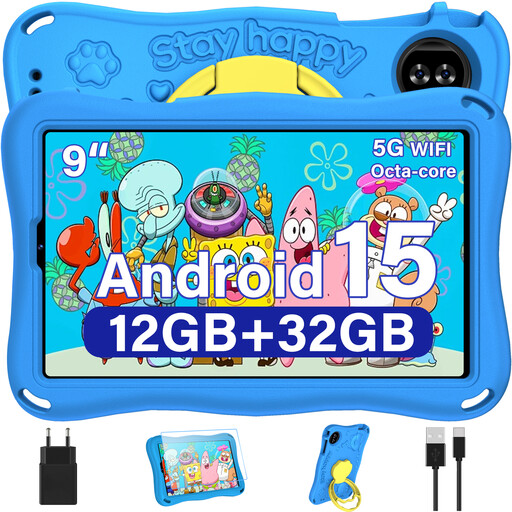
YESTEL T15 2026 Kids Tablet, 9 inches, Android 15, Blue with EVA Case
The listed 9-inch size may suit you if you’re looking for a compact tablet for a café table.
9 inches; Android 15; 1,340 × 800 pixels; Blue with EVA Case.
Joybuy
 No image available
ALLDOCUBE iPlay 70 mini Ultra, 8.8 inches, Android 14, 12GB+256GB, without adapter
The listed 8.8-inch size is a compact option if you often hold your reader in your hand.
8.8 inches; Android 14; 12GB+256GB; without adapter.
Joybuy
 No image available
Samsung Galaxy Tab A11+ X230, 11 inches, Wi-Fi, 6 GB RAM, 128 GB, Grey
The listed 11-inch display may suit you if you’d like more room for fixed-layout pages when reading at a table.
11 inches; Wi-Fi; 6 GB RAM; 128 GB.
Joybuy
 No image available
Apple 11-Inch iPad Air (M4, 2026), Wi-Fi, 128GB, Starlight
The listed 11-inch size may suit readers with fixed page layouts when you’re reading at a table. Check separately that your preferred reading and translation features are available.
11 inches; Wi-Fi; 128GB; Starlight.
Joybuy
 No image available
HONOR Pad X8a, 11 inches, Wi-Fi, 4GB+128GB, Android 14, Space Grey
The listed 11-inch size is an option if you’re looking for more screen space for PDFs at a table.
11 inches; Wi-Fi; 4GB+128GB; Android 14; Space Grey.
Joybuy
Frequently asked questions
Can I translate words in a café without Wi-Fi?
Apple’s Translate app lets you download certain languages for on-device translation. Download the language and reader you need in advance, then test how they work without an internet connection. This doesn’t confirm that other reading apps offer the same feature.
What should I check before a longer reading session?
Open your own file in the app you plan to use and test text selection, text size and look-up features. Download the content you need in advance, and assess battery figures in light of the stated type of use. For example, Lenovo’s figure for the Tab One is based on YouTube streaming.
Is a manufacturer’s warranty the same as your statutory rights?
No. According to the European Union, when you buy from a business seller in the EU, you generally have a statutory guarantee of at least two years from the date you receive the goods. A commercial guarantee is separate. If there’s a fault, the seller is responsible for dealing with your statutory guarantee.
What product safety details should I check when buying a tablet in Germany?
The German Federal Network Agency lists correct CE marking and a declaration of conformity among the points checked during market surveillance. Check the details for the specific product on offer; a picture of the CE mark or a brand name alone doesn’t prove that the product has been fully assessed.


