First, choose a tablet that works with your group’s apps and file formats, then check its offline features before you travel. A compatible stylus is useful for sketches and quick notes, while a suitable keyboard is better for longer texts. If your work requires Windows programmes, a Windows 2-in-1 may be a better fit. Check the weight and what’s included with the specific version, too: mobile data alone won’t solve an unreliable connection.
Who is a tablet for group work on the train suitable for?
Groups planning together on the go
You want to coordinate tasks and documents with others and keep working even when the train connection is unreliable. Deutsche Bahn offers Wi-Fi on all ICE trains, but only on some Intercity services and selected regional trains.
Group members who do a lot of typing
You write longer sections or minutes, so check that your apps and file formats work with the tablet and a suitable keyboard.
Commuters who like to sketch
You jot down ideas or annotate documents while travelling and want to choose a suitable screen and input method for the job.
What should you check first when buying?
First, check that the group apps and file formats you need work on the tablet, then set up offline access for a test file. After that, you can make a more informed choice between a stylus, a keyboard and an operating system.
| Consideration |
What to check before buying |
Who is this important to? |
| Working together offline |
Check that your group app and file formats are supported, then set up offline access using a test file. Deutsche Bahn offers Wi-Fi on all ICE trains, but only on some Intercity services and selected regional trains. |
When I need to work on shared files on the train, I don’t want to depend on Wi-Fi. Around 36% of consumers prioritise working offline. |
| Longer texts |
Check keyboard compatibility with the specific model generation and make sure it has the layout you need. |
When I’m writing minutes or longer sections, a keyboard that works with my app matters more than stylus input alone. This is a priority for around 29% of consumers. |
| Portability and power |
Check the weight of the tablet, case and keyboard against the space available, and charge the tablet before you travel. Deutsche Bahn says there is one power socket per pair of seats in second class; selected ICE models have one socket per seat. |
I want my tablet to be easy to handle in a cramped train seat, and I’d like to be able to plan my journey without relying on having my own power socket. Around 21% of consumers prioritise portability and power. |
| What’s included |
Check what’s included with the specific version and whether the stylus or keyboard is compatible with that model generation. |
If I need a stylus or keyboard for group work, I want to know exactly what comes with the version I’ve chosen. Around 14% of consumers want to make sure they get the right accessories. |
Which assumptions can make choosing a tablet more difficult?
-
Assuming train Wi-Fi will provide a reliable live connection
Wi-Fi isn’t available on every train, and the connection can fluctuate. If you plan to do all your group work live, you may not be able to access shared files as expected while travelling.
Before you leave, mark the files you need as available offline in the app you use, then test how changes sync later using a sample file.
-
Assuming a stylus or keyboard is included because it appears in a general product name
Accessory compatibility and what’s actually included are not the same thing. Apple lists supported input options for the iPad (A16), while the example of what’s included with the tablet lists the iPad and a USB-C cable. Lenovo’s stylus information for the version shown isn’t clear.
Before buying, check what’s included and which accessories are compatible with the specific model version.
-
Assuming the battery capacity tells you how long it will last during your group work
Xiaomi lists the Pad 7’s battery capacity as 8,850 mAh. This figure alone doesn’t tell you how long the tablet will last with your apps and connection.
Only compare battery life claims alongside their test conditions, and charge the tablet before a longer journey.
Key tablet brands at a glance
Apple
The iPad (A16) is an iPadOS option if the group apps you need work on iPad.
- Apple Germany lists support for Apple Pencil (USB-C) and Magic Keyboard Folio.
- The listed tablet contents include the iPad and a USB-C cable; input accessories are not included. Apple gives the Wi-Fi model’s weight as 477 g without accessories.
Samsung
The Galaxy Tab S10 FE is an Android option for taking notes with a stylus and working together on documents.
- Samsung describes the Galaxy Tab S10 FE as having a 10.9-inch display and promotes the FE series as including an S Pen.
- Check the model code and what’s included with the specific version; the manufacturer’s information about the stylus doesn’t confirm compatibility with your group app.
Xiaomi
The Pad 7 is an Android option with an 11.2-inch display in a 3:2 aspect ratio.
- Xiaomi Germany lists the device weight as 500 g and the battery capacity as 8,850 mAh.
- Battery capacity alone doesn’t tell you how long it will last in your own use. Xiaomi says a power adapter isn’t included.
Lenovo
The 11-inch Idea Tab is an Android option for taking notes and working on documents while you’re out and about.
- For the version shown, Lenovo lists Android 15 or later and an 11-inch display.
- The stylus information for this version isn’t clear. Check exactly what’s included with the version you choose.
Microsoft
The Surface Pro 12-inch (1st Edition) is a Windows 2-in-1 option if your group workflow requires Windows software.
- Microsoft shows it being used with the Surface Pro 12-inch Keyboard and Slim Pen.
- Check which accessories are compatible with the specific configuration and are actually included.
Joybuy tablets for planning together on the go
The Joybuy models below are options for planning together on the move. Depending on the version, the product details may mention a keyboard, a Wi-Fi or LTE option, or different storage capacities. Check that the apps and file formats you need are supported in each case.
 No image available
VANWIN YC101T310K30, 10.1-inch tablet, 256 GB/1 TB TF, keyboard + case
The keyboard mentioned in the product name could be useful for longer typing sessions; check that it works with your apps first.
The product name lists a 10.1-inch touchscreen, Android, Unisoc T310 Octa Core, 256 GB/1 TB TF, plus a keyboard and case.
View at Joybuy
No image available
VANWIN 10.1-inch tablet, Android 16, 36 GB RAM (6+30), 256 GB, keyboard
The keyboard listed in the product name is an option for writing longer texts on the go; check that the group apps you need are supported.
The product name lists a 10.1-inch touchscreen, Android 16, 36 GB RAM (6+30), 256 GB storage and a keyboard.
View at Joybuy
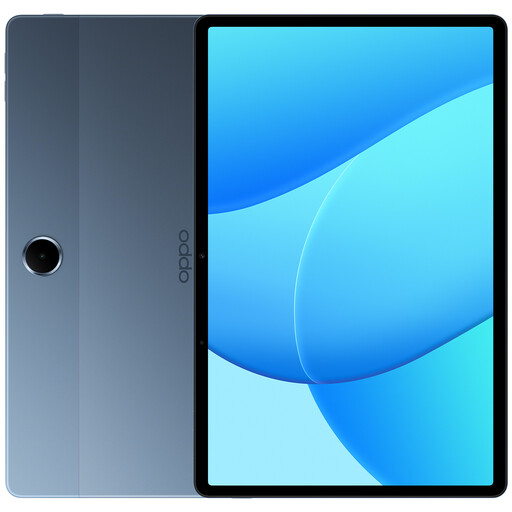 No image available
OPPO Pad SE, 128 GB, 6 GB RAM, LTE, Twilight Blue (OPD2420 EUN)
The LTE version gives you the option of mobile data, but doesn’t guarantee reception on the train; make important files available offline as well.
The product name lists 128 GB storage, 6 GB RAM and model OPD2420 EUN.
View at Joybuy
No image available
OPPO Pad SE, 128 GB, 4 GB RAM, Wi-Fi, Twilight Blue (OPD2419 EUN)
The Wi-Fi version may suit you if you make the files you need available offline in advance and your apps work on the device.
The product name lists 128 GB storage, 4 GB RAM and model OPD2419 EUN.
View at Joybuy
 No image available
Xiaomi Pad 8, Pine Green, 8 GB RAM, 256 GB
The product name lists 256 GB of storage for group documents you want to take with you; also check that your apps work offline.
The product name lists 8 GB RAM and 256 GB storage.
View at Joybuy
Questions about tablets for group work on the train
Is train Wi-Fi good enough for working on a shared document?
Don’t rely on it entirely. Deutsche Bahn says Wi-Fi is available on all ICE trains, but only on some Intercity services and selected regional trains; speeds can vary. Make the files you need available offline before you travel, and check how your app syncs changes later.
How do I prepare group files for the journey?
Set up offline access in the app you actually use before you travel, then test it with a sample file. In Google Docs for Android, you can make individual files available offline in advance; Microsoft Support explains that changes made offline in OneDrive for iOS sync once you’re connected again.
Do I need my own power socket on an ICE train?
Don’t assume you’ll have your own power socket. Deutsche Bahn says there is one socket per pair of seats in second class; selected ICE models have one per seat. Charge your tablet before you travel.
Does every tablet need to have the same EU energy label?
No. According to the European Commission, the labelling rules that came into force on 20 June 2025 apply to covered slate tablets; tablet computers with a desktop-like operating system are exempt. Check how the specific version is classified rather than assuming the rules apply to a Windows 2-in-1.


