What should you look for when buying?
As a rough guide, the percentages below reflect the priorities people may have when checking a hotel room floor plan.
| Priority |
What to check before buying |
Who is this particularly important for? |
| Reading floor plan details |
Open one of your own files, zoom in on labels, and compare how the tablet feels in your hand and when set down. |
If I want to read small labels and hold the tablet for longer, the display needs to work well with my file without making the device awkward to handle. Around 29% of consumers are likely to put readability first. |
| Marking points on a plan |
Check stylus compatibility and what’s included, then test marking up and saving in the app you plan to use. |
If I want to note questions directly on the plan, I need a stylus that lets my app save annotations too. Around 23% of consumers are likely to prioritise mark-ups and inspection notes. |
| Accessing plans offline |
Download the file in advance, open it in aeroplane mode and test how it syncs later. |
If the connection in the hotel room might drop, I still want to be able to open the drawing and sync any changes later. Around 18% of consumers are likely to put offline access first. |
| Choosing the right bundle |
Check that the stylus you need and access to the software are available with the specific tablet version. |
If I need to choose a device, stylus and app together, it’s important that everything suits the inspection process I have in mind. Around 18% of consumers are likely to weigh up the complete package first. |
| Protecting confidential plans |
For sensitive content, check your organisation’s approval requirements, storage location and transfer method. |
If a plan contains personal or confidential information, I only want to open and save it using an approved method. Around 12% of consumers are likely to prioritise the confidential handling of these plans. |
Joybuy’s selection of tablets for checking floor plans
This selection includes compact and larger tablets for viewing floor plans; for making annotations, we’ve only included stylus details that are explicitly stated.
 No image available
GOODTEL G11 Android 15 tablet, 11 inches, 256 GB
The 11-inch format may suit you if you want to check a floor plan on a handy tablet. Test readability using your own file.
- Display: 11 inches, 2176 × 1600 pixels
- Storage: 256 GB
- Listed RAM: 16 GB (8 + 8 GB virtual)
Joybuy
 No image available
UXD Android 16 tablet, 13.4 inches, 256 GB
The larger display may work well for viewing a plan at full size. Check how your file looks and what stylus features your app supports.
- Display: 13.4 inches, 1920 × 1200 pixels
- Storage: 256 GB ROM
- Accessories listed in the title: keyboard, mouse and stylus
Joybuy
 No image available
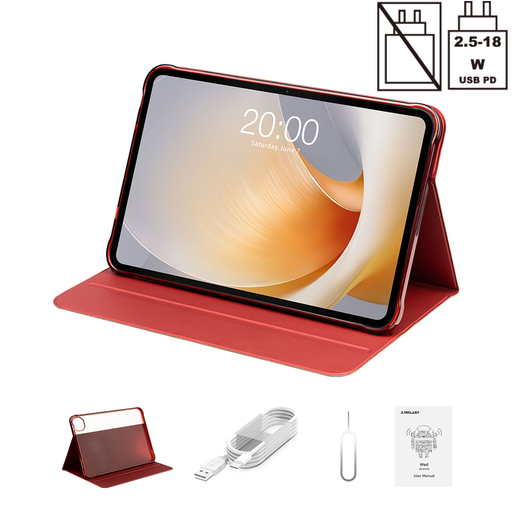
TECLAST T65 Plus, 13.4 inches, 128 GB
If you prefer a larger display for viewing plans, compare it with your own file and check whether the size is still practical for the way you’ll use it.
- Display: 13.4 inches, 120 Hz
- Storage: 128 GB
- Features listed in the title: Android 15 and Dual-SIM 4G
Joybuy
 No image available
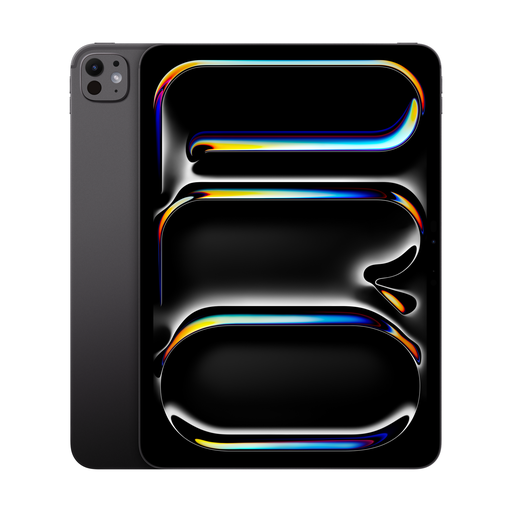
Apple 11-inch iPad Pro Wi-Fi (2025), 2 TB, nano-texture glass
The 11-inch format may suit you if you want a more compact tablet for checking plans. Open your plan file in the app you intend to use beforehand.
- Display size: 11 inches
- Storage: 2 TB
- Version listed in the title: Wi-Fi, nano-texture glass
Joybuy
 No image available
TECLAST ArtPad Pro, 12.7 inches, 2K, 256 GB
If you want to check a floor plan on a larger screen and mark it up with a stylus, test in advance how your plan app handles the file and annotations.
- Display: 12.7 inches, 2K
- Storage: 256 GB
- Feature listed in the title: T-Pen with 4096 pressure levels
Joybuy
Frequently asked questions
Do I need to know whether my floor plan is a PDF or DWG file before buying a tablet?
Yes, because the file format affects which app you can use. According to Autodesk, AutoCAD mobile opens DWG files, supports DXF files in read-only mode and can’t open PDFs. Test your specific file in the app you plan to use.
Can I open the plan in my hotel room without an internet connection?
With the AutoCAD mobile process described by Autodesk, you can only do so if you’ve downloaded the drawing while connected to the internet. According to Autodesk, changes made offline sync once you reconnect. If you’re using a different app, test its offline process separately.
Does the tablet come with a stylus?
It depends on the specific version. Samsung describes the Galaxy Tab S10 FE as including an S Pen; Apple lists compatible Pencil models for the iPad Air M4, but doesn’t include a Pencil in the stated contents. The Lenovo Idea Tab Pro bundle we researched includes a Tab Pen Plus.
What should I consider when handling confidential plans?
If a plan contains personal or confidential information, check before copying it to a personal tablet that the device, storage location and transfer method are approved by your organisation. The German Federal Commissioner for Data Protection and Freedom of Information outlines principles for handling personal data; the Federal Office for Information Security provides guidance on using public Wi-Fi networks.


